
Pie Menu
A downloadable Pie Menu for Windows, macOS, and Linux
🎯 Radial Menu (Pie Menu) for Aseprite
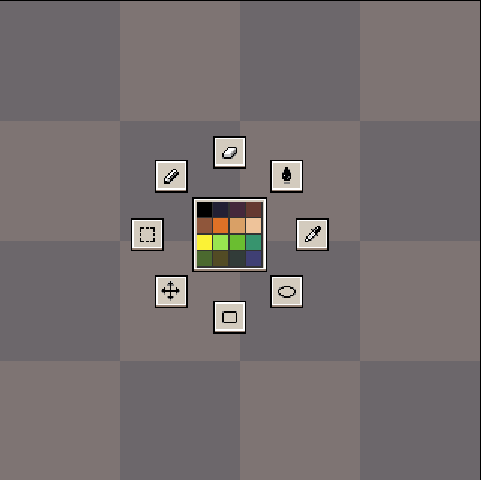
Boost your workflow with a radial menu! Open it with a single hotkey (K) to quickly switch tools and pick colors from your active palette.
✨ Features
-
🎨 Quick access to tools: Pencil, Eraser, Paint Bucket, Eyedropper, Rectangle, Ellipse, Rectangular Marquee, Move
-
🎨 Fast color picking from the active palette (center of the menu)
-
🖱️ Menu appears at the mouse position
-
⚙️ Fully customizable hotkey via Edit → Keyboard Shortcuts

📌 Requirements
-
Aseprite 1.3+ (API ≥ 20)
-
Color Mode: RGBA
⚡ Installation
-
Download the .aseprite-extension file
-
Double-click it to install automatically
-
Or copy the script into: Edit → Preferences→ Extensions → Add Extension
🎮 Usage
-
Press K to open the radial menu
-
Click a tool icon or pick a color from the center
-
Change the hotkey under Edit → Keyboard Shortcuts → Radial Menu
Light Mode
Dark Mode

Customization


🔧 Updates
v1.1
-
Fix: pen scrolling
-
Add: Esc key to close pie menu
v2.0
- You can now customize your pie menu tools
Purchase
In order to download this Pie Menu you must purchase it at or above the minimum price of $1 USD. You will get access to the following files:
Development log
- Pie Menu Customization Update22 days ago

Comments
Log in with itch.io to leave a comment.
Ok... I'm using a 4K 16" huion digital tablet, and the default size (I think is the unique size) is really really small. It makes the extension not usable..
Any Idea to set different scaling sizes?
ow, ty. i'll fix it as soon as possible
Okay, I’ve found a solution. If you want to check it out, I’ve just uploaded the update.
Now, in the radial menu settings, you can choose different sizes:
This should work. :)
Yes. That works!
![]()
nice stuff!
ty so much
I looove this
One note: I'm running ase on Linux Wayland, and I had to edit the script a bit to clamp the closing animation to minimum one pixel, because it going to size 0 was crashing me. I also did it for the closing animation just in case.
This plugin is a lifesaver, thank you so much for your work!
ty for your comment, if u want i've just published an update. Hope u like it :)
The animation looks so damn sleek. I would buy it in a heartbeat (and for more than a dollar for your work) if the tools were easily customisable (maybe with a bunch of icons to choose from so actions without them can be handled?) Either way, excited to see where this goes.
I absolutely love this! The only thing I noticed was that I can't scroll the palette with my pen. Maybe have an option to add a scrollbar (which remembers the position) or add a col/row number setting so I can change the palette size.
And if you make it so the palette is the pie menu it would be nice to be able to put constraints on where the colors should be shown. For example I would like to have all colors shown to the left side of my hand when drawing with a pen - because my hand covers half the pie. So a constraint of 180-360 degrees would work well. (Does that make sense?)
Or you could add an option to ditch the tools and just show the palette as a pie menu. I have most tools as hotkeys anyway.
Also, see if it's possible to close the menu by either pressing escape or somewhere outside of the menu. Right now I'm forced to make an action and no way to cancel.
But this is a thumbs up and it's worth more than 1 euro once you have refined the tool.
Thank you so much, you gave me some really good ideas.
I’ll definitely look into these improvements for future updates
You can expand the palette dialog by hovering over the right-border until the cursor changes to the adjustment icon then drag to the right to expand it. This exposes the scrollbar although when clicking the scrollbar physically, it registers as a normal click.
Doesn't work for me. Would be too slow anyway.
Really nice work! The animation is smooth as hell which is great. It feels like it should be part of Aseprite by default.
Thanks so much. If you have any suggestions, feel free to share them in the comments; I'll try to add them. I was thinking of adding the ability to change the tools to your liking.
That would be a really nice addition. If I come up with any ideas I'll drop a comment here.
I really needed it!!!