
一個響應式的 Python 筆記本,可重現、支援 Git 版本控制,並可部署為腳本或應用程式。
文件 · Discord · 範例 · 展示廊 · YouTube
English | 繁體中文 | 简体中文 | 日本語 | Español

 **與高成本筆記本相容。** marimo 讓您[設定執行環境為惰性模式](https://docs.marimo.io/guides/configuration/runtime_configuration.html),將受影響的單元格標記為過時,而不是自動執行它們。這為您提供了程式狀態的保證,同時防止意外執行高成本的單元格。
**同步的 UI 元素。** 與 [UI 元素](https://docs.marimo.io/guides/interactivity.html)互動,如[滑桿](https://docs.marimo.io/api/inputs/slider.html#slider)、[下拉選單](https://docs.marimo.io/api/inputs/dropdown.html)、[資料框轉換器](https://docs.marimo.io/api/inputs/dataframe.html)和[聊天介面](https://docs.marimo.io/api/inputs/chat.html),使用它們的單元格會自動以最新值重新執行。
**與高成本筆記本相容。** marimo 讓您[設定執行環境為惰性模式](https://docs.marimo.io/guides/configuration/runtime_configuration.html),將受影響的單元格標記為過時,而不是自動執行它們。這為您提供了程式狀態的保證,同時防止意外執行高成本的單元格。
**同步的 UI 元素。** 與 [UI 元素](https://docs.marimo.io/guides/interactivity.html)互動,如[滑桿](https://docs.marimo.io/api/inputs/slider.html#slider)、[下拉選單](https://docs.marimo.io/api/inputs/dropdown.html)、[資料框轉換器](https://docs.marimo.io/api/inputs/dataframe.html)和[聊天介面](https://docs.marimo.io/api/inputs/chat.html),使用它們的單元格會自動以最新值重新執行。
 **互動式資料框。** [翻頁瀏覽、搜尋、篩選和排序](https://docs.marimo.io/guides/working_with_data/dataframes.html)數百萬行資料,速度極快,無需編寫程式碼。
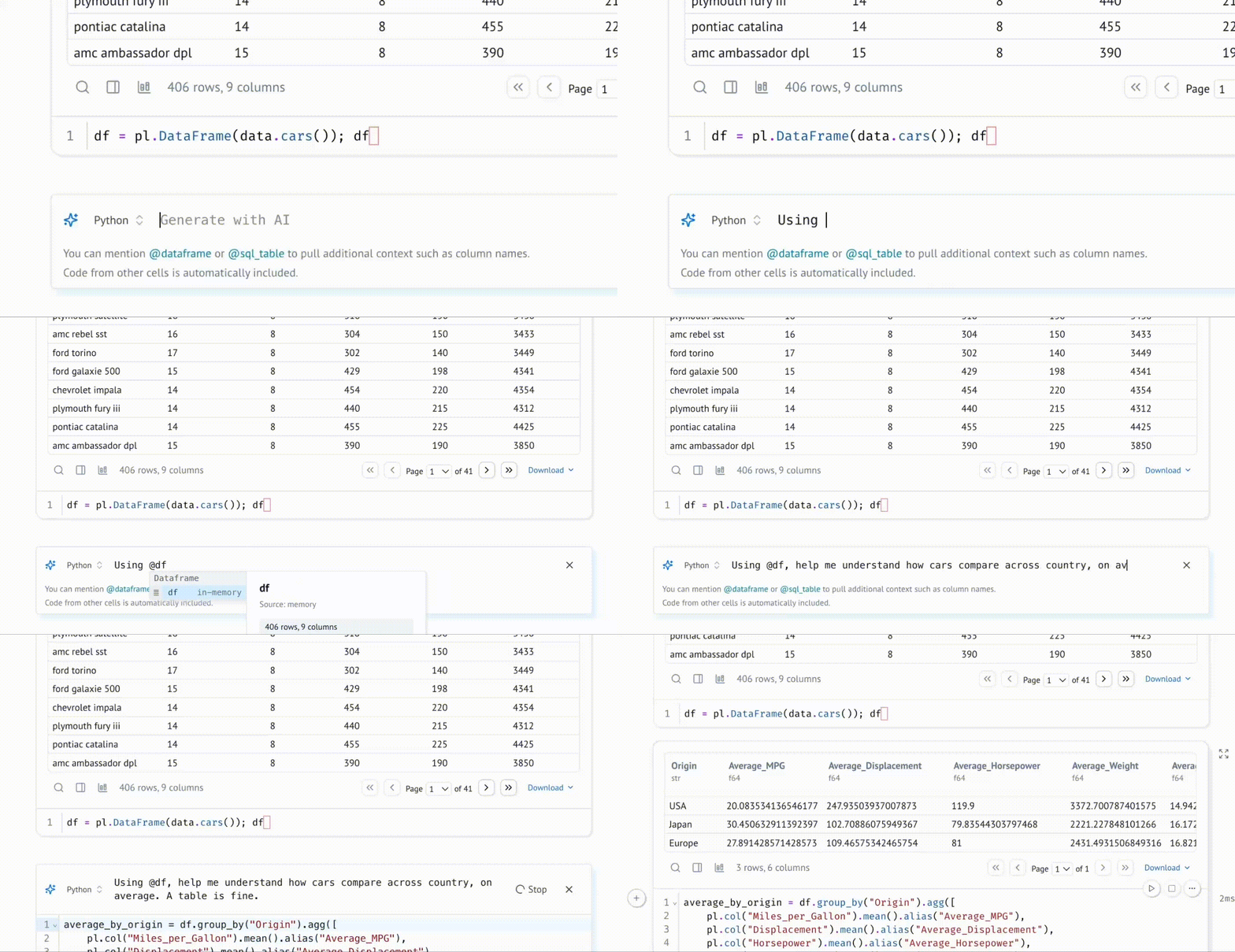
 **使用資料感知 AI 生成單元格。** 使用您最喜愛 agent(如 Claude Code、Codex 或 OpenCode),透過 [marimo pair](https://docs.marimo.io/guides/generate_with_ai/marimo_pair/) 協作編輯 marimo 筆記本。或者,透過 [marimo 編輯器的 AI 助手](https://docs.marimo.io/guides/editor_features/ai_completion/)生成程式碼,該助手專門為資料處理而設計,具有記憶體中變數的上下文。自訂系統提示,使用您自己的 API 金鑰,或使用本地模型。
 **使用 SQL 查詢資料。** 建構依賴於 Python 值的 [SQL](https://docs.marimo.io/guides/working_with_data/sql.html) 查詢,並使用我們內建的 SQL 引擎對資料框、資料庫、資料湖、CSV、Google 試算表或任何其他資料來源執行查詢,結果會以 Python 資料框返回。
 您的筆記本仍然是純 Python,即使使用了 SQL。
**動態 Markdown。** 使用由 Python 變數參數化的 Markdown,講述依賴於 Python 資料的動態故事。
**內建套件管理。** marimo 內建支援所有主要的套件管理器,讓您[在匯入時安裝套件](https://docs.marimo.io/guides/editor_features/package_management.html)。marimo 甚至可以在筆記本檔案中[序列化套件需求](https://docs.marimo.io/guides/package_management/inlining_dependencies/),並在隔離的 venv 沙盒中自動安裝它們。
**確定性執行順序。** 筆記本以確定性順序執行,基於變數引用而不是單元格在頁面上的位置。組織您的筆記本以最佳方式講述您想要的故事。
**高效能執行環境。** marimo 透過靜態分析您的程式碼,只執行需要執行的單元格。
**功能齊全。** marimo 附帶 GitHub Copilot、AI 助手、Ruff 程式碼格式化、HTML 匯出、快速程式碼自動完成、[VS Code 擴充套件](https://marketplace.visualstudio.com/items?itemName=marimo-team.vscode-marimo)、互動式資料框檢視器,以及[更多](https://docs.marimo.io/guides/editor_features/index.html)便利功能。
## 快速開始
_我們 [YouTube 頻道](https://www.youtube.com/@marimo-team)上的 [marimo 概念播放清單](https://www.youtube.com/watch?v=3N6lInzq5MI&list=PLNJXGo8e1XT9jP7gPbRdm1XwloZVFvLEq)提供了許多功能的概覽。_
**安裝**
在終端機中執行
```bash
pip install marimo # 或 conda install -c conda-forge marimo
marimo tutorial intro
```
若要安裝包含額外相依套件以解鎖 SQL 單元格、AI 自動完成等功能,請執行
```bash
pip install "marimo[recommended]"
```
**建立新筆記本**
使用以下指令建立或編輯筆記本
```bash
marimo edit
```
**作為應用程式執行**
將您的筆記本作為網頁應用程式執行,Python 程式碼將被隱藏且不可編輯:
```bash
marimo run your_notebook.py
```
您的筆記本仍然是純 Python,即使使用了 SQL。
**動態 Markdown。** 使用由 Python 變數參數化的 Markdown,講述依賴於 Python 資料的動態故事。
**內建套件管理。** marimo 內建支援所有主要的套件管理器,讓您[在匯入時安裝套件](https://docs.marimo.io/guides/editor_features/package_management.html)。marimo 甚至可以在筆記本檔案中[序列化套件需求](https://docs.marimo.io/guides/package_management/inlining_dependencies/),並在隔離的 venv 沙盒中自動安裝它們。
**確定性執行順序。** 筆記本以確定性順序執行,基於變數引用而不是單元格在頁面上的位置。組織您的筆記本以最佳方式講述您想要的故事。
**高效能執行環境。** marimo 透過靜態分析您的程式碼,只執行需要執行的單元格。
**功能齊全。** marimo 附帶 GitHub Copilot、AI 助手、Ruff 程式碼格式化、HTML 匯出、快速程式碼自動完成、[VS Code 擴充套件](https://marketplace.visualstudio.com/items?itemName=marimo-team.vscode-marimo)、互動式資料框檢視器,以及[更多](https://docs.marimo.io/guides/editor_features/index.html)便利功能。
## 快速開始
_我們 [YouTube 頻道](https://www.youtube.com/@marimo-team)上的 [marimo 概念播放清單](https://www.youtube.com/watch?v=3N6lInzq5MI&list=PLNJXGo8e1XT9jP7gPbRdm1XwloZVFvLEq)提供了許多功能的概覽。_
**安裝**
在終端機中執行
```bash
pip install marimo # 或 conda install -c conda-forge marimo
marimo tutorial intro
```
若要安裝包含額外相依套件以解鎖 SQL 單元格、AI 自動完成等功能,請執行
```bash
pip install "marimo[recommended]"
```
**建立新筆記本**
使用以下指令建立或編輯筆記本
```bash
marimo edit
```
**作為應用程式執行**
將您的筆記本作為網頁應用程式執行,Python 程式碼將被隱藏且不可編輯:
```bash
marimo run your_notebook.py
```
 **作為腳本執行**
在終端機中將 notebook 作為腳本執行
```bash
python your_notebook.py
```
**自動轉換 Jupyter 筆記本**
使用 CLI 自動將 Jupyter 筆記本轉換為 marimo 筆記本
```bash
marimo convert your_notebook.ipynb > your_notebook.py
```
或使用我們的[網頁介面](https://marimo.io/convert)。
**教學**
列出所有教學:
```bash
marimo tutorial --help
```
**分享雲端筆記本。**
使用 [molab](https://molab.marimo.io/notebooks),一個類似於 Google Colab 的雲端 marimo 筆記本服務,
來建立和分享 notebook 連結。
## 有問題嗎?
請參閱我們文件中的[常見問題](https://docs.marimo.io/faq.html)。
## 了解更多
marimo 容易上手,並為進階使用者提供了許多強大功能。
例如,這是一個使用 marimo 製作的嵌入視覺化工具
([在 molab 上即時試用 notebook!](https://molab.marimo.io/notebooks/nb_jJiFFtznAy4BxkrrZA1o9b/app?show-code=true)):
**作為腳本執行**
在終端機中將 notebook 作為腳本執行
```bash
python your_notebook.py
```
**自動轉換 Jupyter 筆記本**
使用 CLI 自動將 Jupyter 筆記本轉換為 marimo 筆記本
```bash
marimo convert your_notebook.ipynb > your_notebook.py
```
或使用我們的[網頁介面](https://marimo.io/convert)。
**教學**
列出所有教學:
```bash
marimo tutorial --help
```
**分享雲端筆記本。**
使用 [molab](https://molab.marimo.io/notebooks),一個類似於 Google Colab 的雲端 marimo 筆記本服務,
來建立和分享 notebook 連結。
## 有問題嗎?
請參閱我們文件中的[常見問題](https://docs.marimo.io/faq.html)。
## 了解更多
marimo 容易上手,並為進階使用者提供了許多強大功能。
例如,這是一個使用 marimo 製作的嵌入視覺化工具
([在 molab 上即時試用 notebook!](https://molab.marimo.io/notebooks/nb_jJiFFtznAy4BxkrrZA1o9b/app?show-code=true)):
 查看我們的[文件](https://docs.marimo.io)、
[使用範例](https://docs.marimo.io/examples/),以及我們的[展示廊](https://marimo.io/gallery)以了解更多。
查看我們的[文件](https://docs.marimo.io)、
[使用範例](https://docs.marimo.io/examples/),以及我們的[展示廊](https://marimo.io/gallery)以了解更多。

|
|

|

|
| 教學 | 輸入 | 繪圖 | 佈局 |

|
|
|
|
 ## 靈感 ✨
marimo 是 Python 筆記本的**重新發明**,作為一個可重現、互動且可分享的 Python 程式,而非容易出錯的 JSON 草稿本。
我們相信工具會影響我們的思考方式——更好的工具,造就更好的思維。透過 marimo,我們希望為 Python 社群提供一個更好的程式設計環境,用以進行研究並傳達成果;實驗程式碼並分享它;學習計算科學並教授它。
我們的靈感來自許多地方和專案,特別是 [Pluto.jl](https://github.com/fonsp/Pluto.jl)、[ObservableHQ](https://observablehq.com/tutorials) 和 [Bret Victor 的文章](http://worrydream.com/)。marimo 是朝向響應式資料流程式設計更大運動的一部分。從 [IPyflow](https://github.com/ipyflow/ipyflow)、[streamlit](https://github.com/streamlit/streamlit)、[TensorFlow](https://github.com/tensorflow/tensorflow)、[PyTorch](https://github.com/pytorch/pytorch/tree/main)、[JAX](https://github.com/google/jax) 到 [React](https://github.com/facebook/react),函數式、聲明式和響應式程式設計的理念正在改善廣泛的工具。
## 靈感 ✨
marimo 是 Python 筆記本的**重新發明**,作為一個可重現、互動且可分享的 Python 程式,而非容易出錯的 JSON 草稿本。
我們相信工具會影響我們的思考方式——更好的工具,造就更好的思維。透過 marimo,我們希望為 Python 社群提供一個更好的程式設計環境,用以進行研究並傳達成果;實驗程式碼並分享它;學習計算科學並教授它。
我們的靈感來自許多地方和專案,特別是 [Pluto.jl](https://github.com/fonsp/Pluto.jl)、[ObservableHQ](https://observablehq.com/tutorials) 和 [Bret Victor 的文章](http://worrydream.com/)。marimo 是朝向響應式資料流程式設計更大運動的一部分。從 [IPyflow](https://github.com/ipyflow/ipyflow)、[streamlit](https://github.com/streamlit/streamlit)、[TensorFlow](https://github.com/tensorflow/tensorflow)、[PyTorch](https://github.com/pytorch/pytorch/tree/main)、[JAX](https://github.com/google/jax) 到 [React](https://github.com/facebook/react),函數式、聲明式和響應式程式設計的理念正在改善廣泛的工具。
