Step by step guide to deploying arftifacts to maven central. For this blog we will use Github
Prerequisites
Step1: Make sure if you have installed JDK,Maven, Git etc.
Step 2: Create Github account (If not already done)
Step 3: Create a new Github repository
Refer https://help.github.com/articles/create-a-repo/
Step 4: Add a new SSH key to your Github account
https://help.github.com/articles/create-a-repo/
Step 5: Push the code to Github
Step 6: Sign up for Sonatype Jira account
https://issues.sonatype.org/secure/Signup!default.jspa
Step 7: Create A Jira issue for new project hosting
Here is a sample request https://issues.sonatype.org/browse/OSSRH-24465

Step 8: Install GNU PG
Download from https://www.gnupg.org/download/ and install in your OS, verify as follows
| C:\Users\Nadeem>gpg --version | |
| gpg (GnuPG) 2.1.15 | |
| libgcrypt 1.7.3 | |
| Copyright (C) 2016 Free Software Foundation, Inc. | |
| License GPLv3+: GNU GPL version 3 or later <https://gnu.org/licenses/gpl.html> | |
| This is free software: you are free to change and redistribute it. | |
| There is NO WARRANTY, to the extent permitted by law. | |
| Home: C:/Users/Nadeem/AppData/Roaming/gnupg | |
| Supported algorithms: | |
| Pubkey: RSA, ELG, DSA, ECDH, ECDSA, EDDSA | |
| Cipher: IDEA, 3DES, CAST5, BLOWFISH, AES, AES192, AES256, TWOFISH, | |
| CAMELLIA128, CAMELLIA192, CAMELLIA256 | |
| Hash: SHA1, RIPEMD160, SHA256, SHA384, SHA512, SHA224 | |
| Compression: Uncompressed, ZIP, ZLIB, BZIP2 | |
| C:\Users\Nadeem> |
Step 9: Generate the key pair
It would prompt you for phrase

Publishing Steps
Step 1: Add distributed management section in your POM.
Add deploy plugin
Add distribution Management Section in your POM
Step 2: Add ossrh server detail into your settings.xml under M2_REPO home.
Id element of servers/server in settings.xml should be identical to id element of snapshotRepository and repository in your POM file.
Step 3: Add SCM section in your POM
Step 4: Add maven release plugin
Add GPG passphrase as profile in maven settings.xml, passphrase you have generated while generating the key
Add nexus staging maven plugin
Step 5 : Add source and javadoc plugin
Step 6: Configure to Sign artificats while releasing
Configure to sign artifacts while releasing
Step 7: Publish GPG key pair
Distribute your key to GPG servers
gpg --keyserver [KEY_SERVER] --send-key [KEY_ID]
gpg --keyserver http://keys.gnupg.net:11371/ --send-key 7743E4C5134ABD42997425B1BF725DE4CBBC7E00
KEY_ID in the above case is 5694AA563793429557F1727835B3BD2A223A
Some of the key servers
- http://pool.sks-keyservers.net:11371/
- http://keyserver.ubuntu.com:11371/
- http://keys.openpgp.org:11371
- http://keys.gnupg.net:11371/
- mit.edu
Step 8: Do the release
mvn clean
mvn release:prepare
mvn release:perform
Step 9: push the tag and code to your remote repo
git push –tags
git push origin master
Step 10: Verify the sonatype repository
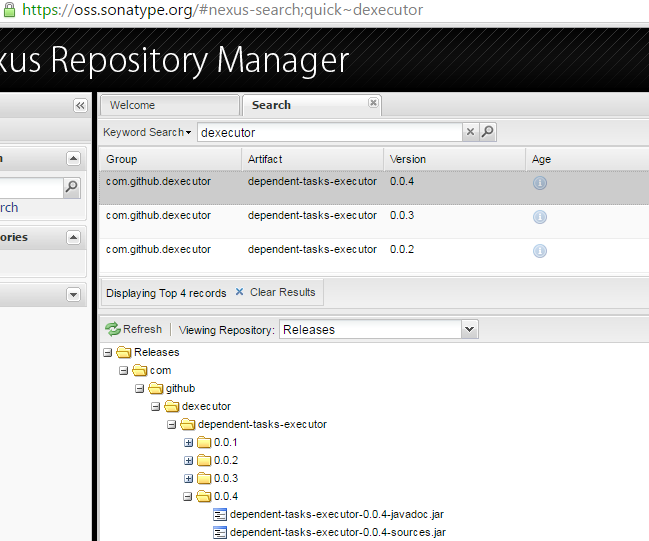
Step 11: Update the Sonatype Jira Ticket

Refer this example POM file for more detail
If something goes wrong
Step 1: Undo the release
git reset –hard HEAD~1(You may have to do it second time, depending upon when the error happened)
git reset –hard HEAD~1
Step 2: Delete the tag
git tag -d tagName
git push origin :refs/tags/tagName
References
- http://central.sonatype.org/pages/producers.html
- http://central.sonatype.org/pages/ossrh-guide.html
- http://central.sonatype.org/pages/apache-maven.html
- http://central.sonatype.org/pages/working-with-pgp-signatures.html
- https://github.com/dexecutor/dependent-tasks-executor
- http://stackoverflow.com/questions/5195859/push-a-tag-to-a-remote-repository-using-git
- https://oss.sonatype.org/
- https://fedoraproject.org/wiki/Creating_GPG_Keys
- https://ekaia.org/blog/2009/05/10/creating-new-gpgkey/
- https://access.redhat.com/documentation/en-US/Red_Hat_Enterprise_Linux/4/html/Step_by_Step_Guide/s1-gnupg-keypair.html
- https://wiki.debian.org/Keysigning
 Craftsman Nadeem