Introduction
FHIR
FHIR provides a model for Healthcare concepts, patient for example
The standard specifies a RESTful API for interacting with that model.
FHIR has several releases
- FHIR R4 (Released 2018)
- FHIR R3 (Released 2017)
- FHIR DSTU2 (Released 2015)
- FHIR DSTU1 (Released 2014)
https://www.hl7.org/fhir/resourcelist.html
HAPI
HAPI started in 2001 as an HL7 v2 Library.
Built to support a simple web portal, now used in applications around the world.
HAPI is now the Java Reference Implementation.
Refer this for more detail.
HAPI Server up and running
Download HAPI Server
https://github.com/hapifhir/hapi-fhir-jpaserver-starter

Extract To Folder

Run the Server
E:\servers\hapi-fhir-jpaserver-starter>mvn jetty:run

Local HAPI server up on 8080
http://localhost:8080/hapi-fhir-jpaserver

Refer this and this for more on configuration
Setup FHIR Client API
Lets create spring boot application
Dependency configuration
Add the following dependencies to your pom file, for any client applications we need two dependencies from hapi. First one is the data structure library and second one is the client library.
Data Structure library
For this purpose we will use r4
<dependency>
	<groupId>ca.uhn.hapi.fhir</groupId>
	<artifactId>hapi-fhir-structures-r4</artifactId>
	<version>4.1.0</version>
</dependency>
There are other versions

Client Library
There are two implementations one uses apache http while other uses okhttp, refer this for more detail on configuration, you just have to use one of them.
<dependency>
	<groupId>ca.uhn.hapi.fhir</groupId>
	<artifactId>hapi-fhir-client</artifactId>
	<version>4.1.0</version>
</dependency>
Logging Configuration
Add logback.xml

<?xml version="1.0" encoding="UTF-8"?>
<configuration>
    <appender name="STDOUT" class="ch.qos.logback.core.ConsoleAppender">
        <encoder>
            <pattern>%d{dd-MM-yyyy HH:mm:ss.SSS} %magenta([%thread]) %highlight(%-5level) %logger{36}.%M - %msg%n</pattern>
        </encoder>
    </appender>
    <root level="info">
        <appender-ref ref="STDOUT" />
    </root>
</configuration>
Client Example
import org.hl7.fhir.r4.model.Bundle;
import org.hl7.fhir.r4.model.Patient;

import ca.uhn.fhir.context.FhirContext;
import ca.uhn.fhir.rest.client.api.IGenericClient;


FhirContext ctx = FhirContext.forR4();

String serverBase = "http://localhost:8080/hapi-fhir-jpaserver/fhir";

IGenericClient client = ctx.newRestfulGenericClient(serverBase);

		// Perform a search
		Bundle results = client
		      .search()
		      .forResource(Patient.class)
		      .where(Patient.FAMILY.matches().value("duck"))
		      .returnBundle(Bundle.class)
		      .execute();

System.out.println("Found " + results.getEntry().size() + " patients named 'duck'");
when you run the application you would get the following result.
Found 0 patients named 'duck'
Generating FHIR Structure Data Using Parser
import org.hl7.fhir.r4.model.Address.AddressUse;
import org.hl7.fhir.r4.model.Bundle;
import org.hl7.fhir.r4.model.CodeableConcept;
import org.hl7.fhir.r4.model.Coding;
import org.hl7.fhir.r4.model.ContactPoint.ContactPointSystem;
import org.hl7.fhir.r4.model.Enumerations.AdministrativeGender;
import org.hl7.fhir.r4.model.HumanName;
import org.hl7.fhir.r4.model.Patient;
import org.hl7.fhir.r4.model.Patient.ContactComponent;


                Patient patient = new Patient();
		// FIRST AND LAST NAME
		patient.addName().setFamily("Duck").addGiven("Donald");
		// SOCIAL SECURITY NUMBER
		// https://www.hl7.org/FHIR/datatypes.html#Identifier
		// https://www.hl7.org/FHIR/identifier-registry.html

		patient.addIdentifier()
		.setType(new CodeableConcept().addCoding(
		 new Coding().setCode("SB").setSystem("http://hl7.org/fhir/v2/0203")
		))
		.setSystem("http://hl7.org/fhir/sid/us-ssn")
		.setValue("123456789");

		// GENDER
		patient.setGender(AdministrativeGender.FEMALE);

		// ADDRESS INFORMATION
		patient.addAddress()
		.setUse(AddressUse.HOME)
		.addLine("Street name, number, direction & P.O. Box etc.")
		.setCity("Name of city, town etc.")
		.setState("Sub-unit of country (abbreviations ok)")
		.setPostalCode("Postal/ZIP code for area");

		// CONTACT https://www.hl7.org/fhir/datatypes-examples.html#ContactPoint
		patient.addTelecom()
		.setSystem(ContactPointSystem.PHONE)
		.setValue("(555) 675 5745");

		patient.addTelecom()
		.setSystem(ContactPointSystem.PHONE)
		.setValue("(415) 675 5745");

		patient.addTelecom()
		.setSystem(ContactPointSystem.EMAIL)
		.setValue("[email protected]");

		// EMERGENCY CONTACT https://www.hl7.org/FHIR/patient-definitions.html#Patient.contact
		ContactComponent emergencyContact = new ContactComponent();

		emergencyContact.addTelecom().setSystem(ContactPointSystem.PHONE)
		.setValue("(111) 675 5745");

		// Relationship to patient
		emergencyContact
		.addRelationship()
		.addCoding()
		 .setSystem("http://hl7.org/fhir/ValueSet/v2-0131")
		 .setCode("C");

		emergencyContact.setName(
				new HumanName().setFamily("Duck Emergency contact").addGiven("Duke")
		);

		patient.addContact(emergencyContact);

		// Encode to JSON
		IParser jsonParser = ctx.newJsonParser();
		jsonParser.setPrettyPrint(true);
		String encoded = jsonParser.encodeResourceToString(patient);
		System.out.println(encoded);
Output of above execution:
{
  "resourceType": "Patient",
  "identifier": [
    {
      "type": {
        "coding": [
          {
            "system": "http://hl7.org/fhir/v2/0203",
            "code": "SB"
          }
        ]
      },
      "system": "http://hl7.org/fhir/sid/us-ssn",
      "value": "123456789"
    }
  ],
  "name": [
    {
      "family": "Duck",
      "given": [
        "Donald"
      ]
    }
  ],
  "telecom": [
    {
      "system": "phone",
      "value": "(555) 675 5745"
    },
    {
      "system": "phone",
      "value": "(415) 675 5745"
    },
    {
      "system": "email",
      "value": "[email protected]"
    }
  ],
  "gender": "female",
  "address": [
    {
      "use": "home",
      "line": [
        "Street name, number, direction & P.O. Box etc."
      ],
      "city": "Name of city, town etc.",
      "state": "Sub-unit of country (abbreviations ok)",
      "postalCode": "Postal/ZIP code for area"
    }
  ],
  "contact": [
    {
      "relationship": [
        {
          "coding": [
            {
              "system": "http://hl7.org/fhir/ValueSet/v2-0131",
              "code": "C"
            }
          ]
        }
      ],
      "name": {
        "family": "Duck Emergency contact",
        "given": [
          "Duke"
        ]
      },
      "telecom": [
        {
          "system": "phone",
          "value": "(111) 675 5745"
        }
      ]
    }
  ]
}
Playing With FHIR Web Application
http://localhost:8080/hapi-fhir-jpaserver


Search


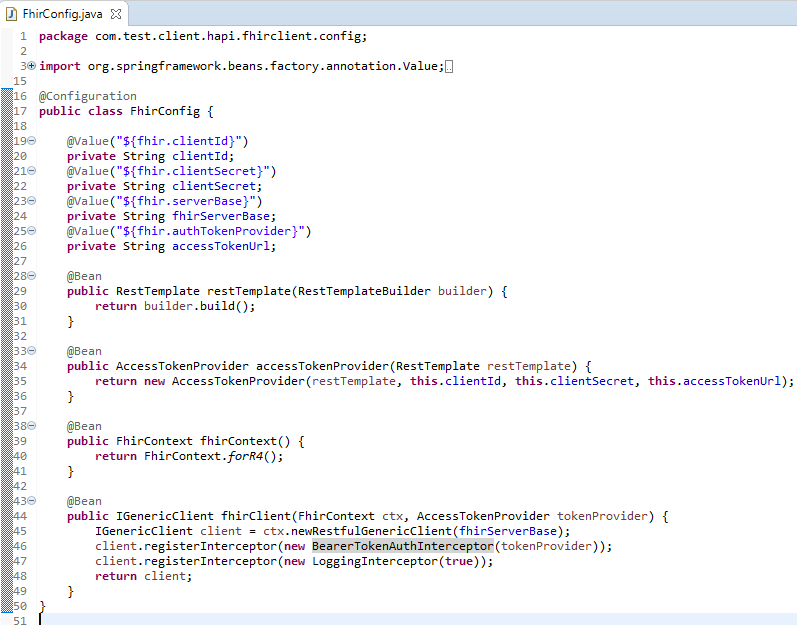
Calling Secure FHIR Resources
The code can be downloaded from here
The key is to use client interceptors
 Craftsman Nadeem