Backend for Frontend BFF Pattern Implementation

In its simple form it is like a proxy for other dependent APIs

How Does it help?

  • Don’t have to expose all the APIs externally, there by reducing the security concerns
  • Caching or rate limiting requests outside of APIs
  • Batch calls to other APIs and return the aggregated data.

Implementation

It can be easily implemented with NodeJs http-proxy-middleware

Install the following package

npm i http-proxy-middleware

Add the following file in your react application

app_server.js

const express = require('express');
const path = require('path');

const { createProxyMiddleware } = require('http-proxy-middleware');

const app = express();

const api1Service = process.env.API1_ROUTE || 'api1:5555';
const api1Url = `http://${api1Service}`;
console.log(api1Url);

const api2Service = process.env.API2_ROUTE || 'api2:5555';
const api2Url = `http://${api2Service}`;
console.log(api2Url);


app.use(express.static(path.join(__dirname, 'build')));
app.use('/api1', createProxyMiddleware({ target: api1Url, changeOrigin: false}));
app.use('/api2', createProxyMiddleware({ target: api2Url, changeOrigin: false}));


app.get('/status', function(req, res) {
    res.sendStatus(200);
    console.log('working!');
});

app.get('*', function(req, res) {
    res.sendFile(path.join(__dirname, 'build', 'index.html'));
});

let server = app.listen(3000);


Dockerfile

FROM node:10.19.0-jessie

EXPOSE 3000

ENV APP_ROOT=/root/app-root \
    NODEJS_VERSION=8 \
    NPM_RUN=start \
    NAME=nodejs

ENV HOME=${APP_ROOT} \
    NPM_CONFIG_PREFIX=${APP_ROOT}/.npm 


COPY . ${APP_ROOT}


WORKDIR ${APP_ROOT}

RUN npm install && npm run build

CMD node app_server.js

What Next ?

With GraphQL we can implement BFF very easily plus it has got lots of other benefits. If possible switch to GraphQL

Also See

Observability For NodeJs Applications Using Opentelemetry

Project demonstrating Complete Observability Stack utilizing Prometheus, Loki (For distributed logging), Tempo (For Distributed tracing, this basically uses Jaeger Internally), Grafana for NodeJs based applications (With OpenTelemetry auto / manual Instrumentation) involving microservices with DB interactions.

https://github.com/mnadeem/nodejs-opentelemetry-tempo

Demo

Clone the project and run the following commands

docker-compose up --build

Access the api endpoint

View the log and trace in Grafana

Get the trace information Using Jaeger

View the metrics in Prometheus

View prometheus metrics in Grafana as well

Opentelemetry Components

LibraryPurpose
Opentelemetry APIOpenTelemetry API, including all TypeScript interfaces, enums, and no-op implementations. It is intended for use both on the server and in the browser.
Opentelemetry CoreThis package provides default implementations of the OpenTelemetry API for trace and metrics. It’s intended for use both on the server and in the browser.
Opentelemetry NodeThis module provides automated instrumentation and tracing for Node.js applications.
Opentelemetry TracingUsed standalone, this module provides methods for manual instrumentation of code, offering full control over span creation for client-side JavaScript (browser) and Node.js.
It does not provide automated instrumentation of known libraries, context propagation for asynchronous invocations or distributed-context out-of-the-box. Contains processors and exporters
Opentelemetry InstrumentationInstrumentation for web and node module, provides mechanism to register instrumentations
Opentelemetry Js ContribThis is a repository for OpenTelemetry JavaScript contributions that are not part of the core repository and core distribution of the API and SDK.
Opentelemetry Js Exporter JaegerOpenTelemetry Jaeger Trace Exporter allows the user to send collected traces to Jaeger.

OpenTelemetry can collect tracing data automatically using plugins

Auto Instrumentation PluginPurpose
@opentelemetry/plugin-expressInstruments expressJs
@opentelemetry/plugin-http @opentelemetry/plugin-httpsInstruments http and https calls
opentelemetry-plugin-aws-sdkInstrument Amazon S3 api calls
opentelemetry-plugin-mssqlInstruments Microsoft SQL Server calls
@opentelemetry/plugin-mysqlInstruments MySQL db calls

Opentelemetry is still in early stages when it comes to metrics export, hence we would be using Prometheus Nodejs client which is pretty mature.

There is no parallel to Grafana Loki for distributed logging.

docker-compose.yaml file would take care of the following things

npm install --save @opentelemetry/api @opentelemetry/core @opentelemetry/node @opentelemetry/tracing @opentelemetry/instrumentation @opentelemetry/exporter-jaeger

Enabling Auto Instrumentation

npm install --save @opentelemetry/plugin-http @opentelemetry/plugin-https @opentelemetry/plugin-express opentelemetry-plugin-aws-sdk opentelemetry-plugin-mssql

The following would enable automatic tracing for express, http/https, aws and mssql

import log4js from 'log4js';
import opentelemetry, { context, getSpan, getSpanContext } from '@opentelemetry/api';
import {NodeTracerProvider} from '@opentelemetry/node'
import {registerInstrumentations} from '@opentelemetry/instrumentation'
import {JaegerExporter} from '@opentelemetry/exporter-jaeger'
import {SimpleSpanProcessor, BatchSpanProcessor, ConsoleSpanExporter} from '@opentelemetry/tracing'

const logger = log4js.getLogger("tracing");
logger.level = "debug";

// Enable OpenTelemetry exporters to export traces to Grafan Tempo.
const provider = new NodeTracerProvider ({
    plugins: {
        express: {
          enabled: true,
          path: '@opentelemetry/plugin-express',
        },
        http: {
            enabled: true,
            path: '@opentelemetry/plugin-http',
        },
        'aws-sdk': {
            enabled: true,
            // You may use a package name or absolute path to the file.
            path: "opentelemetry-plugin-aws-sdk",
        },
        mssql: {
            enabled: true,
            // You may use a package name or absolute path to the file.
            path: "opentelemetry-plugin-mssql",
        },
    },
});
// register and load instrumentation and old plugins - old plugins will be loaded automatically as previously
// but instrumentations needs to be added
registerInstrumentations({
    tracerProvider: provider
});

// Initialize the exporter. 
const options = {
    serviceName: process.env.OTEL_SERVICE_NAME,
    tags: [], // optional
    // You can use the default UDPSender
    //host: 'localhost', // optional
    //port: 6832, // optional
    // OR you can use the HTTPSender as follows
    //14250 : model.proto not working 
    endpoint: process.env.OTEL_EXPORTER_JAEGER_ENDPOINT,
    maxPacketSize: 65000 // optional
}

/**
 * 
 * Configure the span processor to send spans to the exporter
 * The SimpleSpanProcessor does no batching and exports spans
 * immediately when they end. For most production use cases,
 * OpenTelemetry recommends use of the BatchSpanProcessor.
 */
provider.addSpanProcessor(new BatchSpanProcessor(new JaegerExporter(options)));
//provider.addSpanProcessor(new SimpleSpanProcessor(new ConsoleSpanExporter()));

/**
 * Registering the provider with the API allows it to be discovered
 * and used by instrumentation libraries. The OpenTelemetry API provides
 * methods to set global SDK implementations, but the default SDK provides
 * a convenience method named `register` which registers same defaults
 * for you.
 *
 * By default the NodeTracerProvider uses Trace Context for propagation
 * and AsyncHooksScopeManager for context management. To learn about
 * customizing this behavior, see API Registration Options below.
 */
// Initialize the OpenTelemetry APIs to use the NodeTracerProvider bindings
provider.register();

export const tracer = opentelemetry.trace.getTracer(process.env.OTEL_SERVICE_NAME);

export const addTraceId = (req, res, next) => {
    const spanContext = getSpanContext(context.active());
    req.traceId = spanContext && spanContext.traceId;    
    next();
};

logger.debug("tracing initialized for %s sending span to %s", options.serviceName, options.endpoint);

Manual Instrumentation

Here is an example for manual instrumentation

import { tracer, addTraceId} from './tracing';
import { context, setSpan, getSpan } from '@opentelemetry/api';

:
:
:

app.get('/health', (req, res) => {
    const parentSpan = getSpan(context.active()); 
    doSomeWorkInNewSpan(parentSpan);

    return res.status(200).send({ message: "Health is good" });
});

const doSomeWorkInNewSpan = (parentSpan) => {

    //const ctx = setSpan(context.active(), parentSpan);
    //const childSpan = tracer.startSpan('doWork', undefined, ctx);
    const childSpan = tracer.startSpan('doSomeWorkInNewSpan', {
        attributes: { 'code.function' : 'doSomeWorkInNewSpan' }
    }, context.active());

    childSpan.setAttribute('code.filepath', "test");
    doSomeWorkInNewNestedSpan(childSpan);
    childSpan.end();
}

Reference

Publish a npm package locally for testing

How to use local Node packages as project dependencies, we would be using yalc for this purpose

npm install -g yalc

Lets publish the package that you are developing to your local yalc store

yalc publish

Add the package as a dependency from yalc store

yalc add <dependency name>

Install the new dependency which is added

 npm install 

Push back the changes to local dependent projects

 yalc push 

Alternatively

publish the changes

yalc publish

and update individual projects

yalc update

Remove the yalc dependency

yalc remove opentelemetry-instrumentation-mssql

References

Writing A Plugin For Opentelemetry Automatic Instrumentation Of A NodeJs Library

Library Identification

mssql npm has a huge weekly download

And no opentelemetry implementation in core, contrib and extensions, it would be a great library to instrument since lots of folks are using it.

Create a request with Opentelemetry team

Analyzing Existing Echo System

Currently there are lots of libraries which are instrumented, explore the source code, understand the api, patterns, design, implementation and idioms.

While analyzing the code you would quickly notice that there two ways to do it. Work with opentelemetry team to understand the write approach. This way you would find the write approach to proceed, in this case you have to go ahead with Instrumentation

One more thing you would notice is specific libraries/transpiler are used, Typescript for example, Mocha for testing, shimmer for monkey patching and so on.

Analyzing the Library APIs

To Start with you would stick to ConnectionPool and Request Interface, to implement the first use case.

ConnectionPool to grab the config, which would be used as Span attributes

And Request to to execute the actual queries.

Implementation

Lets Extend InstrumentationBase, you would be asked to override init method (Since it is typescript). An example implementation can be found here

import type * as mssql from 'mssql';

import {
    InstrumentationBase,
    InstrumentationConfig,
    InstrumentationModuleDefinition,
} from '@opentelemetry/instrumentation';

type Config = InstrumentationConfig & MssqlInstrumentationConfig;

export class MssqlPlugin extends InstrumentationBase<typeof mssql> {
      

    protected init(): void | InstrumentationModuleDefinition<any> | InstrumentationModuleDefinition<any>[] {
        throw new Error('Method not implemented.');
    }
}

Add constructor.

import type * as mssql from 'mssql';

import {
    InstrumentationBase,
    InstrumentationConfig,
    InstrumentationModuleDefinition,
} from '@opentelemetry/instrumentation';

import { VERSION } from './version';

type Config = InstrumentationConfig & MssqlInstrumentationConfig;;

export class MssqlPlugin extends InstrumentationBase<typeof mssql> {

    static readonly COMPONENT = 'mssql';

    
    constructor(config: Config = {}) {
        super('opentelemetry-plugin-mssql', VERSION, Object.assign({}, config));
    }

    protected init(): void | InstrumentationModuleDefinition<any> | InstrumentationModuleDefinition<any>[] {
        throw new Error('Method not implemented.');
    }
    private _getConfig(): MssqlInstrumentationConfig {
        return this._config as MssqlInstrumentationConfig;
    }
}

Provide Instrumentation module definition(s), i.e, provide patch and unpatch methods

// New Module Added
import {
    InstrumentationBase,
    InstrumentationConfig,
    InstrumentationModuleDefinition,
    InstrumentationNodeModuleDefinition,
} from '@opentelemetry/instrumentation';

// init() expanded for patch and unpatch
protected init(): void | InstrumentationModuleDefinition<any> | InstrumentationModuleDefinition<any>[] {
        const module = new InstrumentationNodeModuleDefinition<typeof mssql>(
            MssqlPlugin.COMPONENT,
            ['*'],
            this.patch.bind(this),
            this.unpatch.bind(this)
        );
        return module;
    } 
    protected patch(moduleExports: typeof mssql): typeof mssql {
        if (moduleExports === undefined || moduleExports === null) {
            return moduleExports;
        }
        return moduleExports;
    }
    protected unpatch(moduleExports: typeof mssql): void {
    }

Complete example

import { DatabaseAttribute } from '@opentelemetry/semantic-conventions';
import {
    InstrumentationBase,
    InstrumentationConfig,
    InstrumentationModuleDefinition,
    InstrumentationNodeModuleDefinition,
    isWrapped
} from '@opentelemetry/instrumentation';

import {
    SpanKind,
    SpanStatusCode,
    getSpan,
    context,
    diag
} from '@opentelemetry/api';

import type * as mssql from 'mssql';
import { MssqlInstrumentationConfig } from './types';
import { getConnectionAttributes, getSpanName } from './Spans';
import { VERSION } from './version';

type Config = InstrumentationConfig & MssqlInstrumentationConfig;

export class MssqlInstrumentation extends InstrumentationBase<typeof mssql> {

    static readonly COMPONENT = 'mssql';
    static readonly COMMON_ATTRIBUTES = {
        [DatabaseAttribute.DB_SYSTEM]: MssqlInstrumentation.COMPONENT,
    };

    constructor(config: Config = {}) {
        super('opentelemetry-instrumentation-mssql', VERSION, Object.assign({}, config));
    }

    private _getConfig(): MssqlInstrumentationConfig {
        return this._config as MssqlInstrumentationConfig;
    }

    protected init(): InstrumentationModuleDefinition<typeof mssql> | InstrumentationModuleDefinition<typeof mssql>[] | void {
        const module = new InstrumentationNodeModuleDefinition<typeof mssql>(
            MssqlInstrumentation.COMPONENT,
            ['*'],
            this.patch.bind(this),
            this.unpatch.bind(this)
        );

        return module;
    }

    protected patch(moduleExports: typeof mssql) {
        if (moduleExports === undefined || moduleExports === null) {
            return moduleExports;
        }
        diag.debug(`applying patch to ${MssqlInstrumentation.COMPONENT}`);
        this.unpatch(moduleExports);

        this._wrap(moduleExports, 'ConnectionPool', this._patchCreatePool() as any);
        this._wrap(moduleExports, 'Request', this._patchRequest() as any);

        return moduleExports;
    }

    // global export function
    private _patchCreatePool() {
        return (originalConnectionPool: any) => {
            const thisInstrumentation = this;
            diag.debug('MssqlPlugin#patch: patching mssql ConnectionPool');
            return function createPool(_config: string | mssql.config) {
                if (thisInstrumentation._getConfig()?.ignoreOrphanedSpans && !getSpan(context.active())) {
                    return new originalConnectionPool(...arguments);
                }
                const pool = new originalConnectionPool(...arguments);
                thisInstrumentation._wrap(pool, 'query', thisInstrumentation._patchPoolQuery(pool));
                return pool;
            };
        };
    }

    private _patchPoolQuery(pool: mssql.ConnectionPool) {
        return (originalQuery: Function) => {
            const thisInstrumentation = this;
            diag.debug('MssqlPlugin#patch: patching mssql pool request');
            return function request() {
                if (thisInstrumentation.shouldIgnoreOrphanSpans(thisInstrumentation._getConfig())) {
                    return originalQuery.apply(pool, arguments);
                }
                const args = arguments[0];
                const span = thisInstrumentation.tracer.startSpan(getSpanName(args[0]), {
                    kind: SpanKind.CLIENT
                });               
                return originalQuery.apply(pool, arguments)
                    .catch((error: { message: any; }) => {
                        span.setStatus({
                            code: SpanStatusCode.ERROR,
                            message: error.message,
                        })
                    }).finally(() => {
                        span.end();
                    });

            };
        };
    }

    private _patchRequest() {
        return (originalRequest: any) => {
            const thisInstrumentation = this;
            diag.debug('MssqlPlugin#patch: patching mssql pool request');
            return function request() {
                const request: mssql.Request = new originalRequest(...arguments);
                thisInstrumentation._wrap(request, 'query', thisInstrumentation._patchQuery(request));
                return request;
            };
        };
    }

    private _patchQuery(request: mssql.Request) {
        return (originalQuery: Function) => {
            const thisInstrumentation = this;

            diag.debug('MssqlPlugin#patch: patching mssql request query');
            return function query(command: string | TemplateStringsArray): Promise<mssql.IResult<any>> {
                if (thisInstrumentation.shouldIgnoreOrphanSpans(thisInstrumentation._getConfig())) {
                    return originalQuery.apply(request, arguments);
                }
                const span = thisInstrumentation.tracer.startSpan(getSpanName(command), {
                    kind: SpanKind.CLIENT,
                    attributes: {
                        ...MssqlInstrumentation.COMMON_ATTRIBUTES,
                        ...getConnectionAttributes((<any>request).parent!.config)
                    },
                });
                var interpolated = thisInstrumentation.formatDbStatement(command)
                for (const property in request.parameters) {
                    interpolated = interpolated.replace(`@${property}`, `${(request.parameters[property].value)}`);
                }
                span.setAttribute(DatabaseAttribute.DB_STATEMENT, interpolated);
                const result = originalQuery.apply(request, arguments);

                result
                    .catch((error: { message: any; }) => {
                        span.setStatus({
                            code: SpanStatusCode.ERROR,
                            message: error.message,
                        })
                    }).finally(() => {
                        span.end()
                    });

                return result;
            };
        };
    }

    private shouldIgnoreOrphanSpans(config: MssqlInstrumentationConfig) {
        return config?.ignoreOrphanedSpans && !getSpan(context.active())
    }

    private formatDbStatement(command: string | TemplateStringsArray) {
        if (typeof command === 'object') {
            return command[0];
        }
        return command;
    }

    protected unpatch(moduleExports: typeof mssql): void {
        if (isWrapped(moduleExports.ConnectionPool)) {
            this._unwrap(moduleExports, 'ConnectionPool');            
        }
        if (isWrapped(moduleExports.Request)) {
            this._unwrap(moduleExports, 'Request');
        }
    }
}

make sure to create index.ts and types.ts

package.json

Test Cases

  • The instrumentation class (In this case MssqlInstrumentation) should be instantiated first before requiring the library you are instrumenting in the test cases, otherwise calls will not be patched. i.e, load all instrumentations before a real usage – not event importing / requiring it so it can be patched correctly. The instrumentation needs to be loaded also, you can do it by either creating a new instance and setting things manually or you can use registerInstrumentations where you pass the new instance of your instrumentation there.
  • The instrumentation is enabled by default unless you call it with config option to disable it.

Plugin Version

The plugin version can be found here, Keep a note that plugin approach to instrumentation is deprecated and would be removed as soon as existing plugins are converted to new instrumentation approach.

Plugin Limitations

  • Plugin version only supports traces, and end goal is to have a single auto instrumentation that generate both traces and metrics.
  • Being able to auto instrument multiples packages at once, this makes sense for @opentelemetry/instrumentation-http that both handle http and https or @opentelemetry/instrumentation-grpc that handle grpc and @grpc/grpc-js, that allows to keep related utils where we use them
  • Allows auto instrumentation to only depend on @opentelemetry/api so they works with any SDK (and not necessarily only the sdk we provide)
  • Not tech stuff but at the time the name instrumentation was decided at the spec level to represent all auto instrumentations packages so we neeed to rename all of the plugins that already exists.
  • Some issues with plugin approach, #1412 and #1315
  • The instrumentation also allows you to patch more packages and individual files – this was not possible with plugin so this is huge and the biggest difference between those 2 classes.

Also See

Credits

Instrumenting NodeJs Express Applications For Prometheus Metrics

NodeJs Application

Create Folder

mkdir nodejs-prometheus
cd nodejs-prometheus

create package.json

npm init --yes

install dev dependencies

npm install -D  babel-cli babel-preset-env nodemon npm-run-all rimraf pino-pretty

install prod dependencies

npm install -P  cors dotenv express prom-client pino express-pino-logger

script

"scripts": {
    "test": "echo \"Error: no test specified\" && exit 1",
    "clean": "rimraf ./dist/",
    "build": "babel ./src/ --presets=babel-preset-env --out-dir dist --ignore ./node_modules,./.babelrc,./package.json,./npm-debug.log --copy-files",
    "server:dev": "nodemon ./src/server.js --exec babel-node --presets babel-preset-env",
    "server:prod": "node ./dist/server.js",
    "prod:build": "npm-run-all clean build",
    "prod": "npm-run-all clean prod:build server:prod",
    "dev": "npm-run-all server:dev | pino-pretty"
  }

Complete package.json

{
  "name": "nodejs-prometheus",
  "version": "1.0.0",
  "description": "",
  "main": "index.js",
  "scripts": {
    "test": "echo \"Error: no test specified\" && exit 1",
    "clean": "rimraf ./dist/",
    "build": "babel ./src/ --presets=babel-preset-env --out-dir dist --ignore ./node_modules,./.babelrc,./package.json,./npm-debug.log --copy-files",
    "server:dev": "nodemon ./src/server.js --exec babel-node --presets babel-preset-env",
    "server:prod": "node ./dist/server.js",
    "prod:build": "npm-run-all clean build",
    "prod": "npm-run-all clean prod:build server:prod",
    "dev": "npm-run-all server:dev | pino-pretty"
  },
  "keywords": [],
  "author": "",
  "license": "ISC",
  "devDependencies": {
    "babel-cli": "^6.26.0",
    "babel-preset-env": "^1.7.0",
    "nodemon": "^2.0.7",
    "npm-run-all": "^4.1.5",
    "pino-pretty": "^4.5.0",
    "rimraf": "^3.0.2"
  },
  "dependencies": {
    "cors": "^2.8.5",
    "dotenv": "^8.2.0",
    "express": "^4.17.1",
    "express-pino-logger": "^6.0.0",
    "pino": "^6.11.1",
    "prom-client": "^13.1.0"
  }
}

server.js file

import express from 'express';
import pino from 'pino';
import expressPino from 'express-pino-logger';

const PORT = process.env.PORT || 5555;

const logger = pino({level:process.env.LOG_LEVEL || 'info'})
const expressLogger = expressPino({logger});

const app = express();
app.use(express.json(), expressLogger);

app.get('/health', (req, res) => {
    logger.debug('Calling res.send');
    return res.status(200).send({message: "Health is good"});
});

app.listen(PORT, () => {
    logger.info('App is listening for requests on port %d', PORT);
});

Dockerfile

FROM node:10.15.0-jessie

EXPOSE 5555

ENV APP_ROOT=/root/app-root \
    NODEJS_VERSION=8 \
    NPM_RUN=start \
    NAME=nodejs

ENV HOME=${APP_ROOT} \
    NPM_CONFIG_PREFIX=${APP_ROOT}/.npm 

COPY . ${APP_ROOT}

WORKDIR ${APP_ROOT}

RUN npm install && npm run prod:build
CMD node ./dist/server.js

start the application

npm run dev

looks good

Application Instrumentation Using prom-client

import

import promClient from 'prom-client';

add counter variable

const Counter = promClient.Counter;

create an instance, and keep incrementing

const c = new Counter({
	name: 'test_counter',
	help: 'Example of a counter',
	labelNames: ['code'],
});
setInterval(() => {
	c.inc({ code: 200 });
}, 500);

expose metric endpoint

// Setup server to Prometheus scrapes:
app.get('/metrics', async (req, res) => {
	try {
		res.set('Content-Type', promClient.register.contentType);
		res.end(await promClient.register.metrics());
	} catch (ex) {
		res.status(500).end(ex);
	}
});

metrics endpoint

Lets go real now, and expose http request durations.

server.js

import express from 'express';
import pino from 'pino';
import expressPino from 'express-pino-logger';
import promClient from 'prom-client';

const PORT = process.env.PORT || 5555;

const logger = pino({level:process.env.LOG_LEVEL || 'info'})
const expressLogger = expressPino({logger});

const app = express();
app.use(express.json(), expressLogger);

const collectDefaultMetrics = promClient.collectDefaultMetrics;

collectDefaultMetrics();
const Histogram = promClient.Histogram;
const requestDuration = new Histogram({
	name: 'http_request_duration_milliseconds',
	help: 'request duration histogram',
	labelNames: ['handler' , 'method', 'statuscode'],
});

const profilerMiddleware = (req, res, next) => {
    const start = Date.now();
   res.once('finish', () => {
    const duration = Date.now() - start;
    requestDuration.labels(req.url, req.method, res.statusCode).observe(duration)
   });

  next();
};
app.use(profilerMiddleware);


app.get('/health', (req, res) => {
    logger.debug('Calling res.send');    
    return res.status(200).send({message: "Health is good"});
});

app.listen(PORT, () => {
    logger.info('App is listening for requests on port %d', PORT);
});

// Setup server to Prometheus scrapes:
app.get('/metrics', async (req, res) => {
	try {
		res.set('Content-Type', promClient.register.contentType);
		res.end(await promClient.register.metrics());
	} catch (ex) {
		res.status(500).end(ex);
	}
});

Metrics exposed

An Alternate implementation of server.js

import express from 'express';
import pino from 'pino';
import expressPino from 'express-pino-logger';
import promClient from 'prom-client';

const PORT = process.env.PORT || 5555;

const logger = pino({level:process.env.LOG_LEVEL || 'info'})
const expressLogger = expressPino({logger});

const app = express();
app.use(express.json(), expressLogger);

// Create a Registry which registers the metrics
const register = new promClient.Registry()
promClient.collectDefaultMetrics({ register });

const Histogram = promClient.Histogram;
const requestDuration = new Histogram({
	name: 'http_request_duration_seconds',
	help: 'request duration histogram',
    labelNames: ['handler' , 'method', 'statuscode'],
    //buckets: [0.5, 10, 25, 50, 100, 250, 500, 1000, 2500, 5000, 10000],
    buckets: [0.005, 0.01, 0.025, 0.05, 0.1, 0.25, 0.5, 1, 2.5, 5, 10],
});

// Register the histogram
register.registerMetric(requestDuration)

const profilerMiddleware = (req, res, next) => {
    //const start = Date.now();
    const end = requestDuration.startTimer()
    res.once('finish', () => {
      //const duration = Date.now() - start;
      //requestDuration.labels(req.url, req.method, res.statusCode).observe(duration);
      //requestDuration.observe({ handler:req.url, method: req.method, statuscode: res.statusCode }, duration);
      const duration = end({ handler:req.url, method: req.method, statuscode: res.statusCode });
      logger.info('Duration  %d', duration);
    });

  next();
};
app.use(profilerMiddleware);


app.get('/health', (req, res) => {
    logger.debug('Calling res.send');    
    return res.status(200).send({message: "Health is good"});
});

app.listen(PORT, () => {
    logger.info('App is listening for requests on port %d', PORT);
});

// Setup server to Prometheus scrapes:
app.get('/metrics', async (req, res) => {
	try {
		res.set('Content-Type', register.contentType);
		res.end(await register.metrics());
	} catch (ex) {
		res.status(500).end(ex);
	}
});

Prometheus Integration

scrap config

scrape_configs:  
  - job_name: 'nodeJsApp'
    static_configs:
      - targets: ['localhost:5555']   

Targets

Average request time by dividing sum over count

http_request_duration_seconds_sum / http_request_duration_seconds_count

Calculating 50% percentile (second quartile) for last 10 :

histogram_quantile(.5, rate(http_request_duration_seconds_bucket[10m]))

References

Multi IDP Support on React App For SSO Using OAuth2 / JWT

Okta Setup

Fusion Auth Setup

User

Add use to groups

Keycloak Setup

Refer this on setting up keycloak

Application Setup

Application setup

Demo

Source Code

Download from github

Source Code

Authentication / SSO with OAuth2 and JWT In React Application With NodeJs Back-end And KeyCloak IAM

We will use Keycloak as IDP, and OAuth 2 with JWT as AuthToken in react application with NodeJS (Express) back-end

KeyCloak IAM

Keycloak is a great tool for IAM from JBOSS, it is easy to get started and configure. Start KeyCloak as follows.

E:\softwares\keycloak-8.0.1\bin>standalone.bat

Add initial console user

E:\softwares\keycloak-8.0.1\bin>add-user.bat -u admin admin
Updated user 'admin' to file 'E:\softwares\keycloak-8.0.1\standalone\configuration\mgmt-users.properties'
Updated user 'admin' to file 'E:\softwares\keycloak-8.0.1\domain\configuration\mgmt-users.properties'
Press any key to continue . . .

Login with the credentials, created above

Start keycloak application

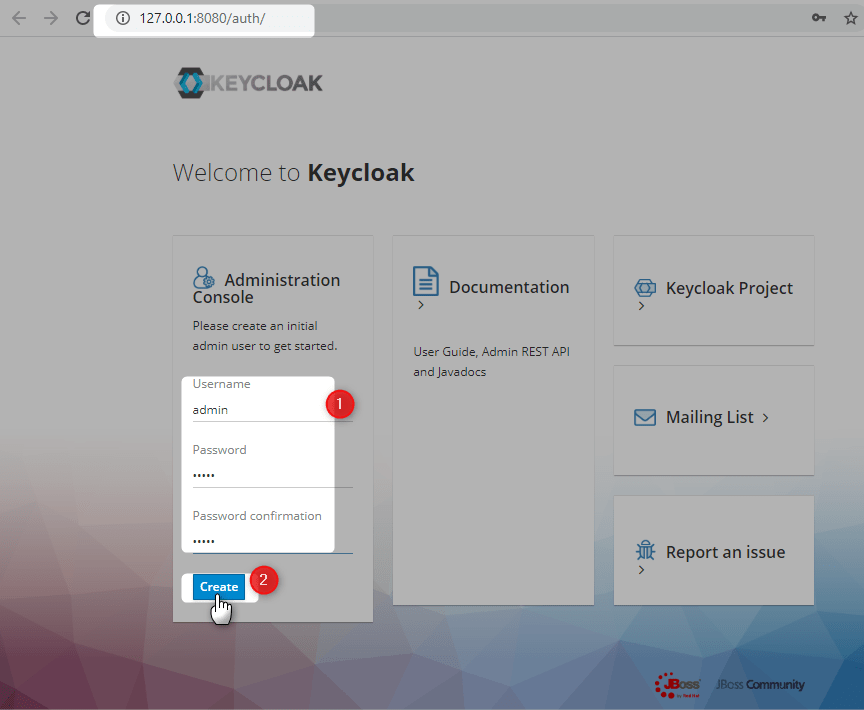
Create initial keycloak user

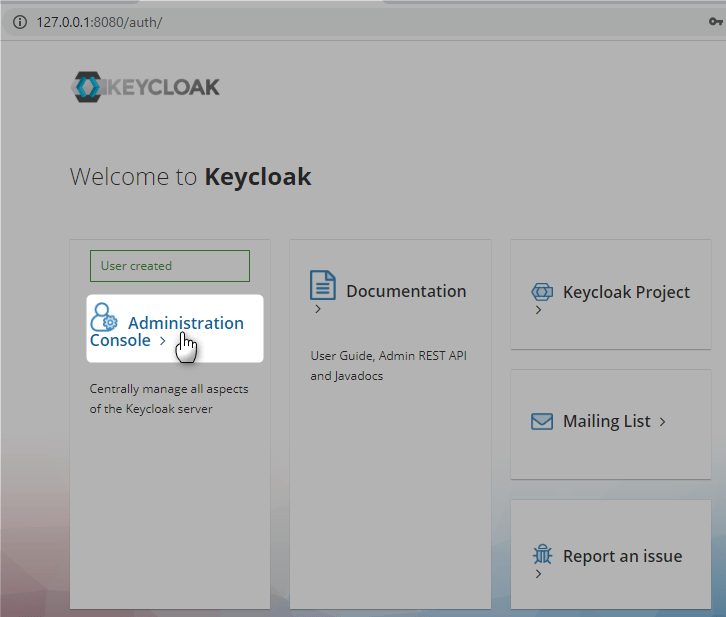
Login with initial keycloak user

Create New Realm

Create new client called react

Access Type should be confidential

Click Save, and go to Roles

New Role demo-user

New Role demo-admin

Client Secret can be found as follows

Add new user mnadeem

Add roles to user

OpenId Configuration

http://127.0.0.1:8080/auth/realms/demo/.well-known/openid-configuration

React App

Lets create react application following this

E:\practices\node>create-react-app react-sso-app
E:\practices\node>code react-sso-app

Create Backend NodeJs API

Lets follow the steps as described in here

E:\practices\node\react-sso-app>mkdir api
E:\practices\node\react-sso-app>cd api
E:\practices\node\react-sso-app\api>npm init --yes

Install dependencies

E:\practices\node\react-sso-app\api> npm install –save-dev babel-cli babel-preset-env nodemon
E:\practices\node\react-sso-app\api>npm install --save express
E:\practices\node\react-sso-app\api>npm install --save-dev rimraf
E:\practices\node\react-sso-app\api>npm install npm-run-all --save-dev

Final package.json of api project under react-sso-app

{
  "name": "api",
  "version": "1.0.0",
  "description": "",
  "main": "index.js",
  "scripts": {
    "test": "echo \"Error: no test specified\" && exit 1",
    "clean": "rimraf ./dist/",
    "build": "babel ./src/ --presets=babel-preset-env --out-dir dist --ignore ./node_modules,./.babelrc,./package.json,./npm-debug.log --copy-files",
    "server:dev": "nodemon ./src/server.js --exec babel-node --presets babel-preset-env",
    "server:prod": "node ./dist/server.js",
    "prod": "npm-run-all clean build server:prod",
    "dev": "npm-run-all server:dev"
  },
  "keywords": [],
  "author": "",
  "license": "ISC",
  "devDependencies": {
    "babel-cli": "^6.26.0",
    "babel-preset-env": "^1.7.0",
    "nodemon": "^2.0.2",
    "npm-run-all": "^4.1.5",
    "rimraf": "^3.0.1"
  },
  "dependencies": {
    "express": "^4.17.1"
  }
}

Add api to workspace

Create files, .babelrc, server.js

E:\practices\node\react-sso-app\api>npm run dev

> [email protected] dev E:\practices\node\react-sso-app\api
> npm-run-all server:dev


> [email protected] server:dev E:\practices\node\react-sso-app\api
> nodemon ./src/server.js --exec babel-node --presets babel-preset-env

[nodemon] 2.0.2
[nodemon] to restart at any time, enter `rs`
[nodemon] watching dir(s): *.*
[nodemon] watching extensions: js,mjs,json
[nodemon] starting `babel-node ./src/server.js --presets babel-preset-env`
App is listening for requests on port 5555

Lets install the following package

E:\practices\node\react-sso-app\api>npm install --save dotenv

lets create .env file (for local use) in api project

You can get all the details from keycloak (http://127.0.0.1:8080/auth/realms/demo/.well-known/openid-configuration)

SSO_CLIENT_ID=react
SSO_CLIENT_SECRET=202f6844-8b88-45b8-898a-327a74c10ab1
SSO_AUTH_URL=http://127.0.0.1:8080/auth/realms/demo/protocol/openid-connect/auth
SSO_TOKEN_URL=http://127.0.0.1:8080/auth/realms/demo/protocol/openid-connect/token
SSO_SCOPE=openid profile User roles
SSO_REDIRECT_URI=http://localhost:3000

TOKEN_SECRET=2423sdfsfsd3432fdwrerwtg

Lets add the following dependency

E:\practices\node\react-sso-app\api>npm install --save request-promise
E:\practices\node\react-sso-app\api>npm install --save jsonwebtoken

For more details look into the api project and react project

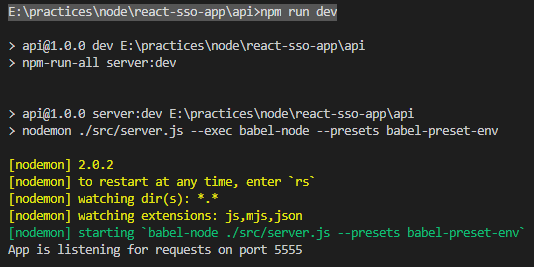
Lets start the api project

E:\practices\node\react-sso-app\api>npm run dev

Lets start the react project

e:\practices\node\react-sso-app>npm start

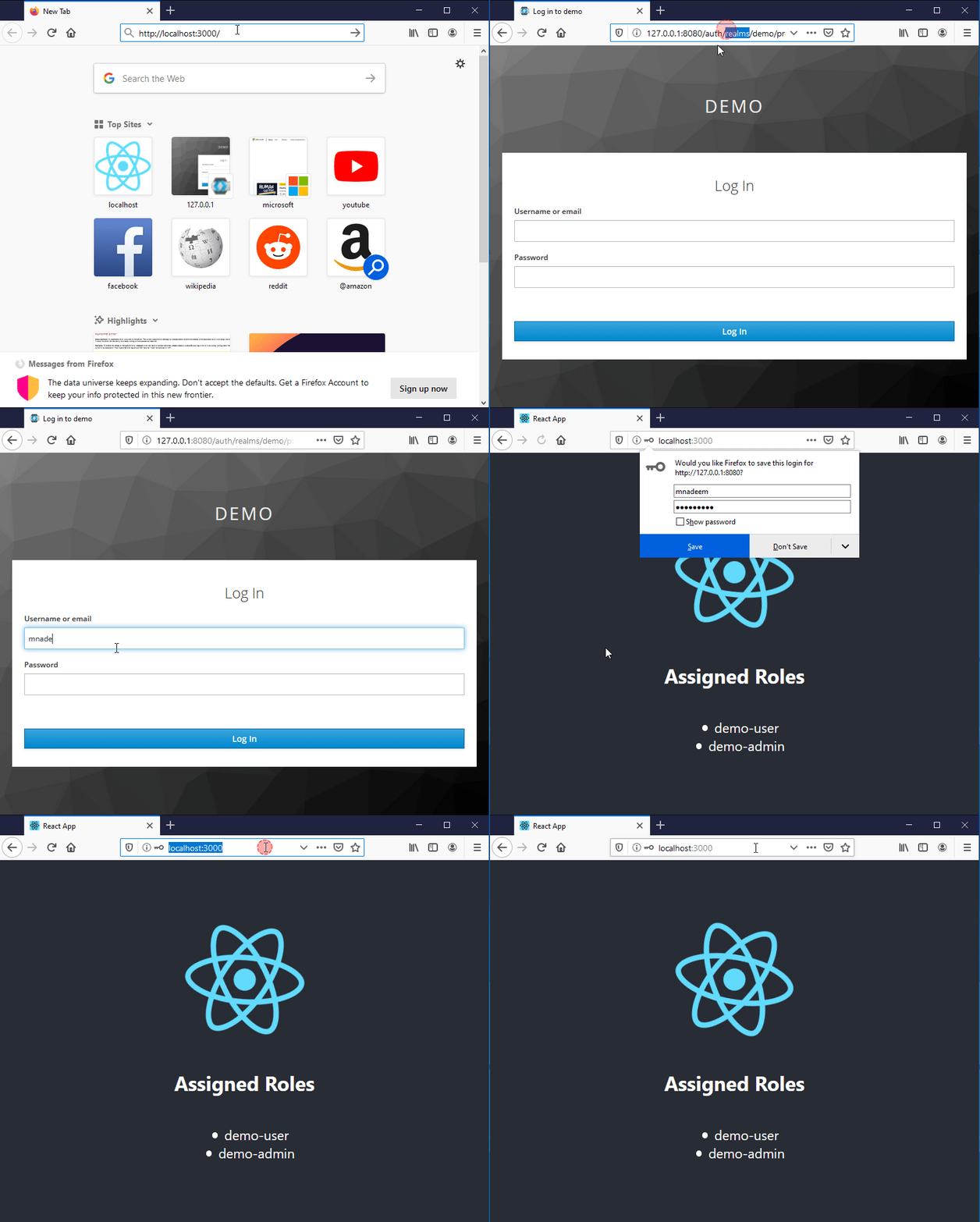
Demo

Make sure keycloak is running.

Key Points

There are three basic things:

  • Redirecting to IDP for authorization code
  • Get the JWT as auth token
  • Re authenticate using JWT until token is valid.

Source Code

Getting Started With NodeJs App Using Visual Studio Code

E:\practices\node>mkdir express-app
E:\practices\node>cd express-app

Lets initialize node project.

E:\practices\node\express-app>npm init --yes

Here is the generated files

Open visual studio code

E:\practices\node\express-app>code .

Install Dev dependencies

Open terminal

npm install –save-dev babel-cli babel-preset-env nodemon

After the execution of above instruction, package.json would automatically get updated.

Lets install express

npm install --save express

After the execution, express is automatically added to package.json as dependency

Write Sample App

Lets create simple server.js file

import express from 'express';

const app = express();

app.use(express.json());


app.get('/health', (req, res) => {
    return res.status(200).send({message: "Health is good"});
});

app.listen(5555, () => {
    console.log("App is listening for requests on port 5555");
});

Lets add the following to package.json

“start”:”node ./server.js”

Lets execute npm start, you will get the following error

The above error is due to the fact that, nodejs runtime don’t understand ES6 features like import. This is where bable comes into picture. That is to complie ES6 code to ES5. Add the following in package.json

 "build": "babel server.js  --presets=babel-preset-env --out-dir dist",
 "start": "npm run build && node dist/server.js"

Lets start server now, execute npm start

rimraf

Lets now enhance the package scripts little bit to delete existing dist folder before compiling. for this purpose we have to use rimraf

E:\practices\node\express-app>npm install --save-dev rimraf

Move server.js to src folder, and modify the package.json as follows.

"build": "rimraf ./dist/ && babel ./src/  --presets=babel-preset-env --out-dir dist  --ignore ./node_modules,./.babelrc,./package.json,./npm-debug.log --copy-files"

babel-node

Lets modify package.json to run the ES6 directly for development, for this purpose we will use babel-node

"dev-start" : "babel-node ./src/server.js --presets babel-preset-env"

Lets run the dev-start

nodemon

Lets enhance it further to reload the changes using nodemon, lets add the following script

"dev-start" : "nodemon ./src/server.js --exec babel-node --presets babel-preset-env"

execute dev-start, and keep changing the files, you will notice that the server is reloaded.

Lets enhance the package.json further

{
  "name": "express-app",
  "version": "1.0.0",
  "description": "",
  "main": "./src/server.js",
  "scripts": {
    "test": "echo \"Error: no test specified\" && exit 1",
    "clean": "rimraf ./dist/",
    "build": "babel ./src/  --presets=babel-preset-env --out-dir dist  --ignore ./node_modules,./.babelrc,./package.json,./npm-debug.log --copy-files",
    "server:dev" : "nodemon ./src/server.js --exec babel-node --presets babel-preset-env",
    "server:prod" : "node ./dist/server.js",
    "prod": "npm run clean && npm run build && npm run server:prod",
    "dev" : "npm run server:dev"
  },
  "keywords": [],
  "author": "",
  "license": "ISC",
  "devDependencies": {
    "babel-cli": "^6.26.0",
    "babel-preset-env": "^1.7.0",
    "nodemon": "^1.1.2",
    "rimraf": "^3.0.0"
  },
  "dependencies": {
    "express": "^4.17.1"
  }
}

you can execute npm run dev or npm run prod

npm-run-all

Lets further enhance packge.json with npm-run-all package, lets execute the following

npm install npm-run-all --save-dev

lets update the package.json as follows

{
  "name": "express-app",
  "version": "1.0.0",
  "description": "",
  "main": "./src/server.js",
  "scripts": {
    "test": "echo \"Error: no test specified\" && exit 1",
    "clean": "rimraf ./dist/",
    "build": "babel ./src/ --presets=babel-preset-env --out-dir dist --ignore ./node_modules,./.babelrc,./package.json,./npm-debug.log --copy-files",
    "server:dev": "nodemon ./src/server.js --exec babel-node --presets babel-preset-env",
    "server:prod": "node ./dist/server.js",
    "prod": "npm-run-all clean build server:prod",
    "dev": "npm-run-all server:dev"
  },
  "keywords": [],
  "author": "",
  "license": "ISC",
  "devDependencies": {
    "babel-cli": "^6.26.0",
    "babel-preset-env": "^1.7.0",
    "nodemon": "^1.1.2",
    "npm-run-all": "^4.1.5",
    "rimraf": "^3.0.0"
  },
  "dependencies": {
    "express": "^4.17.1"
  }
}

babel-watch

Lets enhance package.json with babel-watch

npm install --save-dev @babel/core @babel/preset-env
npm install --save-dev babel-watch

TODO

Debugging

{
    // Use IntelliSense to learn about possible attributes.
    // Hover to view descriptions of existing attributes.
    // For more information, visit: https://go.microsoft.com/fwlink/?linkid=830387
    "version": "0.2.0",
    "configurations": [
        {
            "type": "node",
            "request": "launch",
            "name": "Launch Program",
            "skipFiles": [
                "<node_internals>/**"
            ],
            "program": "${workspaceFolder}\\src\\server.js",
            "stopOnEntry": true,
            "args": [],
            "cwd": "${workspaceFolder}",
            "preLaunchTask": null,
            "runtimeExecutable": "${workspaceFolder}/node_modules/.bin/babel-node",
            "runtimeArgs": ["--nolazy"],
            "env": {"NODE_ENV" : "development"}
        }
    ]
}

Add .babelrc file

{
    "presets": [
        "env"
      ]
}

Add debug point

Start debugging

Stops at first line

Debug

Example