
บทช่วยสอน Qlikview
 เดวิดคาร์เตอร์
⚡ สรุปอย่างชาญฉลาด
QlikView is a classic business intelligence platform that converts raw data into interactive dashboards through an in-memory associative engine. Explore its features, architecture, installation, applications, and how it compares with newer analytics platforms.

QlikView คืออะไร?
Qlik View คือ เครื่องมือทางธุรกิจ for data integration, conversational analytics, and converting raw data into a knowledge base. QlikView offers features for แบบสอบถามเฉพาะกิจ and facilitates quick decision-making based on easily accessible information. This software works on an associative model that lets users explore data in any direction to find answers.
QlikView is now a legacy product: Qlik has shifted its development focus to the successor platform, Qlik Sense.
Why is QlikView widely used?
Here are the major benefits/advantages of using QlikView:
- The platform is simple and very intuitive to use.
- นำเสนอการแสดงภาพข้อมูลในรูปแบบที่มีความหมายและสร้างสรรค์
- เวลาตอบสนองทันทีโดยไม่มีข้อจำกัดเกี่ยวกับปริมาณข้อมูล
- Allows you to search across all data directly and indirectly
- QlikView provides support for dynamic applications, dashboards, and analyses, etc.
- อำนวยความสะดวกในการรวมข้อมูลจากแหล่งต่างๆ ไว้ในแอปพลิเคชันเดียวอย่างรวดเร็ว
- Helps you to identify trends and information to make the most innovative decisions.
- ช่วยให้คุณเข้าถึง วิเคราะห์ และดึงข้อมูลจากอุปกรณ์มือถือ
- ให้ผลตอบแทนจากการลงทุนที่รวดเร็วเนื่องจากระยะเวลาดำเนินการสั้น
- Faster development and change management
- Self-service business intelligence for end users
คุณสมบัติของ QlikView
1) การสร้างแบบจำลองข้อมูลเชิงสัมพันธ์:
QlikView works on an in-memory Associative Model. So you do not need dedicated IT professionals if you can write a SQL SELECT query and understand your data.
2) แพลตฟอร์ม:
QlikView is a Windows-only product, but it is genuinely optimized for 64-bit systems and multiple processors.
3) คุ้มค่า:
QlikView เป็นแอปที่มีหน่วยความจำ ดังนั้นจึงเป็นตัวเลือกที่คุ้มค่าอย่างยิ่งสำหรับองค์กรของคุณ
4) ประหยัด:
QlikView ประหยัดมากด้วยพื้นที่ดิสก์ เนื่องจากจำนวนหน่วยความจำขึ้นอยู่กับปริมาณข้อมูลที่คุณต้องการสำหรับแต่ละแอปพลิเคชัน
Other Important Features of QlikView
- การเชื่อมโยงข้อมูลได้รับการดูแลโดยอัตโนมัติ
- Data is stored in memory for multiple users, to offer a super-fast user experience
- Data can be compressed to around 10% of its original size
- การรายงานที่โปร่งใสและความสามารถในการปรับขนาดด้วยการบูรณาการข้อมูล
- การนำเสนอข้อมูลในรูปแบบต่างๆ
- ใช้งานได้อย่างรวดเร็ว
- การค้นพบข้อมูลที่ไม่ซ้ำใครและการค้นหาทั่วโลก
- การร่วมมือ
- สภาพแวดล้อมการทำงานที่ปลอดภัย
- การวิเคราะห์ด้วยภาพและการค้นหาโดยตรง
- ความยืดหยุ่นและการบูรณาการ
- รายงานอย่างสม่ำเสมอ
การค้นหาแบบเชื่อมโยงเทียบกับการค้นหาแบบดั้งเดิม
Because the associative model is QlikView’s defining concept, let us compare associative and traditional, query-based search:

| แบบดั้งเดิม | ที่สมาคม |
|---|---|
| ขับเคลื่อนด้วยไอที | ขับเคลื่อนโดยผู้ใช้ |
| การคิดเชิงเส้นที่กำหนดไว้ล่วงหน้า | ติดตามผู้ใช้ |
| ต้องใช้เวลาหลายเดือนในการเปลี่ยนแปลง | ใช้เวลาเพียงไม่กี่นาทีในการเปลี่ยนแปลง |
| แนวทางที่เน้นข้อมูลเป็นศูนย์กลาง | ขับเคลื่อนด้วยความเข้าใจ |
ประวัติความเป็นมาของ QlikView
Here are some key milestones in the history of QlikView:
- QlikView was founded in Sweden in 1993 by Staffan Gestrelius and Bjorn Berg.
- Qlik is a software firm headquartered in King of Prussia, Pennsylvania, USA.
- Earlier it was called “QuikView,” as in “Quality, Understanding, Interaction, Knowledge,” and it was later renamed “QlikView.”
- The first two versions were written in Excel โดยใช้ VLOOKUP.
- Qlik สร้างความร่วมมือกับบริษัทไอทีที่มีชื่อเสียง เช่น HP และ Intel
- Today, Qlik serves around 40,000 customers in over 100 countries with more than 1,500 partners worldwide.
- In 2014, Qlik launched Qlik Sense, the modern successor platform that is now the company’s primary focus.
- In 2016, the private equity firm Thoma Bravo acquired Qlik for approximately $3 billion.
- In 2019, QlikTech received a license from the RBI to operate a liaison office in Bangalore.
Archiเทคเจอร์ของ QlikView
Next, let us look at the architecture of QlikView.
The QlikView architecture comprises three main components, namely
- เซิร์ฟเวอร์ QlikView
- ผู้จัดพิมพ์ QlikView
- QlikView เดสก์ท็อป
ส่วนประกอบทั้งหมดเหล่านี้โดยรวมแล้วช่วยในการออกแบบและพัฒนาping, and implementing the QlikView application.
มาเรียนรู้ส่วนประกอบทั้งหมดเหล่านี้โดยละเอียด:

QlikView เดสก์ท็อป
QlikView Desktop คือ Windows-based development tool. Developers use it to create the QlikView data model and the GUI layout that the application uses at the frontend.
The developer prepares the data for users in this desktop environment, manipulating data sets with SQL-like scripting.
Using code scripts, developers can establish linkages/associations between data fields and values, and the data can also be transformed. The files prepared using QlikView Desktop can be used and shared in other QlikView applications.
เซิร์ฟเวอร์ QlikView (QVS)
Applications created in the desktop version are hosted on the QlikView Server (QVS) so that users can access and use them anywhere. A QlikView Server maintains communication between clients/end users.
The QlikView Server is supported by the powerful QIX engine, which provides efficient in-memory การวิเคราะห์ข้อมูล, data management, distribution, consolidation, scaling, and data access. It is the QVS that provides data files from the backend to frontend users.
ผู้จัดพิมพ์ QlikView
The QlikView Publisher is an optional module of the QlikView server-side components. This component allows you to fetch data from data sources such as standard data files and Salesforce, and load that data directly into QlikView files.
It also allows you to conduct data distribution through scheduling and administering tasks. QlikView Publisher helps you to reduce unnecessary data load and traffic through efficient distribution.
คอนโซลการจัดการ QlikView
The QlikView Management Console (QMC) is a platform that centrally manages all the other QlikView components. It is a web-based interface and a server-side application controlled by IT professionals.
การเข้าถึงของผู้ใช้ QlikView
QlikView User Access allows customers to access and manipulate data files. The access points for the user are mostly web browsers, which can be opened on desktops, laptops, and mobile devices.
When the user opens a document in QlikView and requests a data file, the file fetched by the service from the backend is always in its original format. However, the QlikView document made using that file still uses the .qvw extension.
วิธีดาวน์โหลดและติดตั้ง QlikView
Next, let’s learn how to download and install QlikView.
หมายเหตุ Qlik has retired the free QlikView Personal Edition download, and qlik.com now directs visitors toward Qlik Sense trials. The classic QlikView 12 installation flow is shown below for reference:
ขั้นตอน 1) เปิดเว็บไซต์ QlikView และกรอกแบบฟอร์มลงทะเบียน
จุดเปิด Qlik View เว็บไซต์ กรอกแบบฟอร์มลงทะเบียนแล้วคลิกปุ่มส่งแบบฟอร์ม

ขั้นตอน 2) ดาวน์โหลดตอนนี้
คลิกที่ปุ่มดาวน์โหลดทันทีที่ด้านล่างของหน้าจอ

ขั้นตอน 3) คลิกที่ไฟล์ที่ดาวน์โหลด
คลิกที่ไฟล์ที่ดาวน์โหลดมา ในหน้าจอถัดไป เลือกภาษา – อังกฤษ (สหรัฐอเมริกา) คลิกปุ่ม ตกลง

ขั้นตอน 4) คลิกถัดไป
ในหน้าจอตัวช่วยการติดตั้ง คลิกที่ปุ่มถัดไป

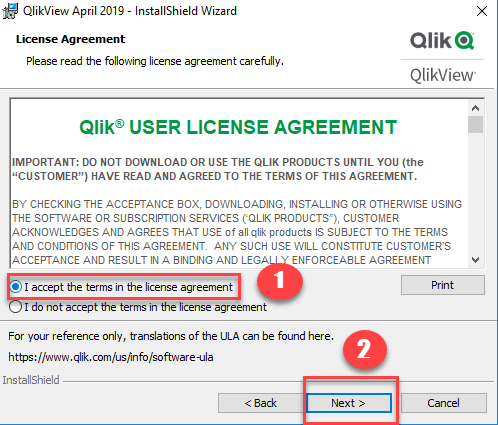
ขั้นตอน 5) ยอมรับเงื่อนไขในข้อตกลงใบอนุญาต
ในหน้าจอข้อตกลงใบอนุญาตผู้ใช้
- Click on the first option “I accept the terms in the license agreement.”
- คลิกที่ปุ่มถัดไป
ขั้นตอน 6) Add User Name and Organization
- Add your user name and organization name in the Customer Information screen
- คลิกที่ปุ่มถัดไป

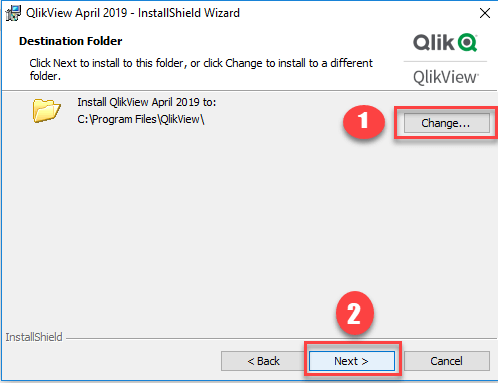
ขั้นตอน 7) เลือกโฟลเดอร์ปลายทาง
- Select the destination folder where you want to install QlikView
- คลิกที่ปุ่มถัดไปเพื่อดำเนินการต่อ
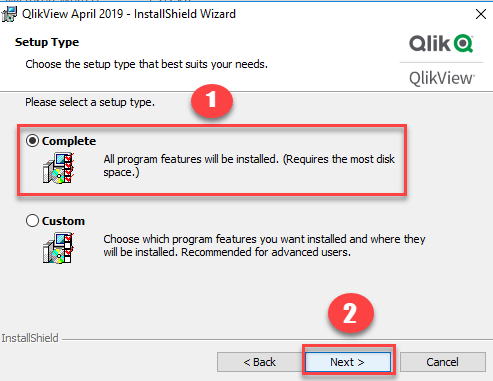
ขั้นตอน 8) เลือกประเภทการตั้งค่า
- เลือกประเภทการตั้งค่า เสร็จสมบูรณ์
- จากนั้นคลิกที่ปุ่มถัดไป
ขั้นตอน 9) คลิกที่ปุ่มติดตั้ง
ในหน้าจอพร้อมติดตั้งโปรแกรม คลิกที่ปุ่มติดตั้ง

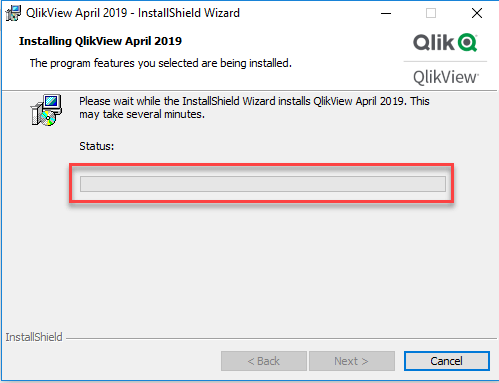
ขั้นตอน 10) ติดตั้งกระบวนการ
หน้าจอถัดไปจะแสดงสถานะของกระบวนการติดตั้งของคุณ
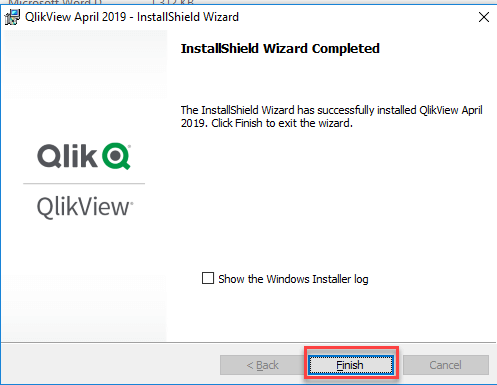
ขั้นตอน 11) คลิกที่ปุ่มเสร็จสิ้น
ในหน้าจอตัวช่วยสร้าง InstallShield และคลิกที่ปุ่มเสร็จสิ้นเพื่อเสร็จสิ้นกระบวนการติดตั้ง
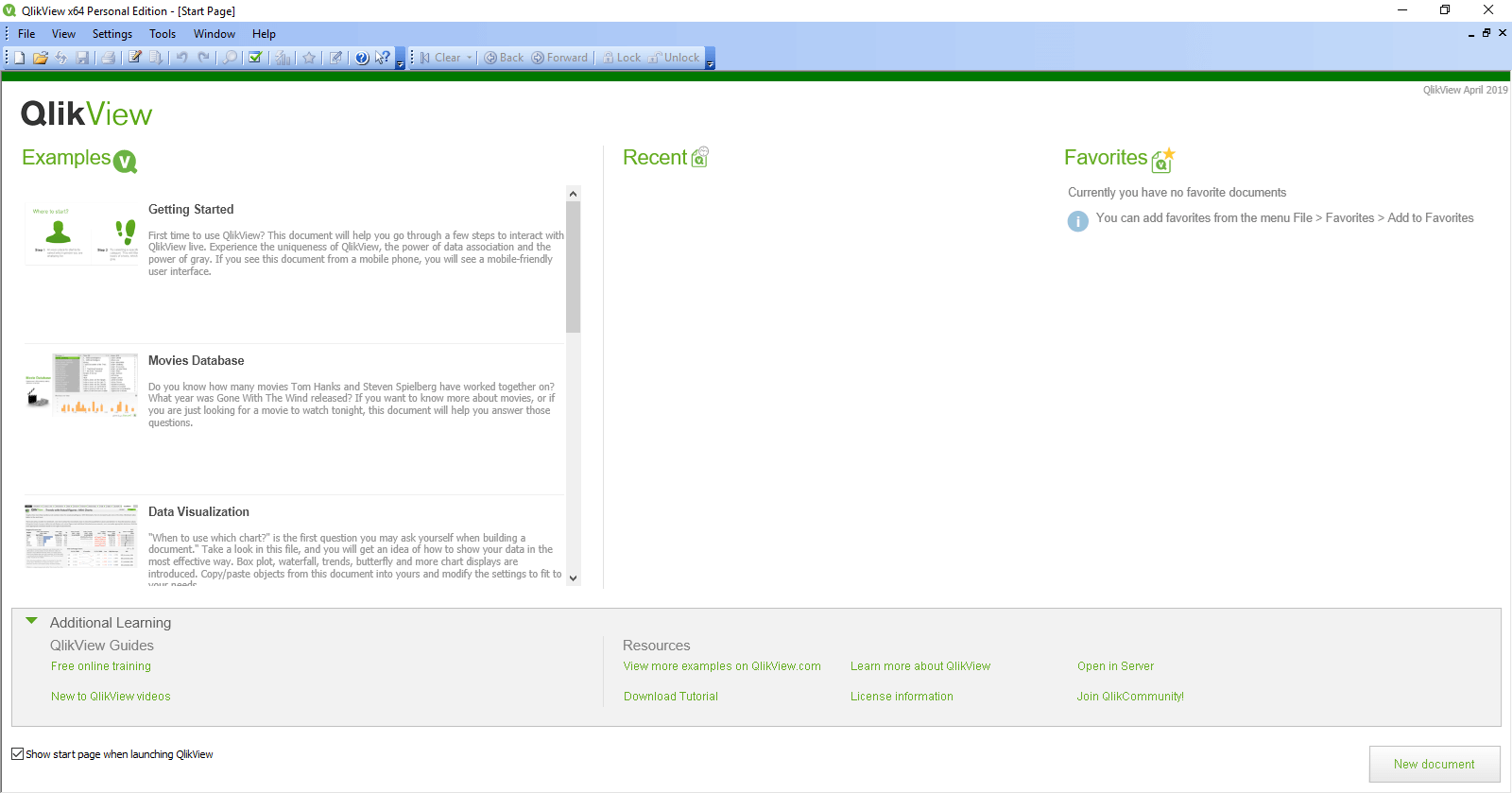
ขั้นตอน 12) Open QlikView
Click on the QlikView 12 icon on your Windows desktop, and you will see this welcome screen.
แอพพลิเคชั่น QlikView
- ช่วยให้คุณวิเคราะห์ข้อมูลรายได้ตามตัวกรองต่างๆ สำหรับบริษัทข้ามชาติขนาดใหญ่
- Allows you to create detailed visualization reports based on social media responses from customers all over the world.
- The QlikView tool allows you to make decisions by predicting cause and effect with diagrams that use historical data.
- QlikView allows you to analyze inventories, work orders, sales, and staffing utilization – all focused on improving performance.
- The tool allows you to analyze information on sales, production, shippingและประสิทธิภาพของผลิตภัณฑ์
- You will be able to easily and quickly create reports and analyses on a strategic, operational, and tactical level.
- Canon, Panasonic, Shell, FILA, and ING Lease are some well-known companies using QlikView for their businesses, as shown in the figure below.

QlikView กับ Tableau
The table below compares QlikView and ฉาก across key parameters:
| พารามิเตอร์ | Qlik View | ฉาก |
|---|---|---|
| รองรับการสร้างแบบจำลองข้อมูล | รองรับการสร้างแบบจำลองข้อมูลที่มีประสิทธิภาพ | Offers only basic data modeling through relationships and joins. |
| ความเร็วในการดำเนินการ | ยอดเยี่ยม | ดี |
| การปรับแต่ง | เป็นไปได้ | เป็นไปไม่ได้ |
| ง่ายดายในการใช้ | Less ที่ใช้งานง่าย | เป็นมิตรกับผู้ใช้มากขึ้น |
| ราคา | กลาง | จุดสูง |
| การสนับสนุนแดชบอร์ด | ยอดเยี่ยม | ดี |
| การเชื่อมต่อฐานข้อมูล | ดี | เสนอการเชื่อมต่อฐานข้อมูลที่ได้รับการปรับปรุง |
| การควบคุมด้วยภาพ | ดีมาก | ดีที่สุด |
| ความเข้าใจในการเขียนสคริปต์ | พื้นฐาน SQL | การเขียนโปรแกรม R |
ยังตรวจสอบ: คำถามและคำตอบสัมภาษณ์ Qlikview ยอดนิยม
QlikView vs Qlik Sense
Many learners confuse QlikView with คิวลิคเซนส์, the modern platform from the same company. Both share the associative engine but sit at very different points in their life cycles, as the comparison below shows:
| พารามิเตอร์ | Qlik View | คิวลิคเซนส์ |
|---|---|---|
| เปิดตัว | 1990s | 2014 |
| แนวทางหลัก | Developer-driven guided analytics built with scripts | Self-service analytics with drag-and-drop authoring |
| แบบ | Fixed, pixel-perfect dashboards | Responsive design for any screen size |
| ความสามารถของ AI | ไม่มี | Insight Advisor provides AI-generated charts and natural-language search |
| การใช้งาน | Windows desktop and client-managed servers | Client-managed or SaaS via Qlik Cloud |
| สถานะสินค้า | Legacy; end of support announced | พัฒนาอย่างแข็งขัน |
For new projects, Qlik Sense is the clear choice; QlikView skills remain useful for maintaining and migrating legacy deployments.
ข้อเสียของ QlikView
Here are the major cons/drawbacks of using the QlikView tool:
- As QlikView needs to bulk-load all data into system RAM, reloading data creates a considerable workload and can take a large amount of time.
- It doesn’t offer any advanced ETL ความสามารถที่จำเป็นสำหรับการรวมข้อมูลที่ซับซ้อนมากขึ้น
- QlikView ไม่มีฟังก์ชันขั้นสูงบางอย่างที่จำเป็นสำหรับการพัฒนาping รายงานที่มีรูปแบบสวยงามมาก
- QlikView เป็นเครื่องมือที่ออกแบบมาเป็นพิเศษสำหรับการวิเคราะห์เชิงโต้ตอบ ไม่ใช่สำหรับการเขียนรายงาน
- หากคุณต้องการสร้างรายงานที่จัดรูปแบบใน QlikView คุณต้องใช้มาโครและการทำซ้ำและการบำรุงรักษาออบเจ็กต์ QlikView
- It is just a simple reporting & analysis tool and does not allow WRITE BACK to the database.
- QlikView is now in legacy status: Qlik has announced its end of support and focuses new development on Qlik Sense.
What is the Future of QlikView?
Qlik has formally announced the end of support for client-managed QlikView, effective December 31, 2025. After this date, the product receives no updates, security patches, or technical assistance, although existing installations continue to run. New feature development stopped years earlier, as Qlik concentrates on Qlik Sense and Qlik Cloud Analytics.
For organizations, migration is now a priority rather than an option. Qlik offers an Analytics Modernization Program that converts QlikView licenses into Qlik Sense subscriptions and provides tooling to move existing documents. Most QlikView concepts, including load scripts, the associative model, and set analysis, transfer directly to the newer platform.
