In modern computer systems, the speed difference between the processor and main memory (RAM) can significantly affect system performance. To bridge this gap, computers use a small, high-speed memory known as cache memory. But since cache is limited in size, the system needs a smart way to decide where to place data from main memory — and that’s where cache mapping comes in.
- Cache mapping is a technique used to determine where a particular block of main memory will be stored in the cache.
- It defines how and where that new data block from main memory will be placed inside the cache.
 Cache-RAM Mapping
Key Terminologies in Cache Mapping
Before diving into mapping techniques, let’s understand some important terms:
- Main Memory Blocks: The main memory is divided into equal-sized sections called blocks.
- Cache Lines (or Cache Blocks): The cache memory is also divided into equal partitions called cache lines.
- Block Size: The number of bytes or words stored in one block or line.
- Tag Bits: A small portion of the address used to identify which block of main memory is stored in a particular cache line.
- Number of Cache Lines: Determined by the ratio of Cache Size ÷ Block Size.
- Number of Cache Sets: Determined by Number of Cache Lines ÷ Associativity (used in set-associative mapping).
Types of Cache Mapping
There are three main cache mapping techniques used in computer systems:
1. Direct Mapping
In Direct mapping, each block of main memory maps to exactly one specific cache line. The main memory address is divided into three parts:
- Tag Bits: Identify which block of memory is stored.
- Line Number: Indicates which cache line it belongs to.
- Byte Offset: Specifies the exact byte within the block.
 Direct Mapping
The formula for finding the cache line is:
Cache Line Number=(Block Number) MOD (Number of Cache Lines)
2. Fully Associative Mapping
In fully associative mapping, a memory block can be stored in any line of the cache. The address is divided into:
- Tag Bits: Identify the memory block.
- Byte Offset: Specifies the byte within that block.
 Fully Associative Mapping
There is no line number here because placement is flexible — any block can go into any cache line.
3. Set-Associative Mapping
Set-associative mapping combines the benefits of both direct and fully associative mapping.
- The cache is divided into a number of sets, each containing a few lines (e.g., 2-way, 4-way set associative).
- A memory block maps to exactly one set, but can be placed in any line within that set.
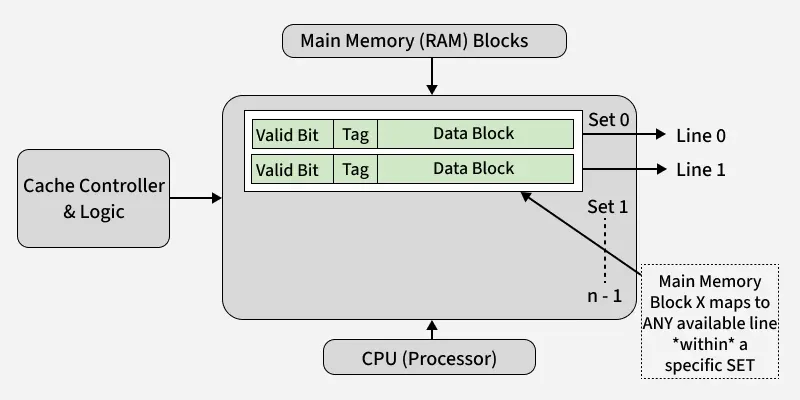 2-way Set Associative Mapping
The address is divided into:
- Tag Bits: Identify which memory block is stored.
- Set Number: Determines which cache set it belongs to.
- Byte Offset: Specifies the byte position.
The mapping formula is:
Set Number = (Block Number) MOD (Number of Sets)
Need for Cache Mapping
Cache mapping is essential for two main reasons:
- Locate Data Efficiently: It helps the processor quickly determine whether the required data is in the cache (cache hit) or must be fetched from main memory (cache miss).
- Manage Data Placement: When a cache miss occurs, mapping tells the system where in the cache to place the new memory block.
Essentially, it’s like assigning a “home address” in the cache for every block of main memory.
Comparison Table
Here is a simple comparison among cache mapping types:
| Feature | Direct Mapping | Fully Associative Mapping | Set-Associative Mapping |
|---|
| Placement Rule | Fixed location | Any location | Limited (within a set) |
| Hardware Cost | Low | High | Moderate |
| Access Time | Fast | Slow | Moderate |
| Conflict Misses | High | None | Low |
| Flexibility | Low | High | Medium |
Real-Life Analogy
Imagine a parking lot:
- Direct Mapping: Each car has a fixed parking spot number.
- Fully Associative: Any car can park in any spot.
- Set-Associative: Cars are assigned to a specific section, but can park in any space within that section.
This analogy helps visualize how memory blocks find their “parking spots” in the cache.