
Excel’s custom number formats let you tailor how numbers appear, like using the Indian number system or rounding decimals, without altering their values.
1. Why Use Custom Number Formats?
- Precision: Display numbers exactly as needed (e.g., 44.64 as 44.6).
- Localization: Support regional formats (e.g., 34,75,23,450 for the Indian number system).
- Professionalism: Create polished reports and dashboards.
- Accessibility: Ensure numbers are readable for all users.
- Dynamic Data: Work seamlessly with dynamic arrays and shared workbooks.
2. Understanding Custom Number Formats
Excel stores numbers as raw values but displays them based on the applied format. Custom formats use codes (e.g., #, 0, ,) to define how numbers appear without affecting calculations.
- Example: 347523450 displays as 34,75,23,450 with ##\,##\,##\,###.
- Sample Table:
Raw Number
Custom Format
Displayed Result
44.64
##.#
44.6
347523450
##,##,##,###
34,75,23,450
-1234
[Red]-#,##0
-1,234 (red)

3. How to Apply Custom Number Formats
Follow these steps to format a range of numbers (e.g., A1:A3 with 44.64, 347523450, -1234).
Step 1: Drag and select the numbers whose format has to be changed using the cursor.

Step 2: a) Go to home and click on format.

b) Then click on Format Cells.

Or
a) Right-Click and choose Format Cells.

b) Format Cells Dialog Box appears.

Step 3: Choose a custom option from the given Dialog Box.

Step 4: Double-Click on the Type box and erase the given format and type your required format as shown and press ok to convert the given number into your required format.

Step 5: The numbers change to the required format.

This is the way in which numbers can be changed to any custom format. However, if you would want to remove the custom formatting from your numbers you can follow the given steps:
Step 1: Follow Step 1, Step 2, and Step 3 mentioned above in the article to go to Format Cells, Custom Format Tab as shown below:
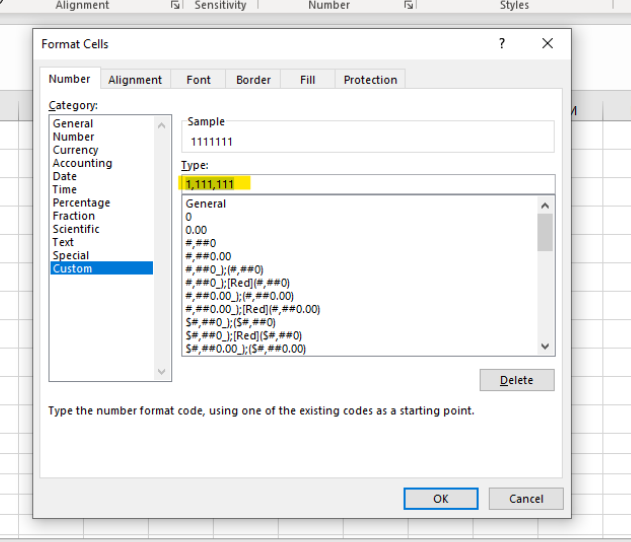
Step 2: Erase the format present in the custom dialog box and keep it blank and click on ok.
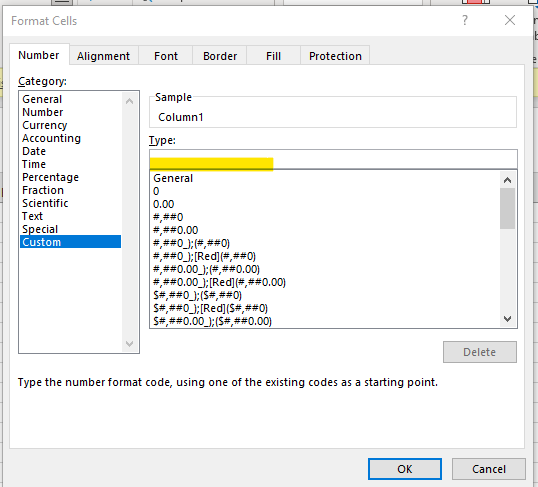
Step 3: The number format changes to the original.
