
Wireless networks are essential today for education, entertainment, and daily life. To maintain privacy, authentication and authorization are key. This is achieved through wireless security encryption, which secures connections with strong passwords or keys and prevents unauthorized access. Encryption protects individuals and organizations from malicious activities and data breaches.
The type of encryption depends on the networking device (like routers), which often come with default keys printed on them. Each encryption standard (WEP, WPA, WPA2, WPA3) has its own importance, evolving over time to improve safety, privacy, and authorized access.

Types of Wireless Security:
Wireless security encryption is mainly divided into four main types:
- Open
- Wired Equivalent Privacy Protocol (WEP)
- Wi-Fi Protected Access Protocol (WPA)
- Wi-Fi Protected Access 2-Personal Protocol (WPA-AES)
- Wi-Fi Protected Access 2-Enterprise (AES)
- Wi-Fi Protected Access 3 Protocol (WPA3)
- 802.11x WEP (Enterprise WEP)
1. Open (No Encryption)
An Open Wi-Fi network has no encryption, so your data is sent in plain text. It’s common in places like cafes and airports but very risky, as anyone on the same network can spy on your activity. To stay safe, always use a VPN or connect only to HTTPS websites
Example: Imagine you’re at an airport and connect to the free open Wi-Fi. Since there’s no encryption, a hacker sitting nearby with a simple tool like Wireshark can see the websites you visit, the apps you use, and even capture your login details if the site isn’t using HTTPS.
Reason for Change: The security incidents for open Wi-Fi occurred in the early 2000s when researchers exposed the fundamental flaws in the Wired Equivalent Privacy (WEP) protocol. They demonstrated that attackers could easily capture and analyze network traffic to crack the WEP encryption key in just a few minutes, essentially rendering the network completely open. This incident exposed the illusion of security that WEP provided.
2. Wired Equivalent Privacy Protocol (WEP)
Wired Equivalent Privacy Protocol, abbreviated as WEP, was initially introduced in 1999 and is considered the standard for wireless security encryption. It is less found in today's modern world because of the risk of security it is associated with directly. WEP is not considered stable, and Wi-Fi discontinued its use in 2004 because it is easy to exploit this level of security.
Example: Security was added in the LAN connections to protect from unauthenticated users trying to breach privacy.
How It Works
- Encryption: WEP uses the RC4 algorithm to scramble and unscramble data.
- Key + IV: A WEP key (40/104-bit) is combined with a 24-bit Initialization Vector (IV) to form the encryption key.
- Authentication:
- Open System: Any device can try to connect.
- Shared Key: AP sends a challenge, client encrypts it with WEP key, AP verifies.
- Data Protection: Each data packet is encrypted before transmission and decrypted by the receiver using the same key.yes
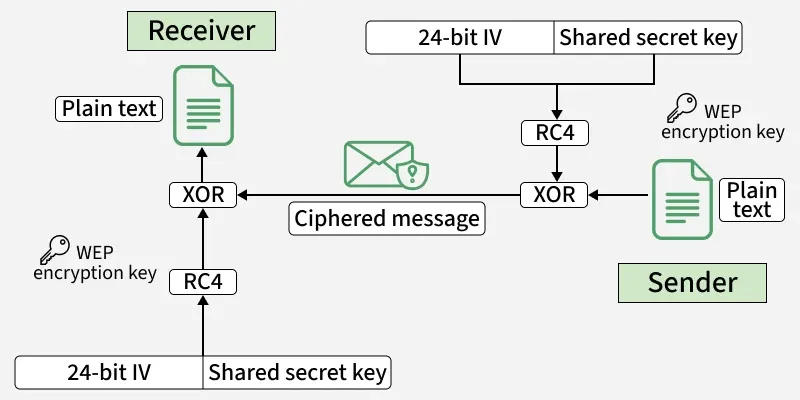
Reason for Change: In WEP, users believed their data was protected, but in reality, it was incredibly easy for anyone with basic hacking tools to intercept and read their information. The incident that exposed this was when researchers publicly demonstrated that they could crack a WEP key within minutes, proving that the “encryption” was so weak it was almost useless.
3. WPA Protocol:
WEP was succeeded by Wi-Fi Protected Access Protocol abbreviated as WAP which offers more security and safety. WPA has a 128-bit dynamic key called Temporary Key Integrity Protocol (TKIP) that's hard to break and makes it unique. One noticeable disadvantage of WPA was that since it was made for WEP-enabled devices, so the core components were majorly the same for WPA and WEP.
Working of WPA protocol
- Authentication: The user must enter a pre-shared key (PSK) or passcode to connect to the WPA-secured network.
- Verification: The Wi-Fi access point checks the entered key to confirm the user’s credentials.
- Secure Connection: Once verified, a secure link is established between the client device and the access point.
- Encryption: All transmitted data is encrypted using a unique session key.
- Key Rotation: The encryption key is periodically refreshed to prevent eavesdropping and unauthorized access.

Reason for change: The main security incident that led to its creation was the widely publicized demonstration that WEP could be easily broken by hackers using simple tools. This left millions of Wi-Fi networks vulnerable. It has Weak encryption (RC4 with small keys) and predictable initialization vectors (IVs) allowed attackers to capture packets and recover passwords in minutes.
4. Wi-Fi Protected Access 2-Personal Protocol (WPA-AES)
WPA2 with AES-CCMP is one of the most common Wi-Fi security methods. It uses a very strong encryption system (AES, 128-bit) to keep your data safe. To connect, you need a password, also called a Pre-Shared Key (PSK). It’s very secure for homes and small businesses, but if the Wi-Fi password is weak (like “12345678”), hackers can still guess it using brute-force attacks. A strong password makes it highly reliable.
Reason for Change: Even though WPA2 uses strong AES encryption, it still had some weaknesses. In 2017, the KRACK attack showed that hackers could trick the Wi-Fi handshake and read users’ data. Also, if people used weak passwords, attackers could guess them using offline dictionary attacks. This meant WPA2 wasn’t completely safe against modern threats, especially on networks with weak passwords or public Wi-Fi.
5. WPA2-Enterprise (AES)
WPA2-Enterprise (AES) is a stronger version of Wi-Fi security mainly used in organizations like companies, universities, and government offices. It uses the same strong AES-CCMP encryption as WPA2-Personal but adds an extra layer of security with 802.1X authentication and a RADIUS server. Instead of one shared Wi-Fi password, every user or device has its own unique login credentials. This makes it much harder for hackers to break in, since stealing one person’s credentials doesn’t expose the whole network. However, it’s more complex to set up because it requires extra infrastructure and management.
Vulnerabilities: It can still be vulnerable if the authentication server is misconfigured or if certificates and credentials are not properly managed.
6. WPA3 Protocol:
WPA3 or Wi-Fi Protected Access 3 (WPA3) Protocol is the newest security encryption that's gaining popularity. WPA3 offers high protection and prevents unauthorized access. Unauthenticated and unauthorized individuals can't breach this level of security. WPA3 is the most desired for public networks as it performs automatic encryption.
7. 802.11x WEP (Enterprise WEP)
WEP-Enterprise works almost like normal WEP, using the same weak RC4 encryption, but it adds 802.1X authentication for enterprise logins. It was once used in business networks, but today it’s rarely seen because the WEP encryption itself has serious flaws and is no longer considered secure
- Encryption/Algorithm: RC4 (same as WEP, weak).
- Authentication: Uses 802.1X for enterprise logins.
- Use: Old business/enterprise networks (rare today).
- Weakness: Insecure due to WEP flaws → no longer recommended.
Below is an overview of how the different types of Wi-Fi security protocols work.