
In Spring Boot applications, efficiently handling HTTP requests is crucial, especially when it comes to modifying or validating the data before it reaches the controller. This might involve tasks such as formatting, logging, adding metadata, or sanitizing input. This article explores how to modify the request body in Spring Boot before it reaches the controller.
Modifying the Request Body Before Reaching the Controller
In Spring Boot applications, the request body refers to the data a client sends to the server during HTTP requests, particularly in POST, PUT, and PATCH requests. The framework automatically binds the request data to Java objects or handles it as raw JSON or form data. However, there are scenarios where you may need to intercept and modify the request body before it reaches the controller. Common reasons include:
- Data Transformation: Adjusting or transforming the incoming data to the format expected by the controller.
- Logging: Capturing or modifying sensitive data before processing.
- Sanitization: Removing or altering unsafe or undesirable data.
- Metadata Augmentation: Adding extra data to the request body (e.g., user IDs, timestamps).
- Input Validation: Preprocessing to ensure data correctness before controller processing.
Spring Boot provides middleware mechanisms like Filters, Interceptors, and RequestBodyAdvice to achieve this. Each mechanism serves slightly different purposes but allows you to manipulate the request before it reaches the controller.
Using the Filters to Modify Request Body
Filters are part of the servlet API and operate at a lower level in the request processing pipeline. They can intercept every request that passes through the application. Filters are ideal for tasks that need to be executed before other components, such as modifying or logging the request body.
Why Filters?
Filters are suitable when you need to modify requests globally across multiple endpoints. They are more generic and useful for altering the request body before it is processed by Spring Boot's DispatcherServlet.
Steps to Use Filters to Modify Request Body
- Intercept the Request: The filter captures the incoming request and reads its body.
- Modify the Request: After interception, the request body can be altered, sanitized, or logged based on specific needs.
- Forward the Request: After modifying the request body, the filter forwards the updated request to the controller.
Implementation of Request Body Modification in Spring Boot
This example demonstrates how to create a Spring Boot project to modify the request body using a Filter before it reaches the controller.
Step 1: Create a New Spring Boot Project
Create a new Spring Boot project using IntelliJ IDEA with the following options:
- Name:
spring-boot-request-modifier - Language: Java
- Type: Maven
- Packaging: Jar
Click on the Next button.

Step 2: Add the Dependencies
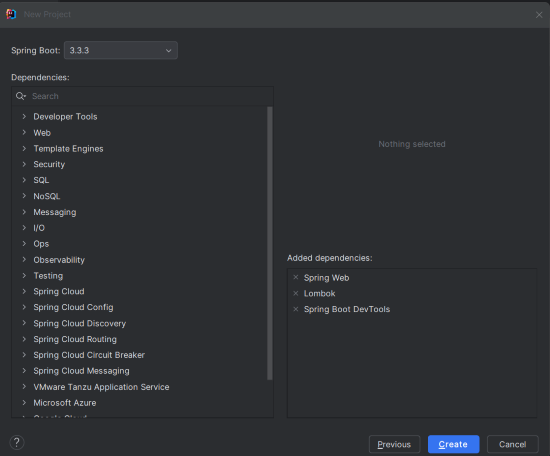
Add the following dependencies to the Spring Boot project:
- Spring Web
- Spring DevTools
- Lombok
Click on the Create button.
Project Structure
After creating the project, the folder structure will look like below image:

Step 3: Configure Application Properties
Open application.properties and add the following configuration (optional):
server.port = 8080Step 4: Create the Custom Filter
Create the CustomRequestFilter class to intercept the incoming HTTP request, modify its body, and forward it to the controller.
package com.gfg.springbootrequestmodifier.filter;

import jakarta.servlet.*;
import jakarta.servlet.http.HttpServletRequest;
import org.springframework.stereotype.Component;

import java.io.IOException;

@Component
public class CustomRequestFilter implements Filter {

    @Override
    public void doFilter(ServletRequest request, ServletResponse response, FilterChain chain)
            throws IOException, ServletException {

        // Wrap the request to read and modify the request body
        CustomHttpServletRequestWrapper requestWrapper = new CustomHttpServletRequestWrapper((HttpServletRequest) request);

        // Log the original body
        System.out.println("Original Body: " + requestWrapper.getRequestBody());

        // Modify the request body
        String modifiedBody = modifyBody(requestWrapper.getRequestBody());
        requestWrapper.setRequestBody(modifiedBody);

        // Log the modified body
        System.out.println("Modified Body: " + modifiedBody);

        // Forward the modified request to the next filter or controller
        chain.doFilter((ServletRequest) requestWrapper, response);
    }

    private String modifyBody(String body) {
        // Example modification: Replace "oldValue" with "newValue" in the request body
        return body.replace("oldValue", "newValue");
    }

    @Override
    public void init(FilterConfig filterConfig) throws ServletException {}

    @Override
    public void destroy() {}
}
Explanation:
- doFilter: Intercepts and processes the request.
- CustomHttpServletRequestWrapper: Wraps the request to allow modification of the body.
- modifyBody: A method to alter the request body content.
Step 5: Create the CustomHttpServletRequestWrapper
Create the CustomHttpServletRequestWrapper class to extend HttpServletRequestWrapper for reading and modifying the request body.
package com.gfg.springbootrequestmodifier.filter;

import jakarta.servlet.ReadListener;
import jakarta.servlet.ServletInputStream;
import jakarta.servlet.http.HttpServletRequest;
import jakarta.servlet.http.HttpServletRequestWrapper;

import java.io.BufferedReader;
import java.io.ByteArrayInputStream;
import java.io.IOException;
import java.io.InputStreamReader;
import java.nio.charset.StandardCharsets;
import java.util.stream.Collectors;

public class CustomHttpServletRequestWrapper extends HttpServletRequestWrapper {

    private String requestBody;

    public CustomHttpServletRequestWrapper(HttpServletRequest request) throws IOException {
        super(request);
        this.requestBody = getBodyFromRequest(request);
    }

    @Override
    public ServletInputStream getInputStream() throws IOException {
        final ByteArrayInputStream byteArrayInputStream = new ByteArrayInputStream(requestBody.getBytes(StandardCharsets.UTF_8));
        return new ServletInputStream() {
            @Override
            public boolean isFinished() {
                return byteArrayInputStream.available() == 0;
            }

            @Override
            public boolean isReady() {
                return true;
            }

            @Override
            public void setReadListener(ReadListener readListener) {
                // No implementation needed
            }

            @Override
            public int read() throws IOException {
                return byteArrayInputStream.read();
            }
        };
    }

    @Override
    public BufferedReader getReader() throws IOException {
        return new BufferedReader(new InputStreamReader(this.getInputStream(), StandardCharsets.UTF_8));
    }

    public String getRequestBody() {
        return this.requestBody;
    }

    public void setRequestBody(String body) {
        this.requestBody = body;
    }

    private String getBodyFromRequest(HttpServletRequest request) throws IOException {
        try (BufferedReader reader = new BufferedReader(new InputStreamReader(request.getInputStream(), StandardCharsets.UTF_8))) {
            return reader.lines().collect(Collectors.joining(System.lineSeparator()));
        }
    }
}
Explanation:
- getInputStream: Provides an input stream from the modified request body.
- getReader: Provides a buffered reader from the modified request body.
- getBodyFromRequest: Extracts the body from the original request.
Step 6: Create the Controller to Handle Modified Requests
Create the RequestController class to process the modified request and return the response.
package com.gfg.springbootrequestmodifier.controller;

import org.springframework.web.bind.annotation.PostMapping;
import org.springframework.web.bind.annotation.RequestBody;
import org.springframework.web.bind.annotation.RestController;

@RestController
public class RequestController {

    @PostMapping("/modify")
    public String handleRequest(@RequestBody String body) {
        // Return the modified request body
        return "Modified Request Body: " + body;
    }
}
Explanation:
- handleRequest: Receives and returns the modified request body.
Step 7: Main Application Class
This is the entry point of the application.
package com.gfg.springbootrequestmodifier;

import org.springframework.boot.SpringApplication;
import org.springframework.boot.autoconfigure.SpringBootApplication;

@SpringBootApplication
public class SpringBootRequestModifierApplication {

    public static void main(String[] args) {
        SpringApplication.run(SpringBootRequestModifierApplication.class, args);
    }

}
Explanation:
- main: Launches the Spring Boot application.
Step 8: Maven Configuration
The pom.xml file includes dependencies for Spring Boot and configuration.
<?xml version="1.0" encoding="UTF-8"?>
<project xmlns="https://maven.apache.org/POM/4.0.0" xmlns:xsi="https://www.w3.org/2001/XMLSchema-instance"
         xsi:schemaLocation="https://maven.apache.org/POM/4.0.0 https://maven.apache.org/xsd/maven-4.0.0.xsd">
    <modelVersion>4.0.0</modelVersion>
    <parent>
        <groupId>org.springframework.boot</groupId>
        <artifactId>spring-boot-starter-parent</artifactId>
        <version>3.3.3</version>
        <relativePath/> <!-- lookup parent from repository -->
    </parent>
    <groupId>com.gfg</groupId>
    <artifactId>spring-boot-request-modifier</artifactId>
    <version>0.0.1-SNAPSHOT</version>
    <name>spring-boot-request-modifier</name>
    <description>spring-boot-request-modifier</description>
    <url/>
    <licenses>
        <license/>
    </licenses>
    <developers>
        <developer/>
    </developers>
    <scm>
        <connection/>
        <developerConnection/>
        <tag/>
        <url/>
    </scm>
    <properties>
        <java.version>17</java.version>
    </properties>
    <dependencies>
        <dependency>
            <groupId>org.springframework.boot</groupId>
            <artifactId>spring-boot-starter-web</artifactId>
        </dependency>

        <dependency>
            <groupId>org.springframework.boot</groupId>
            <artifactId>spring-boot-devtools</artifactId>
            <scope>runtime</scope>
            <optional>true</optional>
        </dependency>
        <dependency>
            <groupId>org.projectlombok</groupId>
            <artifactId>lombok</artifactId>
            <optional>true</optional>
        </dependency>
        <dependency>
            <groupId>org.springframework.boot</groupId>
            <artifactId>spring-boot-starter-test</artifactId>
            <scope>test</scope>
        </dependency>
    </dependencies>

    <build>
        <plugins>
            <plugin>
                <groupId>org.springframework.boot</groupId>
                <artifactId>spring-boot-maven-plugin</artifactId>
                <configuration>
                    <excludes>
                        <exclude>
                            <groupId>org.projectlombok</groupId>
                            <artifactId>lombok</artifactId>
                        </exclude>
                    </excludes>
                </configuration>
            </plugin>
        </plugins>
    </build>

</project>
Step 9: Run the Application
Once completed the project, run the application and it will start at port 8080.

Step 10: Testing the Application
We can use the postman tool to send the post request with the following JSON body.
POST http://localhost:8080/modifyOutput:
The CustomRequestFilter can be modify the "oldValue" to "newValue".

Application Logs:
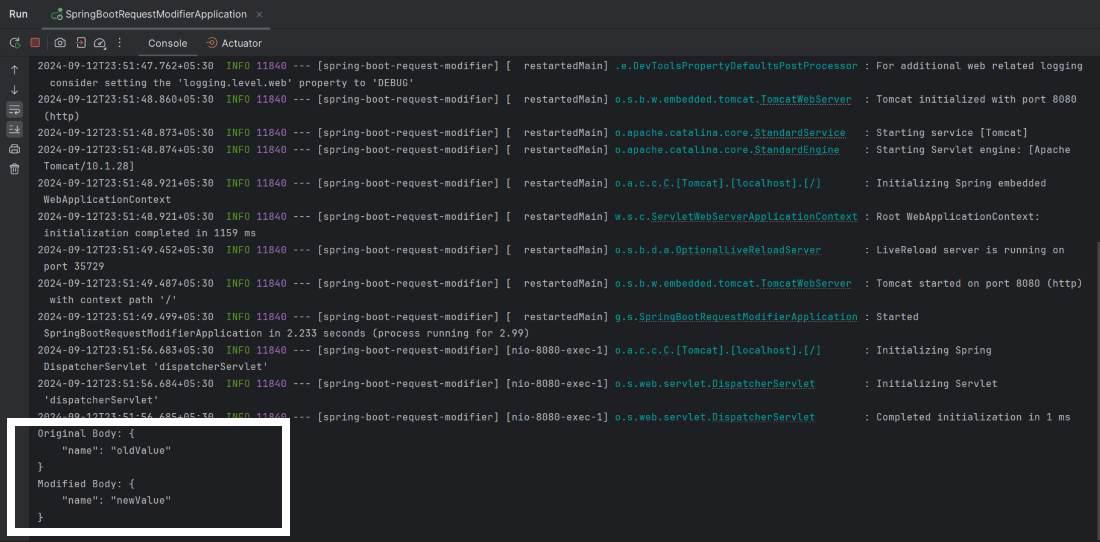
By implementing a custom Filter and HttpServletRequestWrapper, Spring Boot applications can handle complex pre-processing scenarios, ensuring that the controller only works with properly formatted and validated data.
Conclusion
Modifying the request body before it reaches the controller in a Spring Boot application can be achieved through various mechanisms like Filters. By intercepting requests and applying modifications, you can handle tasks such as data transformation, logging, and sanitization effectively. The provided example demonstrates a simple approach using Filters and request wrappers to modify the request body before processing by the controller.