Set the First Column and Row as Index in Pandas
Last Updated :
23 Jul, 2025
In Pandas, an index is a label that uniquely identifies each row or column in a DataFrame. Let's learn how to set the first column and row as index in Pandas DataFrame.
Set First Column as Index in Pandas
Consider a Pandas DataFrame, to set the "Name" column as the index, use the set_index method:
Python
import pandas as pd

data = {'Name': ['Alice', 'Bob', 'Charlie'],
        'Age': [25, 30, 35],
        'City': ['New York', 'San Francisco', 'Los Angeles']}
df = pd.DataFrame(data)
print("Original DtaFrame")
display(df)

df.set_index('Name', inplace=True)
print("\nDataFrame after setting 'Name' column as index:")
display(df)
Output:
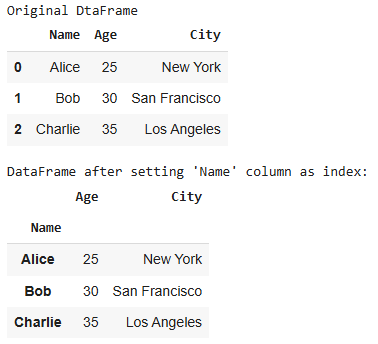 DataFrame after setting 'Name' column as Index
Set First Row as Column Names in Pandas
Sometimes, the first row in a DataFrame is used as the column names. Here's how to set it as the column names:
Python
import pandas as pd

data = [['Name', 'Age', 'City'],
        ['Alice', 25, 'New York'],
        ['Bob', 30, 'San Francisco'],
        ['Charlie', 35, 'Los Angeles']]
df = pd.DataFrame(data)

print("Original DataFrame:")
print(df)

df.columns = df.iloc[0]
df = df[1:]
print("\nDataFrame after removing the first row (header):")
print(df)
Output:
Original DataFrame:
         0    1              2
0     Name  Age           City
1    Alice   25       New York
2      Bob   30  San Francisco
3  Charlie   35    Los Angeles

DataFrame after removing the first row (header):
0     Name Age           City
1    Alice  25       New York
2      Bob  30  San Francisco
3  Charlie  35    Los Angeles
Set Both Row and Column in Pandas DataFrame
You can also set both the first column as the index and the first row as the column names. Consider this DataFrame:
Python
import pandas as pd

data = [['Name', 'Alice', 'Bob', 'Charlie'],
        ['Age', 25, 30, 35],
        ['City', 'New York', 'San Francisco', 'Los Angeles']]
df = pd.DataFrame(data)
print("Original DataFrame:")
print(df)

df.columns = df.iloc[0]
df = df[1:]
df.set_index('Name', inplace=True)
print("\nDataFrame after removing the first row (header) and setting 'Name' column as index:")
print(df)
Output:
Original DataFrame:
      0         1              2            3
0  Name     Alice            Bob      Charlie
1   Age        25             30           35
2  City  New York  San Francisco  Los Angeles

DataFrame after removing the first row (header) and setting 'Name' column as index:
0        Alice            Bob      Charlie
Name
Age         25             30           35
City  New York  San Francisco  Los Angeles
Set Index Using a List in Pandas
You can also set the index and column names using custom lists. Here's an example:
Python
import pandas as pd

# Create a sample DataFrame
data = {'A': [1, 2, 3],
        'B': [4, 5, 6],
        'C': [7, 8, 9]}

df = pd.DataFrame(data)
print("Original DataFrame")
print(df)

# Define row and column labels
row_labels = ['Row1', 'Row2', 'Row3']
col_labels = ['ColA', 'ColB', 'ColC']

# Set the index and columns using the lists
df.index = row_labels
df.columns = col_labels

# Display the DataFrame
print("\nDataFrame with custom row and column labels:")
print(df)
Output:
Original DataFrame:
   A  B  C
0  1  4  7
1  2  5  8
2  3  6  9

DataFrame with custom row and column labels:
      ColA  ColB  ColC
Row1     1     4     7
Row2     2     5     8
Row3     3     6     9
Set Index Using Range in Pandas
Another way to set the index is by using a range of numbers. Here's how:
Python
import pandas as pd

# Create a sample DataFrame
data = {'A': [1, 2, 3],
        'B': [4, 5, 6],
        'C': [7, 8, 9]}

df = pd.DataFrame(data)
print("Original DataFrame:")
print(df)

# Set the index using a range starting from 1
df.index = range(1, len(df) + 1)

# Display the DataFrame with a numeric index
print("\nDataFrame with a numeric index:")
print(df)
Output:
Original DataFrame:
   A  B  C
0  1  4  7
1  2  5  8
2  3  6  9

DataFrame with a numeric index:
   A  B  C
1  1  4  7
2  2  5  8
3  3  6  9
Explore
Python Fundamentals
Python Data Structures
Advanced Python
Data Science with Python
Web Development with Python
Python Practice