
ST7567 V1.9 Datasheet
Uploaded by
SpecShareST7567 V1.9 Datasheet
Uploaded by
SpecShareST
Sitronix 65 x 132 Dot Matrix LCD Controller/Driver
ST7567
1. INTRODUCTION
ST7567 is a single-chip dot matrix LCD driver which incorporates LCD controller and common/segment drivers. ST7567
can be connected directly to a microprocessor with 8-bit parallel interface or 4-line serial interface (SPI-4). Display data sent
from MPU is stored in the internal Display Data RAM (DDRAM) of 65x132 bits. The display data bits which are stored in
DDRAM are directly related to the pixels of LCD panel. ST7567 contains 132 segment-outputs, 64 common-outputs and 1
icon-common-output. With built-in oscillation circuit and low power consumption power circuit, ST7567 generates LCD
driving signal without external clock or power, so that it is possible to make a display system with the fewest components
and minimal power consumption.
2. FEATURES
Single-chip LCD Controller & Driver Power Saving Mode, Select Common Driver Direction,
On-chip Display Data RAM (DDRAM) Select Voltage Regulator Resistor Ratio (for V0).
Capacity: 65x132=8580 bits External Hardware Reset Pin (RSTB)
Directly display RAM pattern from DDRAM Built-in Oscillation Circuit
Selectable Display Duty (by SEL2 & SEL1) No external component required
1/65 duty : 65 common x 132 segment Low Power Consumption Analog Circuit
1/55 duty : 55 common x 132 segment Voltage Booster (4X, 5X)
1/49 duty : 49 common x 132 segment High-accuracy Voltage Regulator for LCD Vop:
1/33 duty : 33 common x 132 segment (Thermal Gradient: -0.05%/°C)
Microprocessor Interface Voltage Follower for LCD Bias Voltage
Bidirectional 8-bit parallel interface supports: Wide Operation Voltage Range
8080-series and 6800-series MPU VDD1-VSS1=1.8V~3.3V (Typ.)
Serial interface (SPI-4) is also supported (write only) VDD2-VSS2=2.4V~3.3V (Typ.)
Abundant Functions VDD3-VSS3=2.4V~3.3V (Typ.)
Display ON/OFF, Normal/Reverse Display Mode, Set Temperature Range: -30~85°C
Display Start Line, Read IC Status, Set all Display Package Type: COG
Points ON, Set LCD Bias, Electronic Volume Control,
Read-modify-Write, Select Segment Driver Direction,
ST7567 6800 , 8080 , 4-Line ST
Sitronix Technology Corp. reserves the right to change the contents in this document without prior notice.
Ver 1.9 1/49 2016/06/14
ST7567
3-1. ST7567 COG OUTLINE
88
89 86
87
Chip Size: 4840 X 660
Unit: um (2015,-13)
Bump Height: 9 (for G4A-1)
15
9 (for G4B-1) Unit: um
12
77
76
Part Number Chip Thickness
75
27 19 15
ST7567-G4 300
108 34
109 Bump Size
110
PAD No. Size
(1977,-167) Unit: um 1~12, 76~261 16 X 138.5
7.5
13~55, 65~75 50 X 45
10
7.5
56~64 40 x 45
35
15
64
Bump Space (minimum)
15
10 PAD No. Space
35
59
1~12, 76~87, 88~108, 109~240, 241~261 Refer to Fig 1
13~75 15
56
* Refer to section “PAD CENTER COORDINATES” for ITO layout.
54
47
X
Y
42
34
15
16
11
54
38
138.5
16
20
(-1977,-167) Unit: um
240 15
241
7.5
10
242
35
13 15
12
11
7.5
10
35
260 2
261 1
Fig 1. Chip Outline
Ver 1.9 2/49 2016/07/14
ST7567
3-2. PAD CENTER COORDINATES 65 Duty
89
88
86
87
PAD NO. PIN Name X Y
1 COM[53] -2363.00 -74.25
2 COM[54] -2336.00 -227.75
77
76
3 COM[55] -2309.00 -74.25
75
4 COM[56] -2282.00 -227.75
109
108
5 COM[57] -2255.00 -74.25
110
6 COM[58] -2228.00 -227.75
7 COM[59] -2201.00 -74.25
8 COM[60] -2174.00 -227.75
9 COM[61] -2147.00 -74.25
64
10 COM[62] -2120.00 -227.75
11 COM[63] -2093.00 -74.25
59
12 COMS1 -2066.00 -227.75
13 CL -1970.00 -274.50
56
14 CSB -1905.00 -274.50
54
15 RSTB -1840.00 -274.50
16 A0 -1775.00 -274.50
17 RWR -1710.00 -274.50
18 ERD -1645.00 -274.50
47
19 VDDH -1580.00 -274.50
X
20 D0 -1515.00 -274.50
21 D1 -1450.00 -274.50
Y
42
22 D2 -1385.00 -274.50
23 D3 -1320.00 -274.50
24 D4 -1255.00 -274.50
25 D5 -1190.00 -274.50
26 D6 -1125.00 -274.50
34
27 D7 -1060.00 -274.50
28 VDD1 -995.00 -274.50
29 VDD1 -930.00 -274.50
30 VDD2 -865.00 -274.50
31 VDD2 -800.00 -274.50
32 VDD2 -735.00 -274.50
33 VDD3 -670.00 -274.50
34 VSS1 -605.00 -274.50
20
35 VSS1 -540.00 -274.50
36 VSS3 -475.00 -274.50
241
240
37 VSS2 -410.00 -274.50
242
38 VSS2 -345.00 -274.50
13
12
39 VSS2 -280.00 -274.50
11
40 V0in -215.00 -274.50
260 2
261 1
Fig 2. PAD Location
Ver 1.9 3/49 2016/07/14
ST7567
PAD NO. PIN Name X Y PAD NO. PIN Name X Y
41 V0in -150.00 -274.50 81 COM[26] 2201.00 -227.75
42 V0s -85.00 -274.50 82 COM[25] 2228.00 -74.25
43 V0out -20.00 -274.50 83 COM[24] 2255.00 -227.75
44 V0out 45.00 -274.50 84 COM[23] 2282.00 -74.25
45 XV0out 110.00 -274.50 85 COM[22] 2309.00 -227.75
46 XV0out 175.00 -274.50 86 COM[21] 2336.00 -74.25
47 XV0s 240.00 -274.50 87 COM[20] 2363.00 -227.75
48 XV0in 305.00 -274.50 88 COM[19] 2363.00 74.25
49 XV0in 370.00 -274.50 89 COM[18] 2336.00 227.75
50 VMO 435.00 -274.50 90 COM[17] 2309.00 74.25
51 VMO 500.00 -274.50 91 COM[16] 2282.00 227.75
52 VGin 565.00 -274.50 92 COM[15] 2255.00 74.25
53 Vgin 630.00 -274.50 93 COM[14] 2228.00 227.75
54 VGs 695.00 -274.50 94 COM[13] 2201.00 74.25
55 Vgout 760.00 -274.50 95 COM[12] 2174.00 227.75
56 T[6] 820.00 -274.50 96 COM[11] 2147.00 74.25
57 T[7] 875.00 -274.50 97 COM[10] 2120.00 227.75
58 T[8] 930.00 -274.50 98 COM[9] 2093.00 74.25
59 TFCOM 985.00 -274.50 99 COM[8] 2066.00 227.75
60 T[1] 1040.00 -274.50 100 COM[7] 2039.00 74.25
61 T[2] 1095.00 -274.50 101 COM[6] 2012.00 227.75
62 T[3] 1150.00 -274.50 102 COM[5] 1985.00 74.25
63 T[4] 1205.00 -274.50 103 COM[4] 1958.00 227.75
64 T[5] 1260.00 -274.50 104 COM[3] 1931.00 74.25
65 Vref 1320.00 -274.50 105 COM[2] 1904.00 227.75
66 VSSL 1385.00 -274.50 106 COM[1] 1877.00 74.25
67 VDDH 1450.00 -274.50 107 COM[0] 1850.00 227.75
68 C86 1515.00 -274.50 108 COMS2 1823.00 74.25
69 PSB 1580.00 -274.50 109 SEG[0] 1768.50 227.75
70 SEL1 1645.00 -274.50 110 SEG[1] 1741.50 74.25
71 VSSL 1710.00 -274.50 111 SEG[2] 1714.50 227.75
72 SEL2 1775.00 -274.50 112 SEG[3] 1687.50 74.25
73 VDD1 1840.00 -274.50 113 SEG[4] 1660.50 227.75
74 VDD2 1905.00 -274.50 114 SEG[5] 1633.50 74.25
75 VDD3 1970.00 -274.50 115 SEG[6] 1606.50 227.75
76 COM[31] 2066.00 -74.25 116 SEG[7] 1579.50 74.25
77 COM[30] 2093.00 -227.75 117 SEG[8] 1552.50 227.75
78 COM[29] 2120.00 -74.25 118 SEG[9] 1525.50 74.25
79 COM[28] 2147.00 -227.75 119 SEG[10] 1498.50 227.75
80 COM[27] 2174.00 -74.25 120 SEG[11] 1471.50 74.25
Ver 1.9 4/49 2016/07/14
ST7567
PAD NO. PIN Name X Y PAD NO. PIN Name X Y
121 SEG[12] 1444.50 227.75 161 SEG[52] 364.50 227.75
122 SEG[13] 1417.50 74.25 162 SEG[53] 337.50 74.25
123 SEG[14] 1390.50 227.75 163 SEG[54] 310.50 227.75
124 SEG[15] 1363.50 74.25 164 SEG[55] 283.50 74.25
125 SEG[16] 1336.50 227.75 165 SEG[56] 256.50 227.75
126 SEG[17] 1309.50 74.25 166 SEG[57] 229.50 74.25
127 SEG[18] 1282.50 227.75 167 SEG[58] 202.50 227.75
128 SEG[19] 1255.50 74.25 168 SEG[59] 175.50 74.25
129 SEG[20] 1228.50 227.75 169 SEG[60] 148.50 227.75
130 SEG[21] 1201.50 74.25 170 SEG[61] 121.50 74.25
131 SEG[22] 1174.50 227.75 171 SEG[62] 94.50 227.75
132 SEG[23] 1147.50 74.25 172 SEG[63] 67.50 74.25
133 SEG[24] 1120.50 227.75 173 SEG[64] 40.50 227.75
134 SEG[25] 1093.50 74.25 174 SEG[65] 13.50 74.25
135 SEG[26] 1066.50 227.75 175 SEG[66] -13.50 227.75
136 SEG[27] 1039.50 74.25 176 SEG[67] -40.50 74.25
137 SEG[28] 1012.50 227.75 177 SEG[68] -67.50 227.75
138 SEG[29] 985.50 74.25 178 SEG[69] -94.50 74.25
139 SEG[30] 958.50 227.75 179 SEG[70] -121.50 227.75
140 SEG[31] 931.50 74.25 180 SEG[71] -148.50 74.25
141 SEG[32] 904.50 227.75 181 SEG[72] -175.50 227.75
142 SEG[33] 877.50 74.25 182 SEG[73] -202.50 74.25
143 SEG[34] 850.50 227.75 183 SEG[74] -229.50 227.75
144 SEG[35] 823.50 74.25 184 SEG[75] -256.50 74.25
145 SEG[36] 796.50 227.75 185 SEG[76] -283.50 227.75
146 SEG[37] 769.50 74.25 186 SEG[77] -310.50 74.25
147 SEG[38] 742.50 227.75 187 SEG[78] -337.50 227.75
148 SEG[39] 715.50 74.25 188 SEG[79] -364.50 74.25
149 SEG[40] 688.50 227.75 189 SEG[80] -391.50 227.75
150 SEG[41] 661.50 74.25 190 SEG[81] -418.50 74.25
151 SEG[42] 634.50 227.75 191 SEG[82] -445.50 227.75
152 SEG[43] 607.50 74.25 192 SEG[83] -472.50 74.25
153 SEG[44] 580.50 227.75 193 SEG[84] -499.50 227.75
154 SEG[45] 553.50 74.25 194 SEG[85] -526.50 74.25
155 SEG[46] 526.50 227.75 195 SEG[86] -553.50 227.75
156 SEG[47] 499.50 74.25 196 SEG[87] -580.50 74.25
157 SEG[48] 472.50 227.75 197 SEG[88] -607.50 227.75
158 SEG[49] 445.50 74.25 198 SEG[89] -634.50 74.25
159 SEG[50] 418.50 227.75 199 SEG[90] -661.50 227.75
160 SEG[51] 391.50 74.25 200 SEG[91] -688.50 74.25
Ver 1.9 5/49 2016/07/14
ST7567
PAD NO. PIN Name X Y PAD NO. PIN Name X Y
201 SEG[92] -715.50 227.75 241 COM[32] -1823.00 227.75
202 SEG[93] -742.50 74.25 242 COM[33] -1850.00 74.25
203 SEG[94] -769.50 227.75 243 COM[34] -1877.00 227.75
204 SEG[95] -796.50 74.25 244 COM[35] -1904.00 74.25
205 SEG[96] -823.50 227.75 245 COM[36] -1931.00 227.75
206 SEG[97] -850.50 74.25 246 COM[37] -1958.00 74.25
207 SEG[98] -877.50 227.75 247 COM[38] -1985.00 227.75
208 SEG[99] -904.50 74.25 248 COM[39] -2012.00 74.25
209 SEG[100] -931.50 227.75 249 COM[40] -2039.00 227.75
210 SEG[101] -958.50 74.25 250 COM[41] -2066.00 74.25
211 SEG[102] -985.50 227.75 251 COM[42] -2093.00 227.75
212 SEG[103] -1012.50 74.25 252 COM[43] -2120.00 74.25
213 SEG[104] -1039.50 227.75 253 COM[44] -2147.00 227.75
214 SEG[105] -1066.50 74.25 254 COM[45] -2174.00 74.25
215 SEG[106] -1093.50 227.75 255 COM[46] -2201.00 227.75
216 SEG[107] -1120.50 74.25 256 COM[47] -2228.00 74.25
217 SEG[108] -1147.50 227.75 257 COM[48] -2255.00 227.75
218 SEG[109] -1174.50 74.25 258 COM[49] -2282.00 74.25
219 SEG[110] -1201.50 227.75 259 COM[50] -2309.00 227.75
220 SEG[111] -1228.50 74.25 260 COM[51] -2336.00 74.25
221 SEG[112] -1255.50 227.75 261 COM[52] -2363.00 227.75
222 SEG[113] -1282.50 74.25
223 SEG[114] -1309.50 227.75
224 SEG[115] -1336.50 74.25
225 SEG[116] -1363.50 227.75
226 SEG[117] -1390.50 74.25
227 SEG[118] -1417.50 227.75 Note:
228 SEG[119] -1444.50 74.25 1. Unit: um
229 SEG[120] -1471.50 227.75 2. This is the default PAD Center Coordinate Table with
230 SEG[121] -1498.50 74.25 1/65 Duty. Other duty output mapping can be found
in Section FUNCTION DESCRIPTION and Fig 9.
231 SEG[122] -1525.50 227.75
3. Tolerance: +/- 0.05 um.
232 SEG[123] -1552.50 74.25
4. The definition of pin name is in full duty (65
233 SEG[124] -1579.50 227.75
duty).
234 SEG[125] -1606.50 74.25
5. The definition of output pin name in different
235 SEG[126] -1633.50 227.75
duty (55 Duty, 49 Duty and 33 Duty) please refers
236 SEG[127] -1660.50 74.25
Fig 9.
237 SEG[128] -1687.50 227.75
238 SEG[129] -1714.50 74.25
239 SEG[130] -1741.50 227.75
240 SEG[131] -1768.50 74.25
Ver 1.9 6/49 2016/07/14
ST7567
4. BLOCK DIAGRAM
COM0...COM63
SEG0...SEG131
COMS
VG
VM
SEGMENT COMMON
Drivers Drivers
VMO
Voltage
VGin
VGout Follower COMMON
VGs Display Data Latchs
Output
XV0in XV0 XV0
Controller
XV0out
XV0s Generator
Timing
V0in
Display Data RAM Generator
V0 V0
V0out (DDRAM)
V0s Generator
132X65
Oscillator CL
VDD2
VSS2
VDD3 Power
VSS3 System
Data Address Control
Register Counter Registers
VDD1
VSS1
Command
Decoder
Reset
MPU INTERFACE (Parallel / Serial)
Circuit
RSTB
PSB
C86
CSB
A0
RWR
ERD
D0
D1
D2
D3
D4
D5
D6(SCL)
D7(SDA)
SEL1
SEL2
Fig 3. Block Diagram
Ver 1.9 7/49 2016/07/14
ST7567
PIN DESCRIPTION
LCD Driver Output Pins
Pin Name Type Description No. of Pins
LCD segment driver outputs.
The display data and the frame control the output voltage.
Segment Driver Output Voltage
Display data Frame
Normal Display Inverse Display
SEG0 to SEG131 O H + VG VSS 132
H - VSS VG
L + VSS VG
L - VG VSS
Display OFF, Power Save VSS VSS
LCD common driver outputs.
The internal scanning signal and the frame control the output voltage.
Common Driver Output Voltage
Scan signal Frame
Normal Display Inverse Display
COM0 to COM63 O H + XV0 64
H - V0
L + VM
L - VM
Display OFF, Power Save VSS
LCD common driver outputs for icons.
COMS1, COMS2
O The output signals of these two pins are the same. 2
(COMS)
When icon feature is not used, these pins should be left open.
Microprocessor Interface Pins
Pin Name Type Description No. of Pins
Hardware reset input pin. When RSTB is “L”, internal initialization is executed
RSTB I 1
and the internal registers will be initialized.
Chip select input pin. Interface access is enabled when CSB is “L”.
CSB I 1
When CSB is non-active (CSB=“H”), D[7:0] pins are high impedance.
It determines whether the access is related to data or command.
A0 I A0=“H” : Indicates that signals on D[7:0] are display data. 1
A0=“L” : Indicates that signals on D[7:0] are command.
Read/Write execution control pin. When PSB is “H”,
C86 MPU Type RWR Description
Read/Write control input pin.
6800
H R/W R/W=“H”: read.
series
RWR I R/W=“L”: write. 1
Write enable input pin.
8080
L /WR Signals on D[7:0] will be latched at the rising
series
edge of /WR signal.
RWR is not used in serial interface and should fix to “H” by VDD1 or VDDH.
Ver 1.9 8/49 2016/07/14
ST7567
Pin Name Type Description No. of Pins
Read/Write execution control pin. When PSB is “H”,
C86 MPU Type ERD Description
Read/Write control input pin.
R/W=”H“: When E is “H”, D[7:0] are in output
6800
H E mode.
ERD I series 1
R/W=”L“: Signals on D[7:0] are latched at the
falling edge of E signal.
8080 Read enable input pin.
L /RD
series When /RD is “L”, D[7:0] are in output mode.
ERD is not used in serial interface and should fix to “H” by VDD1 or VDDH.
When using 8-bit parallel interface: (6800 or 8080 mode)
I/O 8-bit bi-directional data bus. Connect to the data bus of 8-bit microprocessor.
When CSB is non-active (CSB=“H”), D[7:0] pins are high impedance.
When using serial interface: 4-LINE
D[7:0] 8
D7=SDA : Serial data input.
I D6=SCL : Serial clock input.
D[5:0] are not used and should connect to “H” by VDD1 or VDDH.
When CSB is non-active (CSB=“H”), D[7:0] pins are high impedance.
Note:
1. After VDD1 is turned ON, any MPU interface pins cannot be left floating.
Configuration Pins
Pin Name Type Description No. of Pins
VDDH O Logic “1” level for option pins which should connected to “H”. 2
VSSL O Logic “0” level for option pins which should connected to “L”. 2
PSB I PSB selects the interface type: Serial or Parallel. 1
C86 selects the microprocessor type in parallel interface mode.
PSB C86 Selected Interface
“H” “H” Parallel 6800 Series MPU Interface
C86 I “H” “L” Parallel 8080 Series MPU Interface 1
“L” “X” Serial 4-Line SPI Interface
Please refer to “APPLICATION NOTES” and “Microprocessor Interface”
(Section 6) for detailed connection of the selected interface.
These pins select the display duty and bias of ST7567.
SEL2 SEL1 Duty Bias
“L” “L” 1/65 1/9 or 1/7
“L” “H” 1/49 1/8 or 1/6
SEL[2:1] I 2
“H” “L” 1/33 1/6 or 1/5
“H” “H” 1/55 1/8 or 1/6
Note:
1. The detailed definition of output pin name can be found in Fig 9.
Ver 1.9 9/49 2016/07/14
ST7567
Power System Pins
Pin Name Type Description No. of Pins
VDD1 Power Digital power. If VDD1=VDD2, connect to VDD2 externally. 3
VDD2 Power Analog power. If VDD1=VDD2, connect to VDD1 externally. 4
VDD3 Power Power for reference voltage circuit. 2
VSS1 Power Digital ground. Connect to VSS2 externally. 2
VSS2 Power Analog ground. Connect to VSS1 externally. 3
VSS3 Power Ground for reference voltage circuit. 1
V0 is the LCD driving voltage for common circuits at negative frame.
V0out V0out is the output of V0 regulator. V0s is the feedback of V0 regulator. 2
V0in Power V0in is the V0 input of common circuits. 2
V0s Be sure that: V0 ≥ VG > VM > VSS ≥ XV0 (under operation). 1
V0out, V0in & V0s should be connected together in ITO layout.
XV0 is the LCD driving voltage for common circuits at positive frame.
XV0out 2
XV0out is the output of XV0 regulator. XV0s is the feedback of XV0 regulator.
XV0in Power 2
XV0in is the V0 input of common circuits.
XV0s 1
XV0out, XV0in & XV0s should be connected together in ITO layout.
VG is the LCD driving voltage for segment circuits.
Vgout Vgout is the output of VG regulator. VGs is the feedback of VG regulator. 1
Vgin Power Vgin is the VG input of segment circuits. 2
VGs Vgout, Vgin & VGs should be connected together in ITO layout. 1
1.6 ≤ VG < VDD2.
VM is the LCD driving voltage for common circuits.
VMO Power 2
0.8V ≤ VM < VDD2.
Test Pins
Pin Name Type Description No. of Pins
Test pin for power system.
Vref T 1
This pin must be left open (without any kinds of connection).
Do NOT use. Reserved for testing.
T1~T8 T 8
Must be floating.
Do NOT use. Reserved for testing.
TFCOM T 1
Must be floating.
Do NOT use. Reserved for testing.
CL T 1
Must be floating.
Ver 1.9 10/49 2016/07/14
ST7567
Recommend ITO Resistance
Pin Name ITO Resistance
VMO, Vref, T[1:8], TFCOM, CL Floating
VDD1, VDD2, VDD3, VSS1, VSS2, VSS3 < 100Ω
V0(V0in, V0out, V0s), VG(Vgin, Vgout, VGs), XV0(XV0in, XV0out, XV0s) < 300Ω
A0, RWR, ERD, CSB, D[7:0] < 1KΩ
PSB, C86, SEL[2:1] < 5KΩ
RSTB *1 < 10KΩ
Note:
1. To prevent the ESD pulse resetting the internal register, applications should increase the resistance of RSTB signal
(add a series resistor or increase ITO resistance). The value is different from modules.
2. The option setting to be “H” should connect to VDD1 or VDDH.
3. The option setting to be “L” should connect to VSS1 or VSSL.
Ver 1.9 11/49 2016/07/14
ST7567
FUNCTION DESCRIPTION
Microprocessor Interface
Chip Select Input
CSB pin is used for chip selection. When CSB is “L”, the microprocessor interface is enabled and ST7567 can interface with
an MPU. When CSB is “H”, the inputs of A0, ERD and RWR with any combination will be ignored and D[7:0] are high
impedance. In 4-Line serial interface, the internal shift register and serial counter are reset when CSB is “H”.
Interface Selection
The interface selection is controlled by C86 and PSB pins. The selection for parallel or serial interface is shown in Table 1.
Table 1. Parallel/Serial Interface Mode
PSB C86 CSB A0 ERD RWR D[7:0] MPU Interface
“H” “H” E R/W 6800-series parallel interface
D[7:0]
“H” “L” CSB A0 /RD /WR 8080-series parallel interface
“L” “X” --- --- Refer to serial interface. 4-Line SPI interface
The un-used pins are marked as “---” and should be fixed to “H” by VDD1 or VDDH.
Parallel Interface
When PSB= “H”, the 8-bit bi-directional parallel interface is enabled and the type of MPU is selected by “C86” pin as shown
in Table 2. The data transfer type is determined by signals on A0, ERD and RWR as shown in Table 3.
Table 2. Microprocessor Selection for Parallel Interface
PSB C86 CSB A0 ERD RWR D[7:0] MPU Interface
“H” “H” E R/W 6800-series parallel interface
CSB A0 D[7:0]
“H” “L” /RD /WR 8080-series parallel interface
Table 3. Parallel Data Transfer Type
Common Pins 6800-Series 8080-Series
Description
CSB A0 E (ERD) R/W (RWR) /RD (ERD) /WR (RWR)
“H” “H” “H” “L” “H” Display data read out
“H” “H” “L” “H” “L” Display data write
“L”
“L” “H” “H” “L” “H” Internal status read
“L” “H” “L” “H” “L” Writes to internal register (instruction)
Setting Serial Interface
Serial Mode PSB C86 CSB A0 ERD RWR D[7:0]
4-Line SPI interface “L” X CSB A0 --- --- SDA, SCLK, ---, ---, ---, ---, ---, ---
* The un-used pins are marked as “---” and should be fixed to “H” by VDD1 or VDDH.
* C86 is marked as “X” and can be fixed to “H” or “L”.
Note:
1. The option setting to be “H” should connect to VDD1 or VDDH.
2. The option setting to be “L” should connect to VSS1 or VSSL.
Ver 1.9 12/49 2016/07/14
ST7567
4-line SPI interface (PSB=“L”, C86=“H” or “L”)
When ST7567 is active (CSB=“L”), serial data (SDA) and serial clock (SCLK) inputs are enabled. When ST7567 is not
active (CSB=“H”), the internal 8-bit shift register and 3-bit counter are reset. Serial data on SDA is latched at the rising edge
of serial clock on SCLK. After the 8th serial clock, the serial data will be processed to be 8-bit parallel data. The address
selection pin (A0), which is latched at the 8th clock, indicates the 8-bit parallel data is display data or instruction. The 8-bit
parallel data will be display data when A0 is “H” and will be instruction when A0 is “L”. The read feature is not available in
this mode. The DDRAM column address pointer will be increased by one automatically after each byte of DDRAM access.
Please note that the SCLK signal quality is very important and external noise maybe causes unexpected data/instruction
latch.
CSB
SDA D7 D6 D5 D4 D3 D2 D1 D0 D7
SCLK
1st 2nd 3rd 4th 5th 6th 7th 8th
A0
Fig 4. 4-Line SPI Access
Note:
Some MPU will set the interface to be Hi-Z (high impedance) mode when power saving mode or after hardware reset.
This is not allowed when the VDD1of ST7567 is turned ON. Because the floating input (especially for those control
pins such as CSB, RSTB, RWR or ERD…) maybe cause abnormal latch and cause abnormal display.
Ver 1.9 13/49 2016/07/14
ST7567
Data Transfer
ST7567 uses bus latch and internal data bus for interface data transfer. When writing data from MPU to the DDRAM, data is
automatically transferred from the bus latch to the DDRAM as shown in Fig 5. When reading data from the on-chip DDRAM
to MPU, the first read cycle reads the content in bus latch (dummy read) and the data that MPU should read will be output
at the next read cycle as shown in Fig 6. That means: after setting the target address, a dummy read cycle is required
before the following read-operation. Therefore, the data of the specified address cannot be read at the first read of display
data right after setting the address, but can be read at the second read of display data.
Writing
WR
MPU
DATA N N+1 N+2 N+3
Internal Timing
Bus
N N+1 N+2 N+3
Latch
Write
Signal
Fig 5. Data Transfer : Write
Reading
WR
MPU
RD
DATA N N n n+1
Address Set
Dummy Data Read Data Read
Read #n #n+1
Address
Preset
Internal Timing
Read
Signal
Column
Preset N Increment N+1 N+2
Address
Bus
N n n+1 n+2
Latch
Fig 6. Data Transfer : Read
Ver 1.9 14/49 2016/07/14
ST7567
Display Data RAM (DDRAM)
ST7567 is built-in a RAM with 65X132 bit capacity which stores the display data. The display data RAM (DDRAM) store the
dot data of the LCD. It is an addressable array with 132 columns by 65 rows (8-page with 8-bit and 1-page with 1-bit). The
X-address is directly related to the column output number. Each pixel can be selected when the page and column
addresses are specified (please refer to Fig 7 for detailed illustration). The rows are divided into: 8 pages (Page-0 ~ Page-7)
each with 8 lines (for COM0~63) and Page-8 with only 1 line (COMS, for icon). The display data (D7~D0) corresponds to
the LCD common-line direction and D0 is on top. All pages can be accessed through D[7:0] directly except icon page. Icon
RAM uses only 1-bit of data bus (D0). Refer to Fig 8 for detailed illustration. The microprocessor can write to and read from
(only Parallel interfaces) DDRAM by the I/O buffer. Since the LCD controller operates independently, data can be written
into DDRAM at the same time as data is being displayed without causing the LCD flicker or data-conflict.
D0 0 1 1 1 0 COM0
D1 1 0 0 0 0 COM1
D2 0 0 0 0 0 COM2
D3 0 1 1 1 0 COM3
D4 1 0 0 0 0 COM4
- -
Display Data RAM Liquid Crystal Display
Fig 7. DDRAM Mapping Mode (Default Setting)
LSB
D0
0
1
2
Y-address
3
D7 4
MSB 5
6
7
8
1-bit ICON 0 X-address 131
Fig 8. DDRAM Format
Ver 1.9 15/49 2016/07/14
ST7567
Addressing
Data is downloaded into the Display Data RAM matrix in ST7567 as byte-format. The Display Data RAM has a matrix of 65
by 132 bits. The address ranges are: X=0~131 (column address), Y=0~8 (page address). Addresses outside these ranges
are not allowed.
Page Address Circuit
This circuit provides the page address of DDRAM. It incorporates 4-bit Page Address Register which can be modified by
the “Page Address Set” instruction only. The Page Address must be set before accessing DDRAM content. Page Address
“8” is a special RAM area for the icons with only one valid bit: D0.
Column Address Circuit
The column address of DDRAM is specified by the Column Address Set command. Column Address Circuit has 8-bit preset
counter that provides Column Address to the Display Data RAM (DDRAM). This allows MPU accessing DDRAM content
continuously. The column address is automatically incremented from the start up to the end column. During auto-increment,
the column address returns to the start address as the end column (counter value) is reached.
Furthermore, Register MX and MY makes it possible to invert the relationship between the DDRAM and the outputs
(COM/SEG). It is necessary to rewrite the display data into DDRAM after changing MX setting.
Ver 1.9 16/49 2016/07/14
ST7567
The relation between DDRAM and outputs with different MX or MY setting is shown below.
Column Address (Hex)
COM Output Map
5D
5E
5F
00
01
02
03
04
05
06
07
08
60
61
62
63
64
65
Page Address MX=0
Data 1/65 Duty 1/49 Duty 1/33 Duty 1/55 Duty PAD No.
5D
5E
5F
65
64
63
62
61
60
08
07
06
05
04
03
02
01
00
D3 D2 D1 D0 MX=1
MY=0 MY=1 MY=0 MY=1 MY=0 MY=1 MY=0 MY=1 (COM)
D0 B B B 00H COM0 COM63 COM0 COM47 COM0 COM31 COM0 COM53 107
D1 B B 01H COM1 COM62 COM1 COM46 COM1 COM30 COM1 COM52 106
D2 B 02H COM2 COM61 COM2 COM45 COM2 COM29 COM2 COM51 105
D3 B B B 03H COM3 COM60 COM3 COM44 COM3 COM28 COM3 COM50 104
0 0 0 0
D4 B
Page 0 04H COM4 COM59 COM4 COM43 COM4 COM27 COM4 COM49 103
D5 B B 05H COM5 COM58 COM5 COM42 COM5 COM26 COM5 COM48 102
D6 B B B 06H COM6 COM57 COM6 COM41 COM6 COM25 COM6 COM47 101
D7 07H COM7 COM56 COM7 COM40 COM7 COM24 COM7 COM46 100
D0 B B B 08H COM8 COM55 COM8 COM39 COM8 COM23 COM8 COM45 99
D1 B 09H COM9 COM54 COM9 COM38 COM9 COM22 COM9 COM44 98
D2 B 0AH COM10 COM53 COM10 COM37 COM10 COM21 COM10 COM43 97
D3 B 0BH COM11 COM52 COM11 COM36 COM11 COM20 COM11 COM42 96
0 0 0 1
D4 B
Page 1 0CH COM12 COM51 COM12 COM35 COM12 COM19 COM12 COM41 95
D5 B 0DH COM13 COM50 COM13 COM34 COM13 COM18 COM13 COM40 94
D6 B B B 0EH COM14 COM49 COM14 COM33 COM14 COM17 COM14 COM39 93
D7 0FH COM15 COM48 COM15 COM32 COM15 COM16 COM15 COM38 92
D0 B B B B B 10H COM16 COM47 COM16 COM31 COM16 COM37 91
D1 B 11H COM17 COM46 COM17 COM30 COM17 COM36 90
D2 B 12H COM18 COM45 COM18 COM29 COM18 COM35 89
D3 B 13H COM19 COM44 COM19 COM28 COM19 COM34 88
0 0 1 0
D4 B
Page 2 14H COM20 COM43 COM20 COM27 COM20 COM33 87
D5 B 15H COM21 COM42 COM21 COM26 COM21 COM32 86
D6 B 16H COM22 COM41 COM22 COM25 COM22 COM31 85
D7 17H COM23 COM40 COM23 COM24 COM23 COM30 84
Line Address (Hex), Start Line S[6:0] = 0
D0 B B B B 18H COM24 COM39 COM24 COM29 83
D1 B B 19H COM25 COM38 COM25 COM28 82
D2 B B 1AH COM26 COM37 COM26 COM27 81
D3 B B B B 1BH COM27 COM36 80
0 0 1 1
D4 B B
Page 3 1CH COM28 COM35 79
D5 B B 1DH COM29 COM34 78
D6 1EH COM30 COM33 77
Reserved
Reserved
Reserved
Reserved
Reserved
Reserved
B B
D7 1FH COM31 COM32 76
D0 B B B 20H COM32 COM31 241
D1 B B 21H COM33 COM30 242
D2 B B 22H COM34 COM29 243
D3 B B 23H COM35 COM28 244
0 1 0 0
D4 B B
Page 4 24H COM36 COM27 245
D5 B B 25H COM37 COM26 COM27 COM26 246
D6 B B B 26H COM38 COM25 COM28 COM25 247
D7 27H COM39 COM24 COM29 COM24 248
D0 B B 28H COM40 COM23 COM24 COM23 COM30 COM23 249
D1 B B B 29H COM41 COM22 COM25 COM22 COM31 COM22 250
D2 B B B 2AH COM42 COM21 COM26 COM21 COM32 COM21 251
D3 B B B 2BH COM43 COM20 COM27 COM20 COM33 COM20 252
0 1 0 1
D4 B B B
Page 5 2CH COM44 COM19 COM28 COM19 COM34 COM19 253
D5 B B B 2DH COM45 COM18 COM29 COM18 COM35 COM18 254
D6 B B 2EH COM46 COM17 COM30 COM17 COM36 COM17 255
D7 2FH COM47 COM16 COM31 COM16 COM37 COM16 256
D0 B B B 30H COM48 COM15 COM32 COM15 COM16 COM15 COM38 COM15 257
D1 B 31H COM49 COM14 COM33 COM14 COM17 COM14 COM39 COM14 258
D2 B 32H COM50 COM13 COM34 COM13 COM18 COM13 COM40 COM13 259
D3 B 33H COM51 COM12 COM35 COM12 COM19 COM12 COM41 COM12 260
0 1 1 0
D4 B
Page 6 34H COM52 COM11 COM36 COM11 COM20 COM11 COM42 COM11 261
D5 B 35H COM53 COM10 COM37 COM10 COM21 COM10 COM43 COM10 1
D6 B B B 36H COM54 COM9 COM38 COM9 COM22 COM9 COM44 COM9 2
D7 37H COM55 COM8 COM39 COM8 COM23 COM8 COM45 COM8 3
D0 B B 38H COM56 COM7 COM40 COM7 COM24 COM7 COM46 COM7 4
D1 B B 39H COM57 COM6 COM41 COM6 COM25 COM6 COM47 COM6 5
D2 B B 3AH COM58 COM5 COM42 COM5 COM26 COM5 COM48 COM5 6
D3 B 3BH COM59 COM4 COM43 COM4 COM27 COM4 COM49 COM4 7
0 1 1 1
D4 B B
Page 7 3CH COM60 COM3 COM44 COM3 COM28 COM3 COM50 COM3 8
D5 B B 3DH COM61 COM2 COM45 COM2 COM29 COM2 COM51 COM2 9
D6 B B 3EH COM62 COM1 COM46 COM1 COM30 COM1 COM52 COM1 10
D7 3FH COM63 COM0 COM47 COM0 COM31 COM0 COM53 COM0 11
1 0 0 0 D0 Page 8 ICON (COMS1, COMS2) 12, 108
PAD No.
109
110
111
112
113
114
115
116
117
232
233
234
235
236
237
238
239
240
(SEG)
Fig 9. DDRAM and Output Map (COM/SEG)
Ver 1.9 17/49 2016/07/14
ST7567
Line Address Circuit
The Line Address Circuit incorporates a counter and a Line Address register which is changed only by the “Display Start
Line Set” instruction. This circuit assigns DDRAM a Line Address corresponding to the first display line (COM0). Therefore,
by setting Line Address repeatedly, ST7567 can realize the screen scrolling without changing the contents of DDRAM as
shown in Fig 10. The last common is always the COMS (common output for the icons). That means the icons will never
scroll with the general display data.
Column Address (Hex)
When the common
7C
7D
7B
7E
7F
00
01
02
03
04
05
06
07
08
80
81
82
83
MX=0 output is normal
Page Address
Data
7D
7C
7E
7B
7F
83
82
81
80
08
07
06
05
04
03
02
01
00
D3 D2 D1 D0 MX=1
MY=0
D0 B B B 00H COM0
D1 B B 01H COM1
D2 B 02H COM2
D3 B B B 03H COM3
0 0 0 0
D4 B
Page 0 04H COM4
D5 B B 05H COM5
D6 B B B 06H COM6
D7 07H COM7
D0 B B B 08H COM8
D1 B 09H COM9
D2 B 0AH COM10
D3 B 0BH COM11
0 0 0 1 Page 1
64 Lines
D4 B 0CH COM12
D5 B 0DH COM13
D6 B B B 0EH COM14
D7 0FH COM15
D0 B B B B B 10H COM16
D1 B 11H COM17
D2 B 12H COM18
D3 B 13H COM19
0 0 1 0
D4 B
Page 2 14H COM20
D5 B 15H COM21
D6 B 16H COM22
D7 17H COM23
Line Address (Hex), Start Line S[6:0] = 0x1C
D0 B B B B 18H COM24
D1 B B 19H COM25
D2 B B 1AH COM26
D3 B B B B 1BH COM27
0 0 1 1
D4 B B
Page 3 1CH COM28
D5 B B 1DH COM29
D6 B B 1EH COM30
D7 1FH COM31
D0 B B B 20H COM32
D1 B B 21H COM33
D2 B B 22H COM34
D3 B B 23H COM35
0 1 0 0
D4 B B
Page 4 24H COM36
D5 B B 25H COM37
D6 B B B 26H COM38
D7 27H COM39
D0 B B 28H COM40
D1 B B B 29H COM41
D2 B B B 2AH COM42
D3 B B B 2BH COM43
0 1 0 1
D4 B B B
Page 5 2CH COM44
Start
D5 B B B 2DH COM45
D6 B B 2EH COM46
D7 2FH COM47
D0 B B B 30H COM48
D1 B 31H COM49
D2 B 32H COM50
D3 B 33H COM51
0 1 1 0
D4 B
Page 6 34H COM52
D5 B 35H COM53
D6 B B B 36H COM54
D7 37H COM55
D0 B B 38H COM56
D1 B B 39H COM57
D2 B B 3AH COM58
D3 B 3BH COM59
0 1 1 1
D4 B B
Page 7 3CH COM60
D5 B B 3DH COM61
D6 B B 3EH COM62
D7 3FH COM63
ICON
1 0 0 0 D0 Page 8 (COMS)
109
110
111
112
113
114
115
116
117
232
233
234
235
236
237
238
239
240
PAD No.
Regardless of the display
SEG No. start line address.
S123
S124
S125
S126
S127
S128
S129
S130
S131
S0
S1
S2
S3
S4
S5
S6
S7
S8
(MX=0) Always the last line.
Fig 10. Start Line Function
Ver 1.9 18/49 2016/07/14
ST7567
Display Data Latch Circuit
The display data latch circuit latches temporarily display data of each segment output which will be output at the next clock.
The special functions such as reverse display, display OFF and display all points ON only change the data in the latch and
the content in the Display Data RAM is not changed.
Oscillation Circuit
The built-in oscillation circuit generates the system clock for the liquid crystal driving circuit. The oscillation circuit is enabled
after initializing ST7567. The clock will not be output to reduce the power consumption.
Liquid Crystal Driver Power Circuit
The built-in power circuits generate the voltage levels which are necessary to drive the liquid crystal. It consumes low power
with the fewest external components. The built-in power system has voltage booster, voltage regulator and voltage follower
circuits. Before power ST7567 OFF, a Power OFF procedure is needed (please refer to the OPERATION FLOW section).
External Components of Power Circuit
The recommended external power components need only 2 capacitors. The detailed values of these two capacitors are
determined by the panel size and loading.
IC Internal IC External
V0 V0
Generator
C2 R1
VG VG
Grnerator
C1
VDD2 C1: 0.1uF~1.0uF
(Non-Polar/6V)
C2: 0.1uF~1.0uF
VSS2 VSS2 (Non-Polar/16V)
R1: Reserved
XV0 XV0 (Default NC)
Generator
Fig 11. Power Circuit
Regulator Circuit
The built-in high accuracy regulation circuit has 8 regulation ratios and each one has 64 EV-levels for voltage adjustment.
Without additional external component, the output voltage can be changed by instructions such as “Regulation Ratio” and
“Set EV”. The detailed setting method can be found in the INSTRUCTION DESCRIPTION section.
Ver 1.9 19/49 2016/07/14
ST7567
RESET CIRCUIT
Setting RSTB to “L” can initialize internal function. While RSTB is “L”, no instruction except read status can be accepted.
RSTB pin must connect to the reset pin of MPU and initialization by RSTB pin is essential before operating. Please note the
hardware reset is not same as the software reset. When RSTB becomes “L”, the hardware reset procedure will start. When
RESET instruction is executed, the software reset procedure will start. The procedure is listed below:
Procedure Hardware Reset Software Reset
Display OFF: D=0, all SEGs/COMs output at VSS V X
Normal Display: INV=0, AP=0 V X
SEG Normal Direction: MX=0 V X
Clear Serial Counter and Shift Register (if using Serial Interface) V X
Bias Selection: BS=0 V X
Booster Level BL=0 V X
Exit Power Saving Mode V X
Power Control OFF: VB=0, VR=0, VF=0 V X
Exit Read-modify-Write mode V V
Start Line S[5:0]=0 V V
Column Address X[7:0]=0 V V
Page Address Y[3:0]=0 V V
COM Normal Direction: MY=0 V V
V0 Regulation Ratio RR[2:0]=(1,0,0) V V
EV[5:0]=(1,0,0,0,0,0) V V
Exit Test Mode: TE=0 V V
After power-on, RAM data are undefined and the display status is “Display OFF”. It’s better to initialize whole DDRAM (ex:
fill all 00h or write the display pattern) before turning the Display ON. Besides, the power is not stable at the time that the
power is just turned ON. A hardware reset is needed to initialize those internal registers after the power is stable.
Ver 1.9 20/49 2016/07/14
ST7567
8. INSTRUCTION TABLE
R/W COMMAND BYTE
INSTRUCTION A0 DESCRIPTION
(RWR) D7 D6 D5 D4 D3 D2 D1 D0
D=1, display ON
(1) Display ON/OFF 0 0 1 0 1 0 1 1 1 D
D=0, display OFF
(2) Set Start Line 0 0 0 1 S5 S4 S3 S2 S1 S0 Set display start line
(3) Set Page Address 0 0 1 0 1 1 Y3 Y2 Y1 Y0 Set page address
(4) 0 0 0 0 0 1 X7 X6 X5 X4 Set column address (MSB)
Set Column Address 0 0 0 0 0 0 X3 X2 X1 X0 Set column address (LSB)
(5) Read Status 0 1 0 MX D RST 0 0 0 0 Read IC Status
(6) Write Data 1 0 D7 D6 D5 D4 D3 D2 D1 D0 Write display data to RAM
(7) Read Data 1 1 D7 D6 D5 D4 D3 D2 D1 D0 Read display data from RAM
Set scan direction of SEG
(8) SEG Direction 0 0 1 0 1 0 0 0 0 MX MX=1, reverse direction
MX=0, normal direction
INV =1, inverse display
(9) Inverse Display 0 0 1 0 1 0 0 1 1 INV
INV =0, normal display
AP=1, set all pixel ON
(10) All Pixel ON 0 0 1 0 1 0 0 1 0 AP
AP=0, normal display
Select bias setting
(11) Bias Select 0 0 1 0 1 0 0 0 1 BS
0=1/9; 1=1/7 (at 1/65 duty)
(12) Column address increment:
0 0 1 1 1 0 0 0 0 0
Read-modify-Write Read:+0 , Write:+1
(13) END 0 0 1 1 1 0 1 1 1 0 Exit Read-modify-Write mode
(14) RESET 0 0 1 1 1 0 0 0 1 0 Software reset
Set output direction of COM
(15) COM Direction 0 0 1 1 0 0 MY - - - MY=1, reverse direction
MY=0, normal direction
Control built-in power circuit
(16) Power Control 0 0 0 0 1 0 1 VB VR VF
ON/OFF
(17) Regulation Ratio 0 0 0 0 1 0 0 RR2 RR1 RR0 Select regulation resistor ratio
0 0 1 0 0 0 0 0 0 1 Double command!! Set
(18) Set EV
0 0 0 0 EV5 EV4 EV3 EV2 EV1 EV0 electronic volume (EV) level
0 0 1 1 1 1 1 0 0 0 Double command
Set booster level:
(19) Set Booster
0 0 0 0 0 0 0 0 0 BL BL=0: 4X
BL=1: 5X
(20) Power Save 0 0 Compound Command Display OFF + All Pixel ON
(21) NOP 0 0 1 1 1 0 0 0 1 1 No operation
Test Command Moe
TE=0: releasing test command
(22) Test 0 0 1 1 1 1 1 1 1 TE mode
TE=1: entering test command
mode
Note: Symbol “-” means this bit can be “H” or “L”.
Ver 1.9 21/49 2016/07/14
ST7567
9. INSTRUCTION DESCRIPTION
Display ON/OFF
The D flag selects the display mode.
A0 R/W(RWR) D7 D6 D5 D4 D3 D2 D1 D0
0 0 1 0 1 0 1 1 1 D
D=1: Normal Display Mode.
D=0: Display OFF. All SEGs/COMs output with VSS.
Set Start Line
This instruction sets the line address of the Display Data RAM to determine the initial display line. The display data of the
specified line address is displayed at the top row (COM0) of the LCD panel.
A0 R/W(RWR) D7 D6 D5 D4 D3 D2 D1 D0
0 0 0 1 S5 S4 S3 S2 S1 S0
S5 S4 S3 S2 S1 S0 Line address
0 0 0 0 0 0 0
0 0 0 0 0 1 1
0 0 0 0 1 0 2
0 0 0 0 1 1 3
: : : : : : :
1 1 1 1 0 1 61
1 1 1 1 1 0 62
1 1 1 1 1 1 63
Set Page Address
Y [3:0] defines the Y address vector address of the display RAM.
A0 R/W(RWR) D7 D6 D5 D4 D3 D2 D1 D0
0 0 1 0 1 1 Y3 Y2 Y1 Y0
Y3 Y2 Y1 Y0 Page Address Valid Bit
0 0 0 0 Page0 D0~ D7
0 0 0 1 Page1 D0~ D7
0 0 1 0 Page2 D0~ D7
: : : : : :
0 1 1 0 Page6 D0~ D7
0 1 1 1 Page7 D0~ D7
1 0 0 0 Page8 (icon page) D0
Ver 1.9 22/49 2016/07/14
ST7567
Set Column Address
This instruction is used to define area of DDRAM where MCU can access. The column address is automatically increased
by one after each byte of display data access (read/write). The X[7:0] setting that must be less than or equal to “83h”. If
X[7:0] setting is great than 83h, out of DDRAM range will be ignored.
A0 R/W(RWR) D7 D6 D5 D4 D3 D2 D1 D0
0 0 0 0 0 1 X7 X6 X5 X4
A0 R/W(RWR) D7 D6 D5 D4 D3 D2 D1 D0
0 0 0 0 0 0 X3 X2 X1 X0
X7 X6 X5 X4 X3 X2 X1 X0 Column address
0 0 0 0 0 0 0 0 0
0 0 0 0 0 0 0 1 1
0 0 0 0 0 0 1 0 2
0 0 0 0 0 0 1 1 3
: : : : : : : : :
1 0 0 0 0 0 0 1 129
1 0 0 0 0 0 1 0 120
1 0 0 0 0 0 1 1 131
Read Status
Read the internal status of ST7567. The read function is not available in serial interface mode.
A0 R/W(RWR) D7 D6 D5 D4 D3 D2 D1 D0
0 1 0 MX D RST 0 0 0 0
Flag Description
MX=0: Normal direction (SEG0->SEG131)
MX
MX=1: Reverse direction (SEG131->SEG0)
D=0: Display ON
D
D=1: Display OFF
RST=1: During reset (hardware or software reset)
RST
RST=0: Normal operation
Write Data
8-bit data of Display Data from the microprocessor can be written to the RAM location specified by the column address and
page address. The column address is increased by 1 automatically so that the microprocessor can continuously write data
to the addressed page. During auto-increment, the column address wraps to 0 after the last column is written.
A0 R/W(RWR) D7 D6 D5 D4 D3 D2 D1 D0
1 0 Write Data
Read Data
8-bit data of Display Data from the RAM location specified by the column address and page address can be read to the
microprocessor. The read function is not available in serial interface mode.
A0 R/W(RWR) D7 D6 D5 D4 D3 D2 D1 D0
1 1 Read Data
Ver 1.9 23/49 2016/07/14
ST7567
SEG Direction
A0 R/W(RWR) D7 D6 D5 D4 D3 D2 D1 D0
0 0 1 0 1 0 0 0 0 MX
Flag Description
MX=0: Normal direction (SEG0->SEG131)
MX
MX=1: Reverse direction (SEG131->SEG0)
Inverse Display
This instruction changes the selected and non-selected voltage of SEG. The display will be inversed (white -> Black, Black
-> White) while the display data in the Display Data RAM is never changed.
A0 R/W(RWR) D7 D6 D5 D4 D3 D2 D1 D0
0 0 1 0 1 0 0 1 1 INV
Flag Description
INV=0: Normal display
INV
INV =1: Inverse display
All Pixel ON
This instruction will let all segments output the selected voltage and make all pixels turned ON.
A0 R/W(RWR) D7 D6 D5 D4 D3 D2 D1 D0
0 0 1 0 1 0 0 1 0 AP
Flag Description
AP =0: Normal display
AP
AP =1: All pixels ON
Bias Select
Select LCD bias ratio of the voltage required for driving the LCD.
A0 R/W(RWR) D7 D6 D5 D4 D3 D2 D1 D0
0 0 1 0 1 0 0 0 1 BS
Bias Reference LCD Bias Voltage (1/65 Duty with 1/9 Bias)
Duty
BS=0 BS=1 Symbol Bias Voltage
1/65 1/9 1/7 V0 V0
1/49 1/8 1/6 VG 2/9 x V0
1/33 1/6 1/5 VM 1/9 x V0
1/55 1/8 1/6 VSS VSS
Please Note:
* VG range: 1.24V ≤ VG < VDD2.
* VM range: 0.62V ≤ VM < VDD2.
Ver 1.9 24/49 2016/07/14
ST7567
Read-modify-Write
This command is used paired with the “END” instruction. Once this command has been input, the display data read
operation will not change the column address, but only the display data write operation will increase the column address
(X[7:0]+1). This mode is maintained until the END command is input. This function makes it possible to reduce the load on
the MPU when there are repeating data changes in a specified display region, such as a blanking cursor.
A0 R/W(RWR) D7 D6 D5 D4 D3 D2 D1 D0
0 0 1 1 1 0 0 0 0 0
In Read-modify-Write mode, other instructions aside from display data read/write commands can also be used.
Read-Modify-Write
Page Address Set
Column Address Set
Read-Modify-Write Cycle
Dummy Read
Data Read
No
Modify Data
Data Write (at same Address)
Finished?
Yes
Done
END
When the END command is input, the Read-modify-Write mode is released and the column address returns to the address
it was when the Read-modify-Write instruction was entered.
A0 R/W(RWR) D7 D6 D5 D4 D3 D2 D1 D0
0 0 1 1 1 0 1 1 1 0
Return to original address
Address increased by Data Write
Column
N N+1 N+2 N+3 …… N+m N
Address
Read-Modify-Write Start
Exit Read-Modify-Write
RESET
This instruction resets Start Line (S[5:0]), Column Address (X[7:0]), Page Address (Y[3:0]) and COM Direction (MY) to their
default setting. Please note this instruction is not complete same as hardware reset (RSTB=L) and cannot initialize the
built-in power circuit which is initialized by the RSTB pin. The detailed information is in “Section RESET CIRCUIT”.
A0 R/W(RWR) D7 D6 D5 D4 D3 D2 D1 D0
0 0 1 1 1 0 0 0 1 0
Ver 1.9 25/49 2016/07/14
ST7567
COM Direction
This instruction controls the common output status which changes the vertical display direction. The detailed information
can be found in Fig 9.
A0 R/W(RWR) D7 D6 D5 D4 D3 D2 D1 D0
0 0 1 1 0 0 MY - - -
Flag Description
MY=0: Normal direction (COM0->COM63)
MY
MY=1: Reverse direction (COM63->COM0)
Power Control
This instruction controls the built-in power circuits. Typically, these 3 flags are turned ON at the same time.
A0 R/W(RWR) D7 D6 D5 D4 D3 D2 D1 D0
0 0 0 0 1 0 1 VB VR VF
Flag Description
VB=0: Built-in Booster OFF
VB
VB=1: Built-in Booster ON
VR=0: Built-in Regulator OFF
VR
VR=1: Built-in Regulator ON
VF=0: Built-in Follower OFF
VF
VF=1: Built-in Follower ON
Regulation Ratio
This instruction controls the regulation ratio of the built-in regulator.
A0 R/W(RWR) D7 D6 D5 D4 D3 D2 D1 D0
0 0 0 0 1 0 0 RR2 RR1 RR0
RR2 RR1 RR0 Regulation Ratio (RR)
0 0 0 3.0
0 0 1 3.5
0 1 0 4.0
0 1 1 4.5
1 0 0 5.0
1 0 1 5.5
1 1 0 6.0
1 1 1 6.5
The operation voltage (V0) calculation formula is shown below: (RR comes from Regulation Ratio, EV comes from EV[5:0])
V0 = RR X [ 1 – (63 – EV) / 162 ] X 2.1, or V0 = RR X [ ( 99 + EV ) / 162 ] X 2.1
SYMBOL REGISTER VALUE
RR RR[2:0] 3, 3.5, 4, 4.5, 5, 5.5, 6 and 6.5
EV EV[5:0] 0~63
Ver 1.9 26/49 2016/07/14
ST7567
Set EV
This is double byte instruction. The first byte set ST7567 into EV adjust mode and the following instruction will change the
EV setting. That means these 2 bytes must be used together. They control the electronic volume to adjust a suitable V0
voltage for the LCD.
A0 R/W(RWR) D7 D6 D5 D4 D3 D2 D1 D0
0 0 1 0 0 0 0 0 0 1
0 0 0 0 EV5 EV4 EV3 EV2 EV1 EV0
Electronic Volume Set
Set EV (byte-1)
(0x81)
Set EV (byte-2)
No
(depends on requirement)
Set Complete?
Yes
Done
The maximum voltage that can be generated is dependent on the VDD2 voltage and the loading of LCD module. There are
8 V0 voltage curve can be selected. It is recommended the EV should be close to the center (1FH) for easy contrast
adjustment. Please refer to the “Selection of Application Voltage” section for detailed information.
V0 (V)
Ta = 25°C with internal power circuit and VDD=3V Regulation Ratio
(RR[2:0])
15
14 111
13 110
12 101
11 100
10
9
011
8
010
7 001
6 000
5
4
3
2
1
0 EV[5:0]
00H 1FH 3FH
EV[5:0] and RR[2:0] vs. V0 Voltage
Fig 21 Setting V0 Voltage
Ver 1.9 27/49 2016/07/14
ST7567
Power Save (Compound Instruction)
This is compound instruction. The 1st instruction is Display OFF (D=0) and the 2nd instruction is All Pixel ON (AP=1). The
Power Save mode starts the following procedure: (the display data and register settings are still kept except D-Flag and
AP-Flag)
1. Stops internal oscillation circuit;
2. Stops the built-in power circuits;
3. Stops the LCD driving circuits and keeps the common and segment outputs at VSS.
Normal Mode Power Save Mode
Display OFF (AEH) Cancel All Pixel ON (A4H)
All Pixel ON (A5H) Display ON (AFH)
Power Save Mode Normal Mode
Enter Power Save Mode Exit Power Save Mode
After exiting Power Save mode, the settings will return to be as they were before.
Set Booster
This is double byte instruction. The first byte set ST7567 into booster configuration mode and the following instruction will
change the booster setting. That means these 2 bytes must be used together. They control the built-in booster circuit to
provide the power source of the built-in regulator. ST7567 booster is built-in booster capacitors. The only external
component is a keep capacitor between V0 and XV0. Booster level can be changed with instruction only without changing
hardware connection.
A0 R/W(RWR) D7 D6 D5 D4 D3 D2 D1 D0
0 0 1 1 1 1 1 0 0 0
0 0 0 0 0 0 0 0 0 BL
Booster Ratio Set
Set Booster (byte-1)
(F8H)
BL Boost Level
Set Booster (byte-2)
0 X4 (depends on requirement)
1 X5
No
Set Complete?
Yes
Done
NOP
“No Operation” instruction. ST7567 will do nothing when receiving this instruction.
A0 R/W(RWR) D7 D6 D5 D4 D3 D2 D1 D0
0 0 1 1 1 0 0 0 1 1
Test
The test mode is reserved for IC testing. Please don’t use this instruction. If the test mode is enabled accidentally, it can be
cleared by: issuing TE=0 instruction or issuing an “L” pulse on RSTB pin.
A0 R/W(RWR) D7 D6 D5 D4 D3 D2 D1 D0
0 0 1 1 1 1 1 1 1 TE
Flag Description
TE=0: Disable Test Command Mode.
TE
TE=1: Enable Test Command Mode.
Ver 1.9 28/49 2016/07/14
ST7567
10. OPERATION FLOW
This section introduces some reference operation flows.
Power ON
R
Reeefffeeerrreeen
R ntttiiiaaalll O
n Op
O peeerrraaatttiiio
p on
o nF
n Flllo
F ow
o w
w O
Op
O peeerrraaatttiiio
p on
o nS
n Seeeq
S qu
q ueeen
u nccceee
n
Power ON Case 1: RSTB=L while Power ON
Wait power stable, t>1ms VDD1 * 50%
VDD1 * 90%
(depends on system power) VDDI
(VDD1)
Keep RSTB=L …*1 tON-V2
Wait reset start, t>5us VDDA VDD2 * 50%
(VDD2,VDD3)
Set RSTB=H …*1
Wait reset finished, t>5us tON-RST tRW
RSTB VIL
Default State ……*2
Function Set (by user)
Arrange to execute all these
(11) Bias Select procedures from releasing
(8) SEG Direction the reset state to setting the
(15) COM Direction Power Control within 5ms. Case 2: RSTB=H while Power ON
In case of other models,
Function Set (by user) execute these procedures
VDD1 * 50%
from turning ON the power VDD1 * 90%
(17) Regulation Ratio
to setting the Power Control
VDDI
(18) Set EV in 5ms. ……*3
(VDD1)
tON-V2
Function Set (by user) VDDA VDD2 * 90%
VDD2 * 50%
(16) Power Control (VDD2,VDD3)
Initialize DDRAM (Page 0~8) tRW
RSTB VIL
tON-RST
[ Display ON ]
Normal Operating
Note: The detailed description can be found in the respective sections listed below.
1. Please refer to the timing specification of tRW and tR.
2. Refer to Section RESET CIRCUIT.
3. The 5ms requirement depends on the characteristics of LCD panel and the external component of the power circuit. It
is recommended to check with the real products with external component.
4. The detailed instruction functionality is described in Section 9. INSTRUCTION DESCRIPTION;
5. Power stable is defined as the time that the later power (VDDI or VDDA) reaches 90% of its rated voltage.
Timing Requirement:
Item Symbol Requirement Note
VDDA power delay tON-V2 0 ≤ tON-V2 Applying VDDI and VDDA in any order will not damage IC.
If RSTB is Low, High or unstable during power ON, a
successful hardware reset by RSTB is required after VDDI is
stable.
RSTB input time tON-RST No Limitation RSTB=L can be input at any time after power is stable.
tRW & tR should match the timing specification of RSTB.
To prevent abnormal display, the recommended timing is:
0 ≤ tON-RST ≤ 30 ms.
The requirement listed here is to prevent abnormal display on LCD module.
Ver 1.9 29/49 2016/07/14
ST7567
Display Data
Write Display Data (After Initialized)
Function setup by command
(user setting)
(2) Display Start Line Set
(3) Page Address Set
(4) Column Address Set
Data setup by Data Write
(6) Display Data Write
Function setup by command
(user setting)
(1) Display ON/OFF
End of Write Display Data
Notes: Reference items
1. The detailed instruction functionality is described in Section 9. INSTRUCTION DESCRIPTION;
2. It is recommended to write display data (initialize DDRAM) before Display ON.
Refresh
It is recommended to use the refresh sequence regularly in a specified interval.
Refresh Flow
Disable test command
Set all commands to the ready state
Refresh DRAM
Ver 1.9 30/49 2016/07/14
ST7567
Power-Save Flow and Sequence
ENTERING THE POWER SAVE MODE EXITING THE POWER SAVE MODE
Normal Mode Power Save Mode
Display OFF (AEH) Cancel All Pixel ON (A4H)
All Pixel ON (A5H) Display ON (AFH)
Power Save Mode Normal Mode
Enter Power Save Mode Exit Power Save Mode
INTERNAL SEQUENCE of EXIT POWER SAVE MODE
After receiving “PD=0”, the internal circuits (Power) will starts the following procedure.
Data A4H AFH
/WR
Max: 100ms tBON
Booster
Max: 100ms tRON
Regulator
Max: 100ms tFON
Follower
Temporary
OFF
Vss
COM/SEG
Force to VSS by IC (typ: 200ms)
Note:
1. The power stable time is determined by LCD panel loading.
2. The power stable time in this figure is base on: LCD Panel Size = 1.4” with C1=1uF, C2=1uF (VDD=2.7V, Vop=9V).
Ver 1.9 31/49 2016/07/14
ST7567
Power OFF Flow and Sequence
In power save mode, LCD outputs are fixed to VSS and all analog outputs are discharged. The power can be turned OFF
after ST7567 is in the power save mode. The power save mode can be triggered by the following two methods.
R
Reeefffeeerrreeen
R ntttiiiaaalll P
n Po
P ow
o weeerrr O
w OF
O FF
F FF
F Flllo
F ow
o w
w O
Op
O peeerrraaatttiiio
p on
o nS
n Seeeq
S qu
q ueeen
u nccceee
n
CASE 1: Use Power Save Instruction
Power Sequence
Data AEH A5H
Normal Mode
/WR
Display OFF (AEH)
All Pixel ON (A5H)
VDDA Turn Off VDD2 after
tPFall
(VDD2,VDD3) discharge complete
Wait 250ms VDD1,
RSTB
Turn VDD1~VDD3 OFF
tPOFF tV2OFF
V0 If VDD1/VDD2<1V,
Power OFF internal status can
NOT be guaranteed
Power OFF Flow VG
VM
Vss
Instruction Flow
XV0 VDD1/VDD2 is gone,
the outputs can NOT
After the built-in power circuits are OFF and completely be guaranteed
discharged, the power (VDDI, VDDA) can be removed.
COM, Vss
SEG
CASE 2: Use Hardware Reset Function
Normal Mode
Power Sequence
RSTB tRW
tR
Set RSTB=L (wait > tRW)
VDDA Turn Off VDD2 after
tPFall
(VDD2,VDD3) discharge complete
Set RSTB=H
Wait 250ms
VDDI
(VDD1)
tPOFF tV2OFF
Turn VDD1~VDD3 OFF V0 If VDD1/VDD2<1V,
internal status can
NOT be guaranteed
Power OFF
VG
VM
Power OFF Flow Vss
Instruction Flow XV0 VDD1/VDD2 is gone,
the outputs can NOT
be guaranteed
After the built-in power circuits are OFF and completely COM, Vss
discharged, the power (VDDI, VDDA) can be removed. SEG
Note:
1. tPOFF: Internal Power discharge time. => 250ms (max).
2. tV2OFF: Period between VDDI and VDDA OFF time. => 0 ms (min).
3. It is NOT recommended to turn VDDI OFF before VDDA. Without VDDI, the internal status cannot be guaranteed and
internal discharge-process maybe stopped. The un-discharged power maybe flows into COM/SEG output(s) and the
liquid crystal in panel maybe polarized.
4. IC will NOT be damaged if either VDDI or VDDA is OFF while another is ON.
5. The timing is dependent on panel loading and the external capacitor(s).
6. The timing in these figures is base on the condition that: LCD Panel Size = 1.4” with C1=1uF, C2=1uF.
7. When turning VDDA OFF, the falling time should follow the specification:
20ms ≤ tPfall ≤ 0.2sec
Ver 1.9 32/49 2016/07/14
ST7567
11. ABSOLUTE MAXIMUM RATINGS
In accordance with the Absolute Maximum Rating System; please refer to notes 1 and 2.
Parameter Symbol Conditions Unit
Digital Power Supply Voltage VDD1 -0.3 ~ 4.0 V
Analog Power supply voltage VDD2, VDD3 -0.3 ~ 4.0 V
LCD Power supply voltage V0-XV0 -0.3 ~ 16 V
LCD Power supply voltage VG -0.3 ~ 4.0 V
Input Voltage VIN -0.3 ~ VDD1+0.3 V
Operating temperature TOPR –30 to +85 °C
Storage temperature TSTR –55 to +125 °C
V0
VDD VDD
VG, VM
VSS VSS VSS
System (MPU) side
XV0
Chip side
Notes
1. Parameters are valid over operating temperature range unless otherwise specified. All voltages are with respect to
VSS unless otherwise noted.
2. Insure the voltage levels of V0, VDD2, VG, VM, VSS and XV0 always match the correct relation:
V0 ≥ VDD2 > VG > VM > VSS ≥ XV0
3. That the stress exceeds the Limiting Value listed above it may cause the driver IC permanent damage. These values
are for stress only. IC should be operated under the DC/Timing Characteristic conditions for normal operation. If these
conditions are not met, IC operation may be error and the reliability may be deteriorated.
4. VIN should be less than or equal to 3.6V. (VIN≦3.6V)
Ver 1.9 33/49 2016/07/14
ST7567
12. HANDLING
Inputs and outputs are protected against electrostatic discharge in normal handling. However, to be totally safe, it is
desirable to take normal precautions appropriate to handling MOS devices.
13. DC CHARACTERISTICS
VSS=0V; Tamb = -30°C to +85°C; unless otherwise specified.
Rating Applicable
Item Symbol Condition Unit
Min. Typ. Max. Pin
Operating Voltage (1) VDD1 1.7 — 3.6 V VDD1
Operating Voltage (2) VDD2 2.4 — 3.6 V VDD2
Operating Voltage (3) VDD3 2.4 — 3.6 V VDD3
MPU
Input High-level Voltage VIHC 0.7 x VDD1 — VDD1 V
Interface
MPU
Input Low-level Voltage VILC VSS1 — 0.3 x VDD1 V
Interface
Output High-level Voltage VOHC IOUT=1mA, VDD1=1.8V 0.8 x VDD1 — VDD1 V D[7:0]
Output Low-level Voltage VOLC IOUT=-1mA, VDD1=1.8V VSS1 — 0.2 x VDD1 V D[7:0]
MPU
Input Leakage Current ILI -1.0 — 1.0 μA
Interface
MPU
Output Leakage Current ILO -3.0 — 3.0 μA
Interface
Vop=8.5V,
— 0.6 0.8 KΩ COMx
Liquid Crystal Driver ON ΔV=0.85V
RON Ta=25°C
Resistance VG=1.9V,
— 1.3 1.5 KΩ SEGx
ΔV=0.19V
Duty=1/65, Vop=8.5V
Frame Frequency FR 70 75 80 Hz
Ta = 25°C
Ver 1.9 34/49 2016/07/14
ST7567
Current consumption: During Display, with internal power system, current consumed by whole IC (bare die).
Rating
Test Pattern Symbol Condition Unit Note
Min. Typ. Max.
VDD1=VDD2=VDD3=3.0V,
Display Pattern: SNOW Booster X5
ISS — 150 300 μA
(Static) VOP = 8.5 V, Bias=1/9
Ta=25°C
VDD1=VDD2=VDD3=3.0V,
Booster X5
Display OFF ISS — 95 190 uA
VOP = 8.5 V, Bias=1/9
Ta=25°C
VDD1=VDD2=VDD3=3.0V,
Power Down ISS — 8 16 μA
Ta=25°C
Note:
The Current Consumption is DC characteristics
Ver 1.9 35/49 2016/07/14
ST7567
14. TIMING CHARACTERISTICS
System Bus Timing for 6800 Series MPU
A0
tAW6 tAH6
R/W
CSB
tCYC6
tEWHW tEWLW
E tEWHR tEWLR
tr tf
tDS6 tDH6
D[7:0]
(Write)
tOH6
tACC6
D[7:0]
(Read)
(VDD1 = 3.3V , Ta =25°C)
Item Signal Symbol Condition Min. Max. Unit
Address setup time tAW6 0 —
A0
Address hold time tAH6 10 —
System cycle time tCYC6 240 —
Enable L pulse width (WRITE) tEWLW 80 —
Enable H pulse width (WRITE) E tEWHW 80 —
Enable L pulse width (READ) tEWLR 80 — ns
Enable H pulse width (READ) tEWHR 140
Write data setup time tDS6 40 —
Write data hold time tDH6 10 —
D[7:0]
Read data access time tACC6 CL = 16 pF — 70
Read data output disable time tOH6 CL = 16 pF 5 50
(VDD1 = 2.8V , Ta =25°C)
Item Signal Symbol Condition Min. Max. Unit
Address setup time tAW6 0 —
A0
Address hold time tAH6 0 —
System cycle time tCYC6 400 —
Enable L pulse width (WRITE) tEWLW 220 —
Enable H pulse width (WRITE) E tEWHW 180 —
Enable L pulse width (READ) tEWLR 220 — ns
Enable H pulse width (READ) tEWHR 180 —
Write data setup time tDS6 40 —
Write data hold time tDH6 20 —
D[7:0]
Read data access time tACC6 CL = 16 pF — 140
Read data output disable time tOH6 CL = 16 pF 10 100
Ver 1.9 36/49 2016/07/14
ST7567
(VDD1 = 1.8V , Ta =25°C)
Item Signal Symbol Condition Min. Max. Unit
Address setup time tAW6 0 —
A0
Address hold time tAH6 0 —
System cycle time tCYC6 640 —
Enable L pulse width (WRITE) tEWLW 360 —
Enable H pulse width (WRITE) E tEWHW 280 —
Enable L pulse width (READ) tEWLR 360 — ns
Enable H pulse width (READ) tEWHR 280 —
Write data setup time tDS6 80 —
Write data hold time tDH6 20 —
D[7:0]
Read data access time tACC6 CL = 16 pF — 240
Read data output disable time tOH6 CL = 16 pF 10 200
*1 The input signal rise time and fall time (tr, tf) is specified at 15 ns or less. When the system cycle time is extremely fast,
(tr + tf) ≦ (tCYC6 – tEWLW – tEWHW) for (tr + tf) ≦ (tCYC6 – tEWLR – tEWHR) are specified.
*2 All timing is specified using 20% and 80% of VDD1 as the reference.
*3 tEWLW and tEWLR are specified as the overlap between CSB being “L” and E.
Ver 1.9 37/49 2016/07/14
ST7567
System Bus Timing for 8080 Series MPU
A0 tAW8 tAH8
CSB
tCYC8
/WR tCCLW tCCHW
/RD tf tCCLR tr tCCHR
tDS8 tDH8
D[7:0]
(Write)
tOH8
tACC8
D[7:0]
(Read)
(VDD1 = 3.3V , Ta =25°C)
Item Signal Symbol Condition Min. Max. Unit
Address setup time tAW8 0 —
A0
Address hold time tAH8 10 —
System cycle time tCYC8 240 —
/WR L pulse width (WRITE) /WR tCCLW 80 —
/WR H pulse width (WRITE) tCCHW 80 —
/RD L pulse width (READ) tCCLR 140 — ns
RD
/RD H pulse width (READ) tCCHR 80
WRITE Data setup time tDS8 40 —
WRITE Data hold time tDH8 20 —
D[7:0]
READ access time tACC8 CL = 16 pF — 70
READ Output disable time tOH8 CL = 16 pF 5 50
(VDD1 = 2.8V , Ta =25°C)
Item Signal Symbol Condition Min. Max. Unit
Address setup time tAW8 0 —
A0
Address hold time tAH8 0 —
System cycle time tCYC8 400 —
/WR L pulse width (WRITE) /WR tCCLW 220 —
/WR H pulse width (WRITE) tCCHW 180 —
/RD L pulse width (READ) tCCLR 220 — ns
RD
/RD H pulse width (READ) tCCHR 180 —
WRITE Data setup time tDS8 40 —
WRITE Data hold time tDH8 20 —
D[7:0]
READ access time tACC8 CL = 16 pF — 140
READ Output disable time tOH8 CL = 16 pF 10 100
Ver 1.9 38/49 2016/07/14
ST7567
(VDD1 = 1.8V , Ta =25°C)
Item Signal Symbol Condition Min. Max. Unit
Address setup time tAW8 0 —
A0
Address hold time tAH8 0 —
System cycle time tCYC8 640 —
/WR L pulse width (WRITE) /WR tCCLW 360 —
/WR H pulse width (WRITE) tCCHW 280 —
/RD L pulse width (READ) tCCLR 360 — ns
RD
/RD H pulse width (READ) tCCHR 280
WRITE Data setup time tDS8 80 —
WRITE Data hold time tDH8 20 —
D[7:0]
READ access time tACC8 CL = 16 pF — 240
READ Output disable time tOH8 CL = 16 pF 10 200
*1 The input signal rise time and fall time (tr, tf) is specified at 15 ns or less. When the system cycle time is extremely fast,
(tr + tf) ≦ (tCYC8 – tCCLW – tCCHW) for (tr + tf) ≦ (tCYC8 – tCCLR – tCCHR) are specified.
*2 All timing is specified using 20% and 80% of VDD1 as the reference.
*3 tCCLW and tCCLR are specified as the overlap between CSB being “L” and WR and RD being at the “L” level.
Ver 1.9 39/49 2016/07/14
ST7567
System Bus Timing for 4-Line Serial Interface
CSB tCSS tCSH
tSAS tSAH
A0
tSCYC
tSLW tSHW
SCL
tf tr
tSDS tSDH
SDA
First bit Last bit
(VDD1 = 3.3V , Ta =25°C)
Item Signal Symbol Condition Min. Max. Unit
Serial clock period tSCYC 50 —
SCLK “H” pulse width SCLK tSHW 25 —
SCLK “L” pulse width tSLW 25 —
Address setup time tSAS 20 —
A0
Address hold time tSAH 10 — ns
Data setup time tSDS 20 —
SDA
Data hold time tSDH 10 —
CSB-SCLK time tCSS 20 —
CSB
CSB-SCLK time tCSH 40 —
(VDD1 = 2.8V , Ta =25°C)
Item Signal Symbol Condition Min. Max. Unit
Serial clock period tSCYC 100 —
SCLK “H” pulse width SCLK tSHW 50 —
SCLK “L” pulse width tSLW 50 —
Address setup time tSAS 30 —
A0
Address hold time tSAH 20 — ns
Data setup time tSDS 30 —
SDA
Data hold time tSDH 20 —
CSB-SCLK time tCSS 30 —
CSB
CSB-SCLK time tCSH 60 —
Ver 1.9 40/49 2016/07/14
ST7567
(VDD1 = 1.8V , Ta =25°C)
Item Signal Symbol Condition Min. Max. Unit
Serial clock period tSCYC 200 —
SCLK “H” pulse width SCLK tSHW 80 —
SCLK “L” pulse width tSLW 80 —
Address setup time tSAS 60 —
A0
Address hold time tSAH 30 — ns
Data setup time tSDS 60 —
SDA
Data hold time tSDH 30 —
CSB-SCLK time tCSS 40 —
CSB
CSB-SCLK time tCSH 100 —
*1 The input signal rise and fall time (tr, tf) are specified at 15 ns or less.
*2 All timing is specified using 20% and 80% of VDD1 as the standard.
Ver 1.9 41/49 2016/07/14
ST7567
Hardware Reset Timing
tRW
RSTB
tR
Internal
During Reset ... Reset Finished
Status
(VDD1 = 3.3V , Ta =25°C)
Item Symbol Condition Min. Max. Unit
Reset time tR — 1.0
us
Reset “L” pulse width tRW 1.0 —
(VDD1 = 2.8V , Ta =25°C)
Item Symbol Condition Min. Max. Unit
Reset time tR — 2.0
us
Reset “L” pulse width tRW 2.0 —
(VDD1 = 1.8V , Ta =25°C)
Item Symbol Condition Min. Max. Unit
Reset time tR — 3.0
us
Reset “L” pulse width tRW 3.0 —
Ver 1.9 42/49 2016/07/14
ST7567
APPLICATION NOTE
Application Circuits
88 87
89 86
6800 Interface
Booster X4 Duty: 1/33
Vop: 5.5~6.7V Bias: 1/6
77 C1=0.1uF~1uF (6V)
76
75 VDD3 C2=0.1uF~1uF (16V)
VDD2
C3=10pF~100pF (6V)
VDD1
108
109 SEL2
110 VSSL
SEL1
PSB
C86
VDDH
VSSL
Vref
64 T[5]
T[4]
T[3]
T[2]
T[1]
59 TFCOM
T[8]
T[7]
56 T[6]
VGout
54 VGs
VG
VGin
VGin C1
VMO
TP3
VMO
XV0in
XV0in
XV0
47 XV0s
XV0out TP1
XV0out
C2
V0out
TP2
V0out
42 V0s
V0
V0in
R1
V0in Default
NC
VSS2
VSS2
VSS2
VSS
VSS3
VSS1
34 VSS1
VDD3
VDD2
VDD2
VDD
VDD2
VDD1
VDD1 D7
D7 D6
D6
D5
D5
D4 D4
D3 D3
D2 D2
D1
D1
20 D0
VDDH D0
ERD E
RWR R/W
240
241 A0
A0
242 RSTB
RSTB C3
CSB
Default
13 CL CSB NC
12
11
ITO Side FPC Side System
260 2
261 1
Ver 1.9 43/49 2016/07/14
ST7567
88 87
89 86
8080 Interface
Booster X4 Duty: 1/55
Vop: 6.0~7.5V Bias: 1/6
77 C1=0.1uF~1uF (6V)
76
75 VDD3 C2=0.1uF~1uF (16V)
VDD2
C3=10pF~100pF (6V)
VDD1
108
109 SEL2
110 VSSL
SEL1
PSB
C86
VDDH
VSSL
Vref
64 T[5]
T[4]
T[3]
T[2]
T[1]
59 TFCOM
T[8]
T[7]
56 T[6]
VGout
54 VGs
VG
VGin
VGin C1
VMO
TP3
VMO
XV0in
XV0in
XV0
47 XV0s
XV0out TP1
XV0out
C2
V0out
TP2
V0out
42 V0s
V0
V0in
R1
V0in Default
NC
VSS2
VSS2
VSS2
VSS
VSS3
VSS1
34 VSS1
VDD3
VDD2
VDD2
VDD
VDD2
VDD1
VDD1 D7
D7 D6
D6
D5
D5
D4 D4
D3 D3
D2 D2
D1
D1
20 D0
VDDH D0
ERD /RD
RWR /RW
240
241 A0
A0
242 RSTB
RSTB C3
CSB
Default
13 CL CSB NC
12
11
ITO Side FPC Side System
260 2
261 1
Ver 1.9 44/49 2016/07/14
ST7567
88 87
89 86
Serial 4-Line SPI
Booster X4 Duty: 1/49
Vop: 6.0~7.0V Bias: 1/6
77 C1=0.1uF~1uF (6V)
76
75 VDD3 C2=0.1uF~1uF (16V)
VDD2
C3=10pF~100pF (6V)
VDD1
108
109 SEL2
110 VSSL
SEL1
PSB
C86
VDDH
VSSL
Vref
64 T[5]
T[4]
T[3]
T[2]
T[1]
59 TFCOM
T[8]
T[7]
56 T[6]
VGout
54 VGs
VG
VGin
VGin C1
VMO
TP3
VMO
XV0in
XV0in
XV0
47 XV0s
XV0out TP1
XV0out
C2
V0out
TP2
V0out
42 V0s
V0
V0in
R1
V0in Default
NC
VSS2
VSS2
VSS2
VSS
VSS3
VSS1
34 VSS1
VDD3
VDD2
VDD2
VDD
VDD2
VDD1
VDD1 SDA
D7 SCLK
D6
D5
D4
D3
D2
D1
20 D0
VDDH
ERD
RWR
240
241 A0
A0
242 RSTB
RSTB C3
CSB
Default
13 CL CSB NC
12
11
ITO Side FPC Side
260 2
261 1
Ver 1.9 45/49 2016/07/14
ST7567
Selection of Application Voltage
Referential LCD Module Setting
VDD1=2.8V, VDD2=VDD3=2.8V, Panel Size=1.4”, Ta=25°C
Duty Booster Vop Bias
8.5 ~ 9.5 1/9
1/65 X5
6.5 ~ 7.5 1/7
7.5 ~ 8.5 1/8
1/55 X5
5.5 ~ 6.5 1/6
7.5 ~ 8.5 1/8
1/49 X5
5.5 ~ 6.5 1/6
5.5 ~ 6.5 1/6
1/33 X5
4.5 ~ 5.5 1/5
It is recommended to reserve some range for user adjustment and temperature effect.
Note:
Positive Booster: (VDD2 x BL x BE) ≥ V0 or (VDD2 x BL x BE) ≥ Vop;
Negative Booster: [–VDD2 x (BL – 1) x BE] ≤ XV0 or [VDD2 x (BL – 1) x BE] ≥ (Vop – VG),
where VG = Vop x 2 / N;
Vop requirement: [VDD2 x (BL – 1) x BE] ≥ [Vop x (N – 2) / N] or [Vop ≤ VDD2 x (BL – 1) x BE x N / (N – 2)].
BL is the booster stage and BE is the booster efficiency. Referential values are listed below: (assume
VDD2=VDD3=2.8V)
Module Size ≤ 1.4”: BE=80% (Typical);
Module Size = 1.4”~1.8”: BE=76% (Typical).
Actual BE should be determined by module loading and ITO resistance value.
1.6 ≤ VG < VDD2. Recommend VG is: VDD2-VG around 0.5~0.8V.
VM=VG/2 and 0.8V ≤ VM < VDD2.
The worse condition should be considered:
Low temperature effect and display on with snow pattern on panel (max: 1.8”).
Ver 1.9 46/49 2016/07/14
ST7567
ITO Layout Reference
The reference ITO layout is shown below:
XV0out
XV0out
VGout
VDD1
VDD1
VDD2
VDD2
VDD2
VDD3
VDD1
VDD1
VDD2
VDD2
VDD2
VDD3
XV0in
XV0in
V0out
V0out
VSS1
VSS1
VSS3
VSS2
VSS2
VSS2
XV0s
VGin
VGin
V0in
V0in
VGs
V0s
FPC FPC FPC FPC FPC FPC FPC
PIN PIN PIN PIN PIN PIN PIN
Single VDD: VDDI and Dual VDD: VDDI and
VDDA together VDDA separately
The equivalent circuit is shown below:
V
VVD
DD
D D
D V
VD
V DD
DDD
V
V000,,, X
V XV
X V000 &
V &V
& VG
VGG
(((V
VD
V DD
DDDIII &
&V
& VD
VDDD
DA
D Attto
A og
o geeettth
g heeerrr)))
h (((V
VD
V DD
DDDIII &
&V
& VD
VDDD
DDA
Assseeep
A paaarrraaattteeelllyyy)))
p
IC Side ITO FPC CAP IC Side ITO FPC Board IC Side ITO FPC Board
V0out VDD3 VDD1
R1 R1 R5
R1
V0s VDD2 R3 VDD3
R2 R4 R2
R2 R4
V0in VDD1 VDD2
R3 R3
Ideal Layout: Ideal Layout: Ideal Layout:
=> R4=0 Ohm. R2≧R1>R3. => R3=0 Ohm. R1≥R2. => R4=0 & R5=0 Ohm. R2≧R1>R3.
Acceptable Layout: Acceptable Layout: Acceptable Layout:
=> R4≠0. R2≧R1>R3>R4. => R3≠0. R1≥R2>R3. => R4≠0 & R5≠0. R2≧R1>R3>R5>R4
Not Acceptable: Not Acceptable: Not Acceptable:
=> R4 ≥ (R1 or R2 or R3). => R3 ≥ (R1 or R2). => R4 & R5 ≥ (R1 or R2 or R3).
V
VS
V SS
SSS
IC Side ITO FPC Board
VSS1
R1
VSS3
R2 R4
VSS2
R3
Ideal Layout:
=> R4=0 Ohm. R2≥R1>R3.
Acceptable Layout:
=> R4≠0. R2≥R1>R3>R4.
Not Acceptable:
=> R4 ≥ (R1 or R2 or R3).
Ver 1.9 47/49 2016/07/14
ST7567
ITO Layout Guide
The reference ITO layout is shown below:
IC Face Down
Interface: 8080
6800
SPI-4
Duty: 1/65
COM32~COM63
COMS1
SEG0~SEG131
COM0~COM31
Note:
Recommend ITO resistance refer to Page11.
Ver 1.9 48/49 2016/07/14
ST7567
REVERSION HISTORY
Version Date Description
Update DC Characteristics.
1.0 2008/02/15
Update Timing Characteristic.
Update Chip Thickness.
1.0a 2008/02/19
Add Pass Number.
Modify outline description.
Fix some arrow direction in Block Diagram.
1.1 2008/03/21 Add more information of operation flow.
Change DC Characteristics of VDD1 range: 1.7V ~ 3.3V.
Add ITO layout note.
Modify Voltage Booster Level.
Add Application Voltage Guide.
1.2 2008/06/26 Modify storage temperature.
Modify Current Consumption of DC Characteristics.
Modify temperature range of Timing Characteristic.
1.3 2008/07/11 Add ITO Layout Guide.
Modify Power ON Sequence.
1.3a 2008/07/22
Add Cap. C3 in Application Note.
Modify ITO Layout Guide.
1.4 2008/10/16
Modify Application note.
1.4a 2008/11/06 Modify ITO Layout Guide.
1.4b 2009/02/04 Add description of output pin name in different duty.
1.5 2010/08/06 Modify Bump Height, Bump Size and Bump Space.
Modify definition of operational power.
1.6 2011/11/12 Modify incorrect type of VDDH and VSSL.
Modify limitation of VM power.
1.7 2012/06/15 Modify bump height.
Modify ABSOLUTE MAXIMUM RATINGS.
Change DC Characteristics of VDD1 range.
1.7a 2013/08/07 Change DC Characteristics of VDD2 and VDD3 range.
Modify Features.
Modify PIN DESCRIPTION, ITO Layout Reference and Application Circuits.
Modify Test Command Description.
1.8 2016/02/16
Modify Refresh Process.
1.9 2016/07/14 Modify Column Address Instructions
Ver 1.9 49/49 2016/07/14


![ST7567
Ver 1.9
5/49
2016/07/14
PAD NO.
PIN Name
X
Y
121
SEG[12]
1444.50
227.75
122
SEG[13]
1417.50
74.25](https://screenshots.scribd.com/Scribd/252_100_85/356/660623057/5.jpeg)
![ST7567
Ver 1.9
6/49
2016/07/14
PAD NO.
PIN Name
X
Y
201
SEG[92]
-715.50
227.75
202
SEG[93]
-742.50
74.25](https://screenshots.scribd.com/Scribd/252_100_85/356/660623057/6.jpeg)


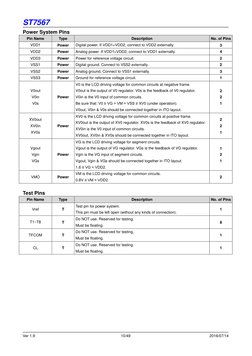
You might also like
- Digital Power-Conversion For The Analog EngineerNo ratings yetDigital Power-Conversion For The Analog Engineer12 pages
- Ultra-Low-Power Arm Cortex - M0+ 32-Bit MCU, Up To 64-Kbyte Flash Memory, 12-Kbyte SRAMNo ratings yetUltra-Low-Power Arm Cortex - M0+ 32-Bit MCU, Up To 64-Kbyte Flash Memory, 12-Kbyte SRAM134 pages
- Offline UPS Reference Design Using The dsPIC DSCNo ratings yetOffline UPS Reference Design Using The dsPIC DSC86 pages
- Graphical LCD - 128x64 Graphics LCD - GLCD Datasheet & PinOut - EngineersGarageNo ratings yetGraphical LCD - 128x64 Graphics LCD - GLCD Datasheet & PinOut - EngineersGarage5 pages
- ST7920 128X64 LCD Display To ESP32 - 3 Steps - Instructables100% (2)ST7920 128X64 LCD Display To ESP32 - 3 Steps - Instructables3 pages
- TMS320 DSP Development Support Reference GuideNo ratings yetTMS320 DSP Development Support Reference Guide430 pages
- AN296110 Current Sensing For Renewable Energy100% (2)AN296110 Current Sensing For Renewable Energy4 pages
- Design and Development of ON-LINE UPS Using PIC MicrocontrollerNo ratings yetDesign and Development of ON-LINE UPS Using PIC Microcontroller6 pages
- WEG - CLP TPW-03 - Manual Original - InglêsNo ratings yetWEG - CLP TPW-03 - Manual Original - Inglês162 pages
- MCT-222 Embedded Systems: Finite State MachinesNo ratings yetMCT-222 Embedded Systems: Finite State Machines39 pages
- Interfacing Example - 16 Character X 2 Line LCD: Description100% (3)Interfacing Example - 16 Character X 2 Line LCD: Description5 pages
- Interfacing GSM With LPC2148 For Sending and Receiving Message and Voice CallNo ratings yetInterfacing GSM With LPC2148 For Sending and Receiving Message and Voice Call10 pages
- A-Si TFT LCD Single Chip Driver 240Rgbx320 Resolution and 262K ColorNo ratings yetA-Si TFT LCD Single Chip Driver 240Rgbx320 Resolution and 262K Color194 pages
- A-Si TFT LCD Single Chip Driver 240Rgbx320 Resolution and 262K ColorNo ratings yetA-Si TFT LCD Single Chip Driver 240Rgbx320 Resolution and 262K Color194 pages
- A-Si TFT LCD Single Chip Driver 240Rgbx320 Resolution and 262K Color100% (1)A-Si TFT LCD Single Chip Driver 240Rgbx320 Resolution and 262K Color222 pages
- A-Si TFT LCD Single Chip Driver 240Rgbx320 Resolution and 262K ColorNo ratings yetA-Si TFT LCD Single Chip Driver 240Rgbx320 Resolution and 262K Color194 pages
- GC9403 TFT LCD Driver Application GuideNo ratings yetGC9403 TFT LCD Driver Application Guide24 pages
- A Time-Interleaved Multimode Rf-Dac For Direct Digital-to-RF SynthesisNo ratings yetA Time-Interleaved Multimode Rf-Dac For Direct Digital-to-RF Synthesis16 pages
- Reg - No:18BEC0175 ECE 3002 VLSI System Design Task. No: 05100% (1)Reg - No:18BEC0175 ECE 3002 VLSI System Design Task. No: 0511 pages
- MiCOM P124 Overcurrent Protection RelaysNo ratings yetMiCOM P124 Overcurrent Protection Relays17 pages
- Engineering Mathematics III Course OverviewNo ratings yetEngineering Mathematics III Course Overview91 pages
- Chapter 1.1-8085 Architecture-Introduction100% (2)Chapter 1.1-8085 Architecture-Introduction34 pages
- NANDFlashControllerDesign DocumentationNo ratings yetNANDFlashControllerDesign Documentation11 pages
- R23 B Tech ECE II Year I Sem II Sem Syllabus (Autonomous)No ratings yetR23 B Tech ECE II Year I Sem II Sem Syllabus (Autonomous)38 pages


