Java Foundations
Methods in Java
Defining and Using
Methods. Overloads
Your Course
Instructors
Svetlin Nakov
George Georgiev
The Judge System
Sending your Solutions
for Automated Evaluation
Testing Your Code in the Judge System
 Test your code online in the SoftUni Judge system:
https://judge.softuni.org/Contests/3294
Methods
Defining and Using
Methods, Overloads
Table of Contents
1. What Is a Method?
2. Naming and Best Practices
3. Declaring and Invoking Methods
 Void and Return Type Methods
4. Methods with Parameters
5. Value vs. Reference Types
6. Overloading Methods
7. Program Execution Flow 7
What Is a Method
Void Methods
Simple Methods
 Named block of code, that can be invoked later
 Sample method definition:
 Invoking (calling) the
method several times:
9
public static void printHello () {
System.out.println("Hello!");
}
Method named
printHello
printHello();
printHello();
Method body
always
surrounded
by { }
 More manageable programming
 Splits large problems into small pieces
 Better organization of the program
 Improves code readability
 Improves code understandability
 Avoiding repeating code
 Improves code maintainability
 Code reusability
 Using existing methods several times
Why Use Methods?
10
 Executes the code between the brackets
 Does not return result
Void Type Method
11
public static void printHello() {
System.out.println("Hello");
}
public static void main(String[] args) {
System.out.println("Hello");
} main() is also
a method
Prints "Hello"
on the console
Naming and Best Practices
 Methods naming guidelines
 Use meaningful method names
 Method names should answer the question:
 What does this method do?
 If you cannot find a good name for a method, think
about whether it has a clear intent
Naming Methods
13
findStudent, loadReport, sine
Method1, DoSomething, HandleStuff, SampleMethod
Naming Method Parameters
 Method parameters names
 Preferred form: [Noun] or [Adjective] + [Noun]
 Should be in camelCase
 Should be meaningful
 Unit of measure should be obvious
14
firstName, report, speedKmH,
usersList, fontSizeInPixels, font
p, p1, p2, populate, LastName, last_name, convertImage
 Each method should perform a single, well-defined task
 A Method's name should describe that task in a clear and
non-ambiguous way
 Avoid methods longer than one screen
 Split them to several shorter methods
Methods – Best Practices
15
private static void printReceipt() {
printHeader();
printBody();
printFooter();
}
Self documenting
and easy to test
 Make sure to use correct indentation
 Leave a blank line between methods, after loops and after
if statements
 Always use curly brackets for loops and if statements bodies
 Avoid long lines and complex expressions
Code Structure and Code Formatting
16
static void main(args) {
// some code…
// some more code…
}
static void main(args)
{
// some code…
// some more code…
}
Declaring and Invoking Methods
{…}
 Methods are declared inside a class
 main() is also a method
 Variables inside a method are local
public static void printText(String text) {
System.out.println(text);
}
Declaring Methods
18
Method Name
Return Type Parameters
Method Body
 Methods are first declared, then invoked (many times)
 Methods can be invoked (called) by their name + ():
Invoking a Method
19
public static void printHeader() {
System.out.println("----------");
}
public static void main(String[] args) {
printHeader();
}
Method
Declaration
Method
Invocation
 A method can be invoked from:
 The main method – main()
Invoking a Method (2)
public static void main(String[] args) {
printHeader();
}
public static void printHeader() {
printHeaderTop();
printHeaderBottom();
}
static void crash() {
crash();
}
 Some other method
 Its own body – recursion
Methods with Parameters
double
String
long
 Method parameters can be of any data type
 Call the method with certain values (arguments)
Method Parameters
22
public static void main(String[] args) {
printNumbers(5, 10);
}
static void printNumbers(int start, int end) {
for (int i = start; i <= end; i++) {
System.out.printf("%d ", i);
}
}
Passing arguments at invocation
Multiple parameters
separated by comma
 You can pass zero or several parameters
 You can pass parameters of different types
 Each parameter has name and type
public static void printStudent(String name, int age, double grade) {
System.out.printf("Student: %s; Age: %d, Grade: %.2fn",
name, age, grade);
}
Method Parameters (2)
23
Parameter
type
Parameter
name
Multiple parameters
of different types
 Create a method that prints the sign of an integer number n:
Problem: Sign of Integer Number
24
2 The number 2 is positive.
-5
The number 0 is zero.
0
The number -5 is negative.
Solution: Sign of Integer Number
25
public static void main(String[] args) {
printSign(Integer.parseInt(sc.nextLine()));
}
public static void printSign(int number) {
if (number > 0)
System.out.printf("The number %d is positive.", number);
else if (number < 0)
System.out.printf("The number %d is negative.", number);
else
System.out.printf("The number %d is zero.", number);
}
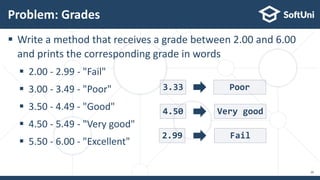
 Write a method that receives a grade between 2.00 and 6.00
and prints the corresponding grade in words
 2.00 - 2.99 - "Fail"
 3.00 - 3.49 - "Poor"
 3.50 - 4.49 - "Good"
 4.50 - 5.49 - "Very good"
 5.50 - 6.00 - "Excellent"
Problem: Grades
26
3.33 Poor
4.50 Very good
2.99 Fail
public static void main(String[] args) {
printInWords(Double.parseDouble(sc.nextLine()));
}
public static void printInWords(double grade) {
String gradeInWords = "";
if (grade >= 2 && grade <= 2.99)
gradeInWords = "Fail";
//TODO: make the rest
System.out.println(gradeInWords);
}
Solution: Grades
27
 Create a method for printing triangles as shown below:
Problem: Printing Triangle
28
1
1 2
1 2 3
1 2
1
1
1 2
1 2 3
1 2 3 4
1 2 3
1 2
1
3 4
 Create a method that prints a single line, consisting of numbers
from a given start to a given end:
Solution: Printing Triangle (1)
29
public static void printLine(int start, int end) {
for (int i = start; i <= end; i++) {
System.out.print(i + " ");
}
System.out.println();
}
 Create a method that prints the first half (1..n) and then the
second half (n-1…1) of the triangle:
Solution: Printing Triangle (2)
30
public static void printTriangle(int n) {
for (int line = 1; line <= n; line++)
printLine(1, line);
for (int line = n - 1; line >= 1; line--)
printLine(1, line);
}
Method with
parameter n
Lines 1...n
Lines n-1…1
Live Exercises
Returning Values From Methods
The Return Statement
 The return keyword immediately stops the method's
execution
 Returns the specified value
 Void methods can be terminated by just using return
33
public static String readFullName(Scanner sc) {
String firstName = sc.nextLine();
String lastName = sc.nextLine();
return firstName + " " + lastName;
}
Returns a String
Using the Return Values
 Return value can be:
 Assigned to a variable
 Used in expression
 Passed to another method
34
int max = getMax(5, 10);
double total = getPrice() * quantity * 1.20;
int age = Integer.parseInt(sc.nextLine());
 Create a method which returns rectangle area
with given width and height
Problem: Calculate Rectangle Area
35
3
4
12
5
10
50
6
8
48
7
8
56
Solution: Calculate Rectangle Area
36
public static double calcRectangleArea(
double width, double height) {
return width * height;
}
public static void main(String[] args) {
double width = Double.parseDouble(sc.nextLine());
double height = Double.parseDouble(sc.nextLine());
double area = calcRectangleArea(width, height);
System.out.printf("%.0f%n",area);
}
 Write a method that receives a string and a repeat count n
 The method should return a new string
Problem: Repeat String
37
abc
3
abcabcabc
String
2
StringString
public static void main(String[] args) {
String inputStr = sc.nextLine();
int count = Integer.parseInt(sc.nextLine());
System.out.println(repeatString(inputStr, count));
}
private static String repeatString(String str, int count) {
String result = "";
for (int i = 0; i < count; i++) result += str;
return result;
}
Solution: Repeat String
38
 Create a method that calculates and returns the value of a
number raised to a given power
Problem: Math Power
39
public static double mathPower(double number, int power) {
double result = 1;
for (int i = 0; i < power; i++)
result *= number;
return result;
}
5.53
256
28 166.375
Live Exercises
Value vs. Reference Types
Memory Stack and Heap
Value vs. Reference Types
42
 Value type variables hold directly their value
 int, float, double,
boolean, char, …
 Each variable has its
own copy of the value
Value Types
43
int i = 42;
char ch = 'A';
boolean result = true;
Stack
42
A
true
(4 bytes)
(2 bytes)
(1 byte)
result
ch
i
 Reference type variables hold а reference
(pointer / memory address) of the value itself
 String, int[], char[], String[]
 Two reference type variables can reference the
same object
 Operations on both variables access / modify
the same data
Reference Types
44
Value Types vs. Reference Types
int i = 42;
char ch = 'A';
boolean result = true;
Object obj = 42;
String str = "Hello";
byte[] bytes ={ 1, 2, 3 };
HEAP
STACK
true (1 byte)
result
A (2 bytes)
ch
42 (4 bytes)
i
int32@9ae764
obj
42 4 bytes
String@7cdaf2
str
Hello String
byte[]@190d11
bytes
1 2 3 byte []
Example: Value Types
6
public static void main(String[] args) {
int num = 5;
increment(num, 15);
System.out.println(num);
}
public static void increment(int num, int value) {
num += value;
}
num == 5
num == 20
Example: Reference Types
7
public static void main(String[] args) {
int[] nums = { 5 };
increment(nums, 15);
System.out.println(nums[0]);
}
public static void increment(int[] nums, int value) {
nums[0] += value;
}
nums[0] == 20
nums[0] == 20
Live Exercises
Overloading Methods
 The combination of method's name and parameters
is called signature
 Signature differentiates between methods with same names
 When methods with the same name have different signature,
this is called method "overloading"
public static void print(String text) {
System.out.println(text);
}
Method Signature
50
Method's
signature
 Using the same name for multiple methods with different
signatures (method name and parameters)
Overloading Methods
51
Different method
signatures
static void print(int number) {
System.out.println(number);
}
static void print(String text) {
System.out.println(text);
}
static void print(String text, int number) {
System.out.println(text + ' ' + number);
}
 Method's return type is not part of its signature
 How would the compiler know which method to call?
Signature and Return Type
52
public static void print(String text) {
System.out.println(text);
}
public static String print(String text) {
return text;
}
Compile-time
error!
 Create a method getMax() that returns the greater of two
values (the values can be of type int, char or String)
Problem: Greater of Two Values
53
z
char
a
z
16
int
2
16
bbb
String
aaa
bbb
Live Exercises
Program Execution Flow
public static void printLogo() {
System.out.println("Company Logo");
System.out.println("http://www.companywebsite.com");
}
public static void main(String[] args) {
System.out.println("before method executes");
printLogo();
System.out.println("after method executes");
}
 The program continues, after a method execution completes:
Program Execution
Main
 "The stack" stores information about the active subroutines
(methods) of a computer program
 Keeps track of the point to which each active subroutine should
return control when it finishes executing
Program Execution – Call Stack
Method B
Method A
Main
Call Stack
call
Start Method A Method B
call
return
return
 Create a program that multiplies the sum of all even digits of a
number by the sum of all odd digits of the same number:
 Create a method called getMultipleOfEvensAndOdds()
 Create a method getSumOfEvenDigits()
 Create getSumOfOddDigits()
 You may need to use Math.abs() for negative numbers
Problem: Multiply Evens by Odds
Evens: 2 4
Odds: 1 3 5
-12345
Even sum: 6
Odd sum: 9
54
Live Exercises
 …
 …
 …
Summary
 Break large programs into simple
methods that solve small sub-problems
 Methods consist of declaration and body
 Methods are invoked by their name + ()
 Methods can accept parameters
 Methods can return a value or nothing
(void)
 …
 …
 …
Next Steps
 Join the SoftUni "Learn To Code" Community
 Access the Free Coding Lessons
 Get Help from the Mentors
 Meet the Other Learners
https://softuni.org

Java Foundations: Methods

  • 1.
    Java Foundations Methods inJava Defining and Using Methods. Overloads
  • 2.
  • 3.
    The Judge System Sendingyour Solutions for Automated Evaluation
  • 4.
    Testing Your Codein the Judge System  Test your code online in the SoftUni Judge system: https://judge.softuni.org/Contests/3294
  • 5.
  • 6.
    Table of Contents 1.What Is a Method? 2. Naming and Best Practices 3. Declaring and Invoking Methods  Void and Return Type Methods 4. Methods with Parameters 5. Value vs. Reference Types 6. Overloading Methods 7. Program Execution Flow 7
  • 7.
    What Is aMethod Void Methods
  • 8.
    Simple Methods  Namedblock of code, that can be invoked later  Sample method definition:  Invoking (calling) the method several times: 9 public static void printHello () { System.out.println("Hello!"); } Method named printHello printHello(); printHello(); Method body always surrounded by { }
  • 9.
     More manageableprogramming  Splits large problems into small pieces  Better organization of the program  Improves code readability  Improves code understandability  Avoiding repeating code  Improves code maintainability  Code reusability  Using existing methods several times Why Use Methods? 10
  • 10.
     Executes thecode between the brackets  Does not return result Void Type Method 11 public static void printHello() { System.out.println("Hello"); } public static void main(String[] args) { System.out.println("Hello"); } main() is also a method Prints "Hello" on the console
  • 11.
    Naming and BestPractices
  • 12.
     Methods namingguidelines  Use meaningful method names  Method names should answer the question:  What does this method do?  If you cannot find a good name for a method, think about whether it has a clear intent Naming Methods 13 findStudent, loadReport, sine Method1, DoSomething, HandleStuff, SampleMethod
  • 13.
    Naming Method Parameters Method parameters names  Preferred form: [Noun] or [Adjective] + [Noun]  Should be in camelCase  Should be meaningful  Unit of measure should be obvious 14 firstName, report, speedKmH, usersList, fontSizeInPixels, font p, p1, p2, populate, LastName, last_name, convertImage
  • 14.
     Each methodshould perform a single, well-defined task  A Method's name should describe that task in a clear and non-ambiguous way  Avoid methods longer than one screen  Split them to several shorter methods Methods – Best Practices 15 private static void printReceipt() { printHeader(); printBody(); printFooter(); } Self documenting and easy to test
  • 15.
     Make sureto use correct indentation  Leave a blank line between methods, after loops and after if statements  Always use curly brackets for loops and if statements bodies  Avoid long lines and complex expressions Code Structure and Code Formatting 16 static void main(args) { // some code… // some more code… } static void main(args) { // some code… // some more code… }
  • 16.
  • 17.
     Methods aredeclared inside a class  main() is also a method  Variables inside a method are local public static void printText(String text) { System.out.println(text); } Declaring Methods 18 Method Name Return Type Parameters Method Body
  • 18.
     Methods arefirst declared, then invoked (many times)  Methods can be invoked (called) by their name + (): Invoking a Method 19 public static void printHeader() { System.out.println("----------"); } public static void main(String[] args) { printHeader(); } Method Declaration Method Invocation
  • 19.
     A methodcan be invoked from:  The main method – main() Invoking a Method (2) public static void main(String[] args) { printHeader(); } public static void printHeader() { printHeaderTop(); printHeaderBottom(); } static void crash() { crash(); }  Some other method  Its own body – recursion
  • 20.
  • 21.
     Method parameterscan be of any data type  Call the method with certain values (arguments) Method Parameters 22 public static void main(String[] args) { printNumbers(5, 10); } static void printNumbers(int start, int end) { for (int i = start; i <= end; i++) { System.out.printf("%d ", i); } } Passing arguments at invocation Multiple parameters separated by comma
  • 22.
     You canpass zero or several parameters  You can pass parameters of different types  Each parameter has name and type public static void printStudent(String name, int age, double grade) { System.out.printf("Student: %s; Age: %d, Grade: %.2fn", name, age, grade); } Method Parameters (2) 23 Parameter type Parameter name Multiple parameters of different types
  • 23.
     Create amethod that prints the sign of an integer number n: Problem: Sign of Integer Number 24 2 The number 2 is positive. -5 The number 0 is zero. 0 The number -5 is negative.
  • 24.
    Solution: Sign ofInteger Number 25 public static void main(String[] args) { printSign(Integer.parseInt(sc.nextLine())); } public static void printSign(int number) { if (number > 0) System.out.printf("The number %d is positive.", number); else if (number < 0) System.out.printf("The number %d is negative.", number); else System.out.printf("The number %d is zero.", number); }
  • 25.
     Write amethod that receives a grade between 2.00 and 6.00 and prints the corresponding grade in words  2.00 - 2.99 - "Fail"  3.00 - 3.49 - "Poor"  3.50 - 4.49 - "Good"  4.50 - 5.49 - "Very good"  5.50 - 6.00 - "Excellent" Problem: Grades 26 3.33 Poor 4.50 Very good 2.99 Fail
  • 26.
    public static voidmain(String[] args) { printInWords(Double.parseDouble(sc.nextLine())); } public static void printInWords(double grade) { String gradeInWords = ""; if (grade >= 2 && grade <= 2.99) gradeInWords = "Fail"; //TODO: make the rest System.out.println(gradeInWords); } Solution: Grades 27
  • 27.
     Create amethod for printing triangles as shown below: Problem: Printing Triangle 28 1 1 2 1 2 3 1 2 1 1 1 2 1 2 3 1 2 3 4 1 2 3 1 2 1 3 4
  • 28.
     Create amethod that prints a single line, consisting of numbers from a given start to a given end: Solution: Printing Triangle (1) 29 public static void printLine(int start, int end) { for (int i = start; i <= end; i++) { System.out.print(i + " "); } System.out.println(); }
  • 29.
     Create amethod that prints the first half (1..n) and then the second half (n-1…1) of the triangle: Solution: Printing Triangle (2) 30 public static void printTriangle(int n) { for (int line = 1; line <= n; line++) printLine(1, line); for (int line = n - 1; line >= 1; line--) printLine(1, line); } Method with parameter n Lines 1...n Lines n-1…1
  • 30.
  • 31.
  • 32.
    The Return Statement The return keyword immediately stops the method's execution  Returns the specified value  Void methods can be terminated by just using return 33 public static String readFullName(Scanner sc) { String firstName = sc.nextLine(); String lastName = sc.nextLine(); return firstName + " " + lastName; } Returns a String
  • 33.
    Using the ReturnValues  Return value can be:  Assigned to a variable  Used in expression  Passed to another method 34 int max = getMax(5, 10); double total = getPrice() * quantity * 1.20; int age = Integer.parseInt(sc.nextLine());
  • 34.
     Create amethod which returns rectangle area with given width and height Problem: Calculate Rectangle Area 35 3 4 12 5 10 50 6 8 48 7 8 56
  • 35.
    Solution: Calculate RectangleArea 36 public static double calcRectangleArea( double width, double height) { return width * height; } public static void main(String[] args) { double width = Double.parseDouble(sc.nextLine()); double height = Double.parseDouble(sc.nextLine()); double area = calcRectangleArea(width, height); System.out.printf("%.0f%n",area); }
  • 36.
     Write amethod that receives a string and a repeat count n  The method should return a new string Problem: Repeat String 37 abc 3 abcabcabc String 2 StringString
  • 37.
    public static voidmain(String[] args) { String inputStr = sc.nextLine(); int count = Integer.parseInt(sc.nextLine()); System.out.println(repeatString(inputStr, count)); } private static String repeatString(String str, int count) { String result = ""; for (int i = 0; i < count; i++) result += str; return result; } Solution: Repeat String 38
  • 38.
     Create amethod that calculates and returns the value of a number raised to a given power Problem: Math Power 39 public static double mathPower(double number, int power) { double result = 1; for (int i = 0; i < power; i++) result *= number; return result; } 5.53 256 28 166.375
  • 39.
  • 40.
    Value vs. ReferenceTypes Memory Stack and Heap
  • 41.
  • 42.
     Value typevariables hold directly their value  int, float, double, boolean, char, …  Each variable has its own copy of the value Value Types 43 int i = 42; char ch = 'A'; boolean result = true; Stack 42 A true (4 bytes) (2 bytes) (1 byte) result ch i
  • 43.
     Reference typevariables hold а reference (pointer / memory address) of the value itself  String, int[], char[], String[]  Two reference type variables can reference the same object  Operations on both variables access / modify the same data Reference Types 44
  • 44.
    Value Types vs.Reference Types int i = 42; char ch = 'A'; boolean result = true; Object obj = 42; String str = "Hello"; byte[] bytes ={ 1, 2, 3 }; HEAP STACK true (1 byte) result A (2 bytes) ch 42 (4 bytes) i int32@9ae764 obj 42 4 bytes String@7cdaf2 str Hello String byte[]@190d11 bytes 1 2 3 byte []
  • 45.
    Example: Value Types 6 publicstatic void main(String[] args) { int num = 5; increment(num, 15); System.out.println(num); } public static void increment(int num, int value) { num += value; } num == 5 num == 20
  • 46.
    Example: Reference Types 7 publicstatic void main(String[] args) { int[] nums = { 5 }; increment(nums, 15); System.out.println(nums[0]); } public static void increment(int[] nums, int value) { nums[0] += value; } nums[0] == 20 nums[0] == 20
  • 47.
  • 48.
  • 49.
     The combinationof method's name and parameters is called signature  Signature differentiates between methods with same names  When methods with the same name have different signature, this is called method "overloading" public static void print(String text) { System.out.println(text); } Method Signature 50 Method's signature
  • 50.
     Using thesame name for multiple methods with different signatures (method name and parameters) Overloading Methods 51 Different method signatures static void print(int number) { System.out.println(number); } static void print(String text) { System.out.println(text); } static void print(String text, int number) { System.out.println(text + ' ' + number); }
  • 51.
     Method's returntype is not part of its signature  How would the compiler know which method to call? Signature and Return Type 52 public static void print(String text) { System.out.println(text); } public static String print(String text) { return text; } Compile-time error!
  • 52.
     Create amethod getMax() that returns the greater of two values (the values can be of type int, char or String) Problem: Greater of Two Values 53 z char a z 16 int 2 16 bbb String aaa bbb
  • 53.
  • 54.
  • 55.
    public static voidprintLogo() { System.out.println("Company Logo"); System.out.println("http://www.companywebsite.com"); } public static void main(String[] args) { System.out.println("before method executes"); printLogo(); System.out.println("after method executes"); }  The program continues, after a method execution completes: Program Execution
  • 56.
    Main  "The stack"stores information about the active subroutines (methods) of a computer program  Keeps track of the point to which each active subroutine should return control when it finishes executing Program Execution – Call Stack Method B Method A Main Call Stack call Start Method A Method B call return return
  • 57.
     Create aprogram that multiplies the sum of all even digits of a number by the sum of all odd digits of the same number:  Create a method called getMultipleOfEvensAndOdds()  Create a method getSumOfEvenDigits()  Create getSumOfOddDigits()  You may need to use Math.abs() for negative numbers Problem: Multiply Evens by Odds Evens: 2 4 Odds: 1 3 5 -12345 Even sum: 6 Odd sum: 9 54
  • 58.
  • 59.
     …  … … Summary  Break large programs into simple methods that solve small sub-problems  Methods consist of declaration and body  Methods are invoked by their name + ()  Methods can accept parameters  Methods can return a value or nothing (void)
  • 60.
     …  … … Next Steps  Join the SoftUni "Learn To Code" Community  Access the Free Coding Lessons  Get Help from the Mentors  Meet the Other Learners https://softuni.org

Editor's Notes

  • #2 Hello, I am Svetlin Nakov from the Software University (SoftUni). Together with my colleague George Georgiev, we continue teaching this free Java Foundations course and the basic concepts from Java programming, such as arrays, lists, methods, strings, classes, objects and exceptions, to prepare you for the "Java Foundations" official exam from Oracle. In this lesson your instructor George will explain and demonstrate how to use methods in Java. Methods allow developers to declare sub-programs in their classes and programs. Declaring a method means to give a name for certain block of commands and invoke these commands later by their name. Methods can accept parameters (input data) and return a result (output data). This is the reason why they are sometimes called "functions" (like in math). Your instructor George will explain how methods work through live coding examples and will give you some hands-on exercises to gain practical experience. Are you ready? Let's start learning!
  • #3 Before the start, I would like to introduce your course instructors: Svetlin Nakov and George Georgiev, who are experienced Java developers, senior software engineers and inspirational tech trainers. They have spent thousands of hours teaching programming and software technologies and are top trainers from SoftUni. I am sure you will like how they teach programming.
  • #4 Most of this course will be taught by George Georgiev, who is a senior software engineer with many years of experience with Java, JavaScript and C++. George enjoys teaching programming very much and is one of the top trainers at the Software University, having delivered over 300 technical training sessions on the topics of data structures and algorithms, Java essentials, Java fundamentals, C++ programming, C# development and many others. I have no doubt you will benefit greatly from his lessons, as he always does his best to explain the most challenging concepts in a simple and fun way.
  • #5 Before we dive into the course, I want to show you the SoftUni judge system, where you can get instant feedback for your exercise solutions. SoftUni Judge is an automated system for code evaluation. You just send your code for a certain coding problem and the system will tell you whether your solution is correct or not and what exactly is missing or wrong. I am sure you will love the judge system, once you start using it!
  • #6 // Solution to problem "01. Student Information". import java.util.Scanner; public class Main { public static void main(String[] args) { Scanner sc = new Scanner(System.in); String name = sc.nextLine(); int age = Integer.parseInt(sc.nextLine()); double grade = Double.parseDouble(sc.nextLine()); System.out.printf("Name: %s, Age: %d, Grade: %.2f", name, age, grade); } }
  • #7 In this section the instructor George will explain the concept of "methods" and how to use methods in Java. In Java, methods (which are called functions in some other programming languages) allow developers to declare sub-programs in their classes and programs. Declaring a method means to give a name for certain block of commands and invoke these commands later by their name. Methods can accept parameters (input data) and return a result (output data). This is the reason why they are sometimes called "functions", like in math. Let's learn how to work with methods in Java. George will give you many examples and hands-on exercises to develop your practical skills.
  • #11 (c) 2007 National Academy for Software Development - http://academy.devbg.org. All rights reserved. Unauthorized copying or re-distribution is strictly prohibited.*
  • #18 Add Image!
  • #33 (c) 2007 National Academy for Software Development - http://academy.devbg.org. All rights reserved. Unauthorized copying or re-distribution is strictly prohibited.*
  • #62 Did you like this lesson? Do you want more? Join the learners' community at softuni.org. Subscribe to my YouTube channel to get more free video tutorials on coding and software development. Get free access to the practical exercises and the automated judge system for this coding lesson. Get free help from mentors and meet other learners. Join now! It's free. SOFTUNI.ORG