Debugging
Debugging an AI feature means finding the boundary where expected behavior stopped: the browser request, your endpoint, provider mapping, event stream, parser, tool handler, or renderer. Start with the evidence for the failing turn before changing the prompt or schema.
Check HTTP status and the terminal event separately. A stream can begin with HTTP 200 and later report RUN_ERROR; a completed run can still report length or refusal. Preserve the current application value while investigating. A visible partial answer and an idle loading flag do not establish successful completion.
HTTP success and run completion are separate checks
Scroll horizontally to see the full diagram, or expand it.
Read the diagram
HTTP 200 means the event stream began. That stream can end with RUN_ERROR or RUN_FINISHED. A finished run may still have a length, refusal, or other finish reason that leaves the feature unsatisfied.
Make the failing boundary visible
Use the endpoint and client configuration from the Quickstart. Keep provideHashbrown in appConfig and the <app-root> host. Import the standalone class below into main.ts and pass it to bootstrapApplication() with that same appConfig.
Start with this text-only component to separate endpoint problems from UI catalogs and response schemas. debugName identifies this runtime in Redux DevTools. The error message stays available in the SDK for local inspection; the user-facing message does not expose raw server details.
import { Component } from '@angular/core';
import { chatResource } from '@hashbrownai/angular';

@Component({
  selector: 'app-root',
  template: `
    <button
      type="button"
      [disabled]="chat.isLoading()"
      (click)="
        chat.sendMessage({
          role: 'user',
          content: 'Suggest one classic novel.',
        })
      "
    >
      Ask
    </button>
    @if (chat.isLoading()) {
      <p role="status">Waiting for a reply…</p>
    }
    @if (chat.error()) {
      <p role="alert">The request failed. Check the endpoint.</p>
    }
    @for (message of chat.value(); track $index) {
      @if (message.role === 'user' || message.role === 'assistant') {
        <p>{{ message.role }}: {{ message.content }}</p>
      }
    }
  `,
})
export class ReadingDiagnostics {
  readonly chat = chatResource({
    system: 'Recommend classic novels. Keep replies brief.',
    debugName: 'reading-diagnostics',
  });
}
Open the browser Network panel before sending. Check the configured URL, request body, HTTP status, event stream, and terminal event. Match threadId and runId with server logs. If text chat works, add your response schema, component catalog, and tools one at a time.
Inspect lastRunFinishReason when a response ends early: length, content_filter, and refusal describe completed runs that may not satisfy your feature. stop describes a model finish, but business validation still decides whether the result can be applied. Do not retry a write until you have checked whether its earlier attempt took effect.
Explore it in the workbench
The workbench below replays a recorded run of this lesson.
Inspect a local HTTP 403, retry in the same conversation, then accept and revise the plan.
Recorded in the real Angular workbench with OpenAI streaming requests and the actual Hashbrown SDK. The initial HTTP 403 is a deliberate local demo denial before provider work; it is not authentication or a provider failure. Unchanged provider events paced at 20 ms for filming. Footage slowed to half speed for readability. Replay makes no requests or writes. No narration. Read the text walkthrough.
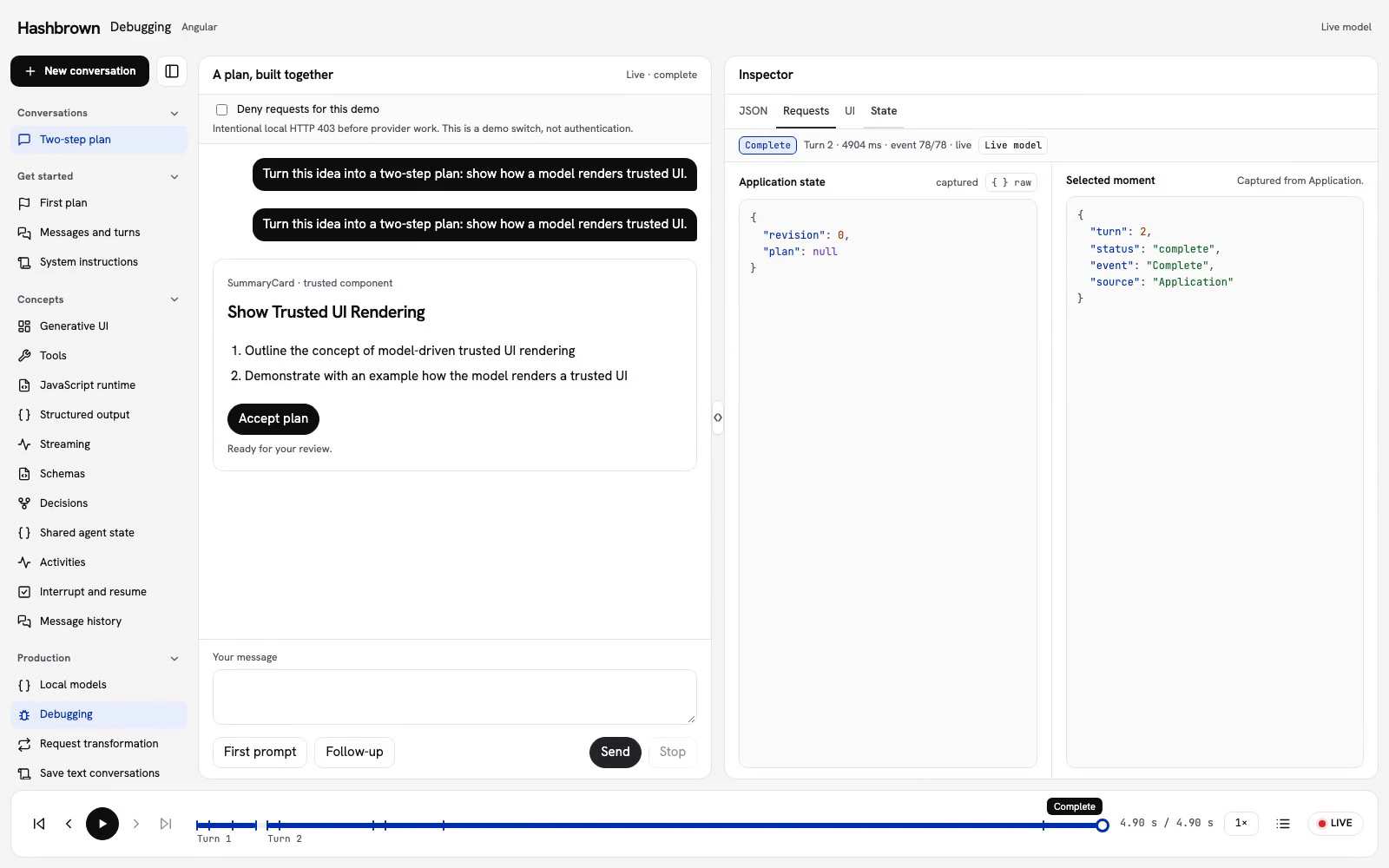
When a card does not appear, I want to find where the turn stopped before changing the code. Let’s follow the same two-step plan through a failed request, recovery, and a follow-up.
Run the workbench
Use the panel above, or run the workbench on your machine.
Follow a failed request
The Deny requests for this demo checkbox starts checked. Send the first prompt. The local endpoint returns HTTP 403 before it invokes the provider, and the source badge reads Local demo failure. The plan stays at revision 0.
This is an intentional local demo denial, not authentication or a provider outage. The checkbox only demonstrates the failure path. Your application still needs its own authentication and authorization.
- In Requests, find the failed row. Its status shows in the table, and the workbench opens its detail so you can read the HTTP response and the captured URL. Raw shows the request and response as captured.
- Choose Return to live, then clear Deny requests for this demo, then send the first prompt again in the same conversation. Changing the checkbox does not send a request or change the plan.
- Watch the real model call
readContextand stream the trustedSummaryCard. After successful completion, choose Accept plan. Application state advances to revision 1. - Send the follow-up to shorten the second step. The next tool call reads the accepted plan; the revised card remains a proposal.
- Select HTTP 403 in the bottom player. The chat, request evidence, JSON, UI, and state follow that point in the conversation. Its source still reads Local demo failure, even after later successful provider requests. Choose Return to live to continue.
Playback does not send requests, execute tools, or apply a plan. The demo checkbox and acceptance control are disabled while inspecting historical frames.
Inspect the request and response
Use the workbench Requests view and the browser Network panel together. Select the request for the current turn, then open Response to see its HTTP response and every streamed event. The browser panel also helps identify failures before a response reaches Hashbrown.
- 404: check the configured endpoint path and development proxy. Restart the frontend server after changing its proxy configuration.
- 401 or 403: inspect your endpoint's authentication response and server logs. If the endpoint rejected a provider request, check the server-side credentials and model access.
- 200 with no card: inspect the event stream and
chat.error(). A provider failure can arrive as aRUN_ERRORevent after the HTTP stream has started. A 200 status alone does not prove that the run succeeded.
In the request payload, check messages for the current transcript and tools for the tool definitions. UI requests carry their response schema in forwardedProps.hashbrown.responseSchema, with ui: true in the same Hashbrown extension. Shared state travels in the separate state field.
Use threadId and runId to match the request to server events. threadId is an opaque conversation identity, not a request to retrieve saved history. The client sends its current transcript. If that transcript is empty after a refresh, investigate your application's history restoration.
In the response, check for RUN_STARTED, content events, and a terminal RUN_FINISHED or RUN_ERROR. The runtime rejects a stream that ends before either terminal event. For RUN_ERROR, inspect the event's message and optional code, then check the corresponding server logs. Remove credentials and private user content before sharing a captured request.
Check the schema and component
Start with the workbench’s trusted SummaryCard. Its exposed input schema accepts a string title and an array of string steps, with no children.
Compare the generated output with that definition:
| Generated output | What to check |
|---|---|
title is a number | The model must supply a string, as declared by s.string(). Inspect the response schema actually sent in the request. |
The component is named Welcome | The registered name is SummaryCard. Check the exposed name and the system instructions. |
| The card has children | The workbench uses children: false. Change the generated output or deliberately expose a component that accepts children. |
| The JSON ends halfway through a value | Check the full stream and its terminal event. An unfinished response cannot supply the completed props the card needs. |
The runtime can report Invalid structured output when generated UI fails its response schema. That message does not identify every invalid field; compare the streamed content with the request's schema to find the mismatch.
If a generated name has no entry in the Angular component registry, the renderer has no component to instantiate. Compare the name with the components exposed by the current chat. If you render a UI wrapper directly with [ui] and [uiKit], completed output is validated against that kit; an unsupported component can throw during rendering.
If the values are valid but nothing appears, confirm that the application renders <hb-render-message [message]="message" /> for assistant messages. A text chat response does not become UI just because its text mentions a component. Use the UI chat API from the Quickstart.
Partial output also matters: a component without a fallback may wait for valid props before appearing. See Streaming props before treating that wait as a rendering failure.
Inspect the chat and tools
Set debugName when creating the chat. The Messages and turns example uses debugName: 'onboarding' and includes the required system instructions.
Hashbrown reports runtime actions to Redux DevTools, where you can inspect the named chat. This is separate from the workbench inspector above.
For a tool failure, inspect the tool name, generated arguments, and handler result. Invalid tool arguments for … points to argument parsing or schema validation. Confirm that the model supplied the fields declared by the tool, then inspect the handler if validation passed. A browser handler needs to return the information the model requires to continue.
Keep authorization in your handler or server. A schema can validate an account ID without proving that the user can access that account. See Tool calling for handler behavior and cancellation signals.
Check cancellation
chat.stop() cancels the active local generation or tool turn. Calling it when there is no active work throws. Connect the tool handler's abort signal to cancellable operations such as fetch, and connect a browser disconnect to the provider's abort signal in your endpoint, as the Quickstart does.
Stopping a request does not undo a completed tool action or prove that the server stopped processing it. Inspect the operation's result before repeating an action with side effects. Shared state streamed during a cancelled attempt rolls back to the attempt's starting value; earlier committed changes remain.
A pending interrupt is a different state: while the agent waits for answers, chat.isLoading() and chat.isResuming() are false and chat.pendingInterrupts() contains the batch. Calling stop() is not an answer to that batch. Use resume() with the complete set of responses, including any cancelled entries your application needs to submit.
Recover an interrupted run
If a resume fails, identify whether its matching RUN_STARTED arrived:
- Before
RUN_STARTED: failure or stop releases the local claim. The same batch can be submitted again while it remains valid. Your endpoint must handle repeated decisions idempotently, because a lost response does not prove the server missed the request. - After
RUN_STARTED: failure or stop requires a new thread before further requests. Hashbrown does not automatically replay the accepted resume. Start a new workflow and inspect any earlier tool effects before repeating them. - The batch expired: start a new thread. Setting the same thread ID does not reset the batch or clear the recovery requirement.
- The page refreshed: the pending batch belonged to the previous runtime. Reusing its thread ID or saving its local batch ID does not restore its canonical checkpoint. Recovery across refreshes requires an application and server persistence design.
Changing to a different thread retires local interrupt ownership; it does not cancel server work. See Interrupt and resume for batch validation and recovery rules.
Try again after fixing the cause
After fixing the cause, send the prompt again in the workbench. In your application, decide whether to send a new message or reload the previous response. chat.reload() removes the last assistant response and resends the previous user message; it can repeat tool execution.
Use Message history when you need to inspect, restore, or prune the conversation before another request. For the full request path, see How Hashbrown works.